Blog

  • Easy & Clear Steps to Cancel Burn Boot Camp Membership in 2025

    Easy & Clear Steps to Cancel Burn Boot Camp Membership in 2025

    Many members feel stuck paying months of fees after life changes, from unexpected medical issues to relocations, and they often meet resistance or extra charges when trying to quit.

    Many members assume the contract “expires” and payments will stop automatically. But after the original 6– or 12-month term ends, your membership keeps billing on a month-to-month basis at the same rate until you cancel in writing.

    “I was told cancelling would cost $698 even though my doctor says I can’t work out” – Reddit user, August 2023

    This guide gives you the official steps, backup options, and real-world tips so you can walk away without surprise costs or collections calls.

    Quick-Answer Checklist

    1. Give proper notice: 30 days for in-gym memberships or 24 hours for On-Demand to avoid another draft.
    2. Use the right channel: In-gym memberships require contacting your home location; app or web cancellation only works for Burn On Demand.
    3. Request written confirmation: Always get an email or signed form proving the end date.
    4. Watch for fees: Annual contracts may bill 50 % of the remaining balance if you break early.

    At-a-Glance Policy Table

    Policy PointIn-GymOn-Demand
    Notice period30 days24 hours before renewal
    Early-exit feeUp to 50 % of remaining contractNone once current period ends
    RefundsNo partial refunds unless billing errorNo partial refunds; prorated only for non-delivery
    Freeze option30 days with 5-day noticeNot offered; just cancel & rejoin later
    Cancellation channelIn person, email, phone, certified mailApp, website, Apple, Google

    Step-by-Step Official Burn Boot Camp Membership Cancellation Methods

    illustration of a man at burn boot camp gym location to canel his membership

    Burn Boot Camp’s cancellation process depends on your membership type (in-gym or On-Demand) and subscription platform (website, App Store, Google Play).

    If you signed up throuh a local gym then you cannot cancel online, per the official Burn Boot Camp App Support, and must be handled through physical gym customer support.

    1. Cancel an In-Gym Membership

    Your account renews unless you actively submit a cancellation form before the notice window closes. Follow the 4 steps listed below to cancel your burn boot camp membership:

    1. Locate your home gym’s contact info via the Locations page – click here to visit.
    2. Submit a written 30-day notice in person or by certified mail using the franchise’s form; keep a copy.
    3. Confirm fee exposure: If you are mid-contract, ask the manager to calculate any 50 % early-termination charge before signing.
    4. Get proof: Request a stamped copy or email confirmation with the exact end date.

    Related to GYM Cancellation: Easy Steps to Cancel Planet Fitness Membership

    2. Cancel Burn Boot Camp On Demand

    1. Go to the Burn Boot Camp Website and log in to your account
    2. Find the My Account section
    3. Select on Billings & Subscription
    4. Finally, click on Cancel Button

    Note: Online Cancelation may not be available for some states or some types of Subscription. In that case, you can just ask their customer support for help regarding cancelation.

    3. Cancel Through Apple or Google

    Android

    1. Open PlayStore on your Android Device.
    2. Visit your Subscriptions list
    3. Choose Burn Boot Camp from the list.
    4. Mention the reason for your cancelation and finally click on Cancel Subscription.

    iPhone

    1. Click on your iPhone Settings and go to your Apple ID Profile.
    2. Choose the Subscriptions option from the profile page
    3. Select Burn Boot Camp Subscription from the Subscriptions list 
    4. Click on the Cancel Subscription button from the bottom of the page
    5. Finally, click on the Cancel button.

    Apple and Google immediately end billing but keep access until the current period closes.

    4. Contact Corporate Support (Backup)

    If your studio is unresponsive, email customerservice@burnbootcamp.com or call (704) 763-7533 with your member ID and last draft date

    What If I cannot cancel my Burn Boot? – Alternative Exit Strategies

    1. Escalate to BBB: Filing a complaint often prompts fast managerial follow-up.
    2. Dispute charges with your bank: Provide your dated cancellation letter and gym replies as proof.
    3. State consumer-protection office: Many states require gyms to honor written cancellations within 30 days; cite your law if staff refuse.

    Common Pain Points & Fixes

    IssueWhy It HappensFix
    “Manager must sign off” delaysStaffing or franchise policyAsk for assistant manager sign-off or email approval
    Continued drafts after cancelBilling cycles overlap 30-day noticeShow proof & request refund of post-notice charge
    Surprise 50 % feeAnnual contract clauseNegotiate medical waiver with doctor note
    Sent to collectionsCharge disputed before form filedProvide bank with cancellation documents and BBB file

    Tips to Protect Your Wallet

    1. Photograph all forms before handing them over.
    2. Send certified mail if you cannot visit the gym, so you have a delivery receipt.
    3. Mark your calendar 30 days out to verify billing stops.
    4. Consider freezing instead of cancelling if you only need a short break; up to 30 days is free with 5-day notice.

    FAQ

    How to Cancel Burn Boot Camp Order?

    To cancel your Burn Boot Camp Order, request by submitting a cancellation request to customer service team at customerservice@burnbootcamp.com.

    Can I cancel my Burn Boot Camp membership online?

    No, you cannot cancel your burn boot camp membership online, you must visit your nearest gym in person to submit a cancellation form.

    Can I cancel through the Burn app for an in-gym plan?

    No, the app only cancels On-Demand; in-gym plans must be handled by your specific location

    Will I get a refund for unused days?

    Burn does not prorate unused time unless there is a billing error or the gym fails to deliver services

    What if my franchise has a different notice window?

    Franchises must follow corporate guidelines but may add stricter terms; always read your signed agreement for any add-ons.

    Why am I charged after my term ended?

    After your GYM contract term ends, your membership automatically converts into a month-to-month basis. Which remains active untill your cancel it.
  • Cancel BetterMe Subscription — Everything You Need to Know

    Cancel BetterMe Subscription — Everything You Need to Know

    BetterMe is a widely used health and wellness app offering personalized workout plans, meal guidance, and mental health resources. With over 150 million downloads, it’s a trusted choice for fitness enthusiasts.

    However, you might want to cancel your fitness subscription if you’ve achieved your goals, need to save money, or are exploring other services. And if you are not sure about process then this guide is for you.

    BetterMe Cancellation Overview

    DetailKey Information
    Cancellation MethodsWebsite, App Store, Google Play, PayPal
    Notice PeriodAt least 24 hours before renewal to avoid charges
    Refund PolicyNo refunds for partial periods; contact support for inquiries
    Common IssuesCharges after cancellation, confusion over platform, difficulty finding options
    Contactsupport@betterme.world, BetterMe Support

    Official Cancellation Methods

    Official method to cancel BetterMe app Online

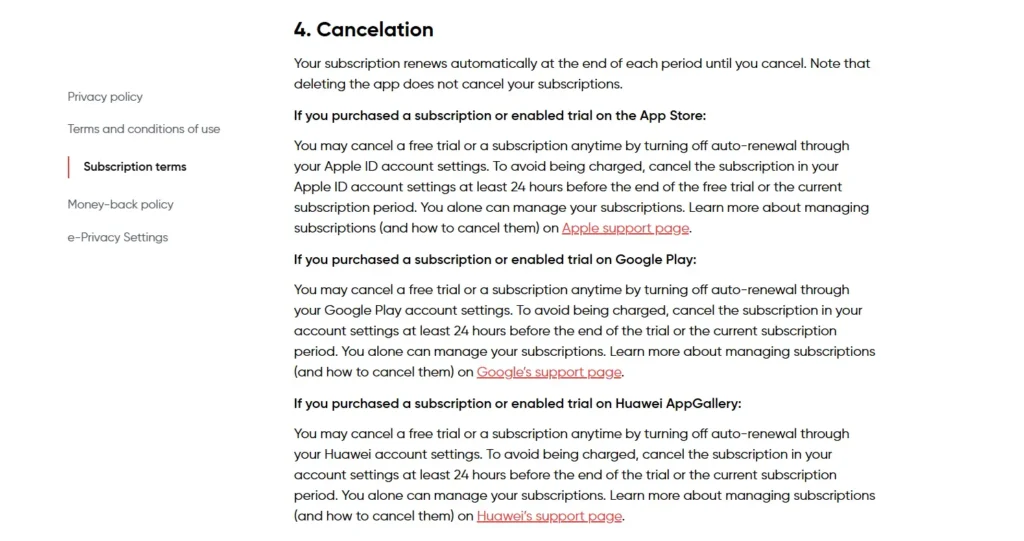
    BetterMe’s cancellation process depends on where you subscribed—website, App Store, Google Play, or PayPal. Deleting the app doesn’t cancel your subscription, so follow the correct steps below.

    Note: Always confirm your subscription platform by checking your purchase confirmation email or bank statements. Canceling through the wrong platform (e.g., the app for a Google Play subscription) won’t work.

    If You Subscribed Through the BetterMe Website

    To cancel via the BetterMe app or website follow the steps listed below.

    Via Website Online

    • Login to your Betterme account, open https://betterme.world/ from your browser.
    • Click on your profile from top right corner.
    • Then, Tap on “subscription” to update settings.
    • Finally, click on “Turn off auto-renewal” to cancel your subscription.

    Via App

    • Open BetterMe and Login to your account.
    • Go to “Profile” by tappin on top right.
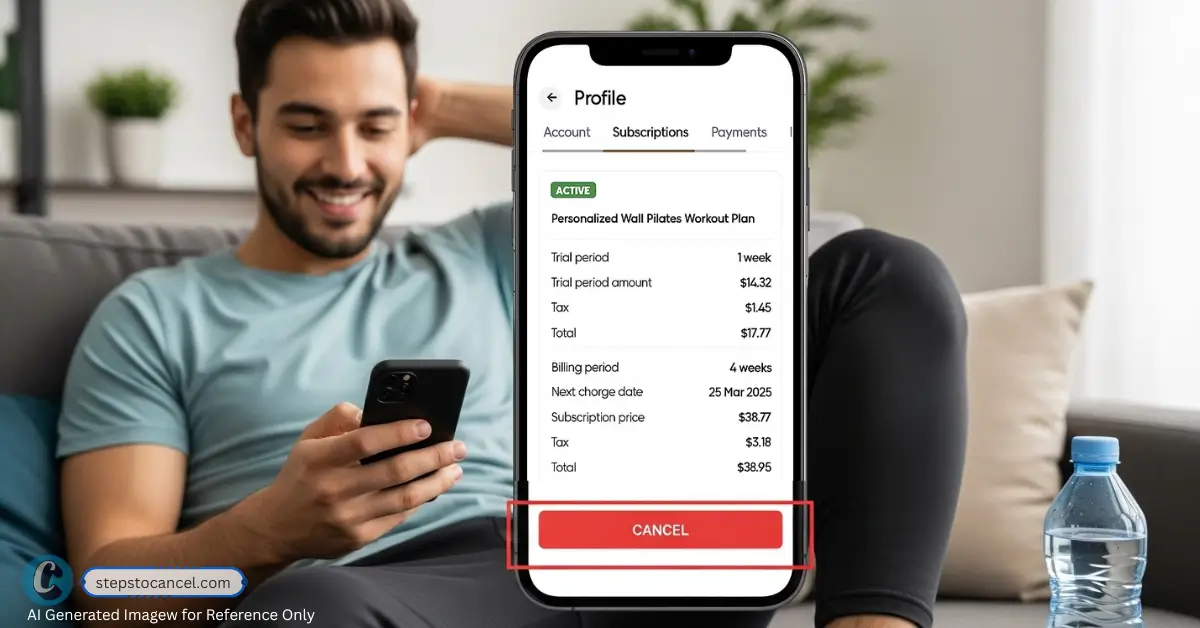
    • Tap on “Subscriptions,” check your billing details.
    • Now, click on “Cancel” to stop auto payment.

    This method is straightforward for web subscribers, but some users report difficulty finding the cancellation option or delays in processing. We suggest keep confirmation as evidance.

    If You Subscribed Through the App Store (iPhone/iPad)

    Terminating your subscription is the only way to cancel if subscribed via Apple ID. Follow the step to cancel:

    • Open the Settings app,
    • Tap your name, then select “Subscriptions.”
    • Find “BetterMe” in the list,
    • Then tap on “Cancel Subscription,” and confirm.

    If You Subscribed Through the Google Play Store (Android)

    To cancel via the Google Play Store app on your Android device, follow the

    • Open the Google Play Store,
    • Tap your profile icon on top right corner, and
    • Select “Payments & Subscriptions” from the menu.
    • Find “BetterMe,” app and select “Cancel Subscription.”
    • Choose a reason for cancellation, then tap Continue to proceed.

    This method is user-friendly, but some users don’t realize they need to use Google Play, not the BetterMe app, causing confusion.

    If You Subscribed Through PayPal

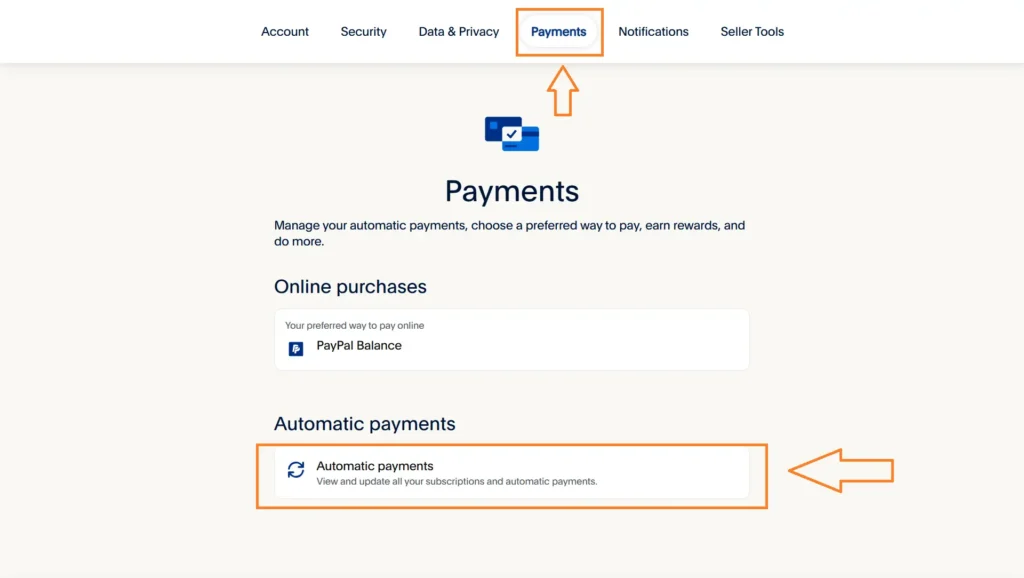
    cancel betterme through paypal

    To cancel your automatic payments through PayPal account.

    • Log into your account at paypal.com,
    • Click the Settings (gear) icon, and select “Payments.”
    • Scroll down and Click on “Automatic Payments,”
    • Find and Tap on “BetterMe,” from the list.
    • Finally, select “Cancel” to end your subscription.

    This is simple but requires logging into PayPal, and some users forget to check their automatic payments, leading to unexpected charges.

    Alternative or User-Reported Cancellation Routes

    If official methods fail, user experiences on internet forums suggested these workarounds:

    Contact BetterMe Support Directly

    You can directly email at support@betterme.world with your cancellation request.

    This is helpful if you can’t access the cancellation option or face technical issues. Users report mixed success, with some getting quick responses and others facing delays.

    • Send an email with your account email, subscription ID (from confirmation email), and a clear cancellation request.
    • Example: “Subject: Cancel My Subscription”
      Dear BetterMe Support,
      Please cancel my subscription effective immediately. My details: [Full Name], [Email], [Subscription ID]. Please confirm cancellation. Thank you.”
    • Follow up if no response within 3–5 days. Keep all correspondence as proof.

    Dispute Charges with Your Bank or Payment Provider

    If BetterMe still continues to charge your after sucessfully terminating the contract. Contact your bank or payment provider to dispute unauthorized charges.

    This can stop charges if BetterMe bills you post-cancellation. Reddit users report success, especially with Apple Pay or credit card disputes, but it may not resolve subscription status.

    Steps to dispute BetterMe unauthorized charges after cancellation

    • Gather proof of cancellation (confirmation email, screenshots).
    • Contact your bank or payment provider to dispute charges or block payments.
    • Follow up with BetterMe to ensure the subscription is canceled to avoid future issues.

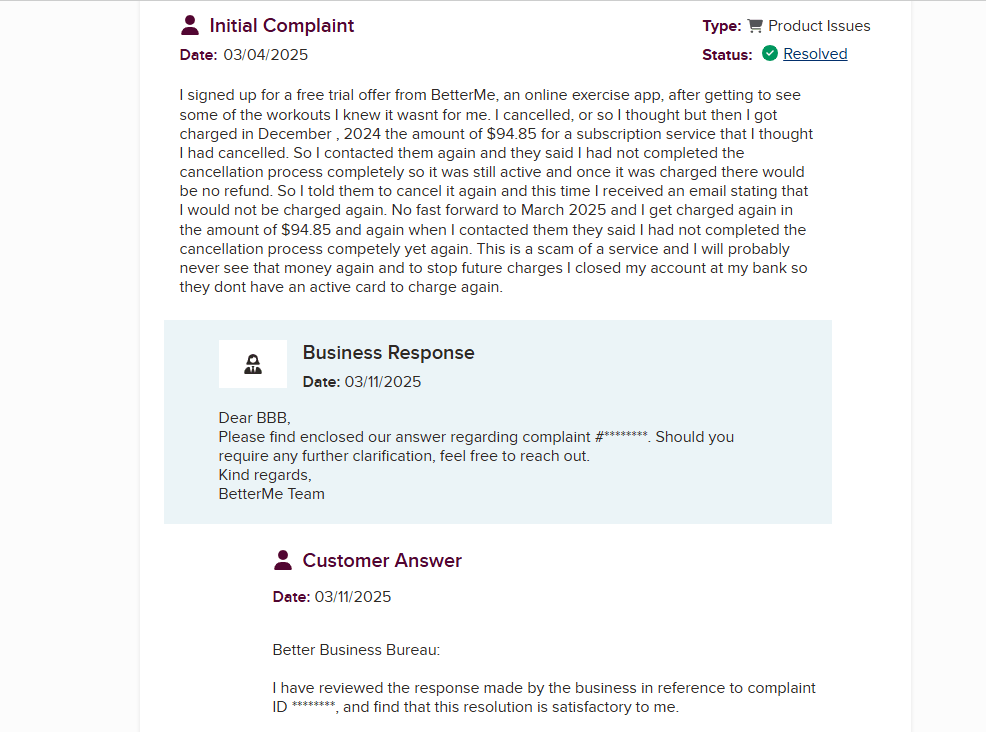
    File a Complaint with Consumer Protection Agencies

    image

    Submit a complaint to agencies like the Better Business Bureau or your local consumer protection office. This can pressure BetterMe to resolve persistent issues, as seen in user reports on X and Trustpilot. It’s a last resort but effective for unresolved charges.

    Cancellation Policy of BetterMe App

    BetterMe allows cancellation at any time, but you must cancel through the platform where you subscribed at least 24 hours before the renewal date. No refunds are typically offered for partially used periods, but you retain access to premium features until the billing cycle ends.

    The 24-hour notice period can catch users off guard, leading to unwanted charges. Reddit and Trustpilot reviews highlight confusion over auto-renewals and non-refunded periods, making it critical to act early.

    • Check your subscription renewal date in your confirmation email or platform settings.
    • Cancel at least 24 hours prior to avoid charges.
    • For refund inquiries, email support@betterme.world or request through App Store/Google Play during the subscription period.
    • If you believe charges violate consumer laws, reference your local regulations (e.g., California’s Automatic Renewal Law) when contacting support.

    Common Issues users face while Cancelling BetterMe

    Canceling BetterMe can feel like a hurdle due to these common issues reported on Reddit, Trustpilot, and X:

    IssueSolution
    No NotificationThe app does not remind or notify your before charging.
    Charged After CancellationProvide proof of cancellation (email, screenshot) to support@betterme.world or dispute with your bank.
    Can’t Find Cancellation OptionVerify your subscription platform; check confirmation email or bank statements. Contact support for guidance.
    Unsure Which Platform Was UsedReview purchase confirmation email or bank statements to identify the platform.
    No Confirmation ReceivedCheck subscription status on the platform; email support if unresolved.

    These issues can leave you feeling frustrated or helpless, but keeping records and following up promptly can resolve them.

    FAQ Section

    Can I cancel my BetterMe subscription through the app?

    Only if you subscribed through the BetterMe website. For App Store or Google Play subscriptions, cancel through those platforms.

    What happens if I delete the BetterMe app?

    Deleting the app doesn’t cancel your subscription. You must cancel through the correct platform to stop charges.

    Will I get a refund if I cancel mid-subscription?

    BetterMe typically doesn’t offer refunds for partial periods. Contact support@betterme.world or request a refund via App Store (reportaproblem.apple.com) or Google Play during the subscription period.

    How do I know if my subscription is canceled?

    Look for a confirmation email or notification. Verify status in the app, website, App Store, or Google Play.

    What if I’m still being charged after canceling?

    Contact support@betterme.world with proof of cancellation. If unresolved, dispute the charge with your bank or payment provider.

    Did this guide help you cancel your subscription? Let us know!

  • 7 Easy Ways to Cancel your In-Shape Fitness Membership in 2025

    7 Easy Ways to Cancel your In-Shape Fitness Membership in 2025

    In-Shape Fitness Clubs, with over 60 locations across California, ranks among the top 20 health club chains in the U.S., offering amenities like cardio equipment, swimming pools, and group fitness classes.

    However, experiences vary by location—some praise clean facilities and friendly staff, while others report overcrowded gyms or unresponsive management.

    If you’re ready to cancel your subscription, we’ll guide you through the process step by step.

    Overview: Things to know before cancelling your Membership

    DetailKey Information
    Cancellation MethodsApp, email, in-person, or certified mail
    Notice Period30 days required; charges apply during this period
    Early Termination FeeUp to $250 for 12-month contracts unless relocating or disabled (proof needed)
    Refund PolicyNon-refunded payments; exceptions for relocation or disability with documentation
    Common IssuesIgnored emails, surprise fees, unhelpful staff, and post-cancellation charges
    Contact831-476-7373, cancelme@inshape.com, 6507 Pacific Ave., #344, Stockton, CA 95207

    Cancellation Methods

    Methods to Cancel Cancel InShape GYM Membership Online and Offline
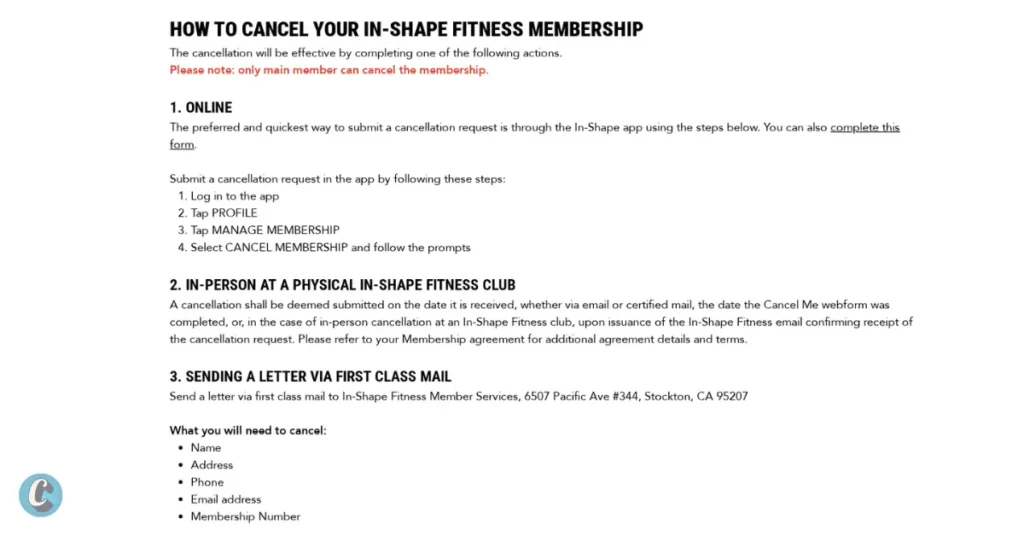
    Screenshot: Cancellation Guide from inshape.com/how-to-cancel

    In-Shape offers 4 main ways to cancel your membership, as outlined on their website. Check out the step-by-step guide below.

    1. Cancellation via In-Shape Mobile App

    Cancellation through an app is the quickest and most convenient method, avoiding awkward in-person or phone conversations. Download from App Store or Google Play if you don’t already have.

    Follow the steps listed below:

    1. Log in to your “InShape account” on the mobile app.
    2. Tap “Profile” in the top-left corner.
    3. Go to “Manage Membership” or “Membership Holds.”
    4. Select “Cancel Membership” and follow the prompts to confirm.

    Do remember to take a screenshot of the confirmation screen and check your email for a confirmation notice. If you do not receive any confirmation within  48 hours, contact customer support as soon as possible.

    2. Cancel via In-Person

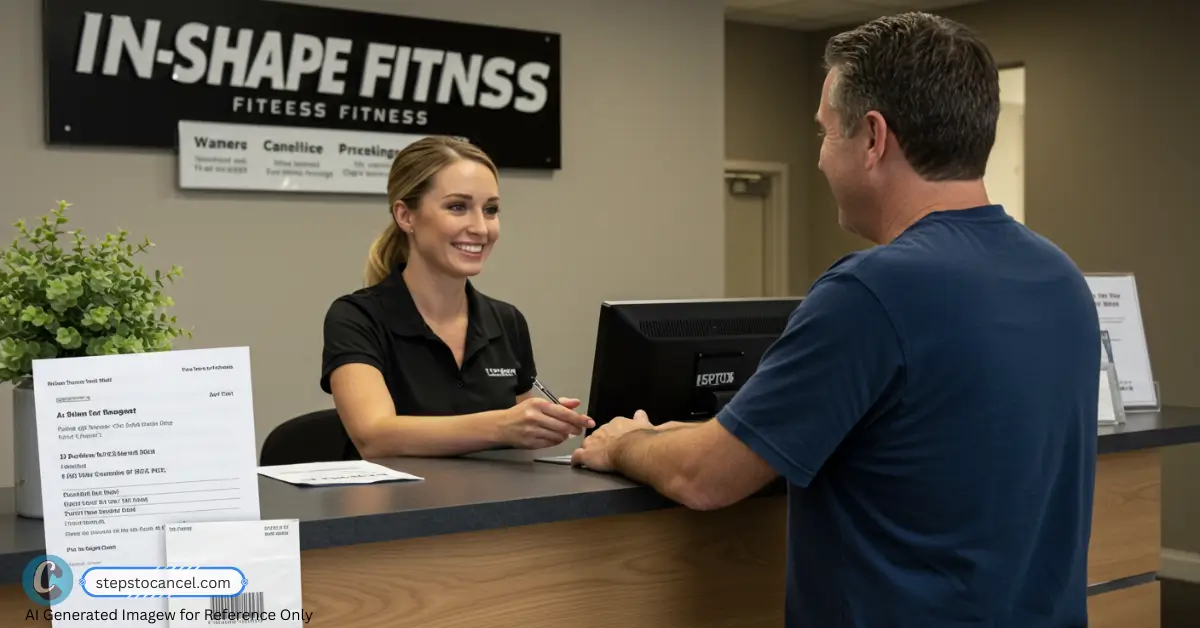
    cancel in shape membership in person
    Cancelling in-shape membership in person [reperesntative only]
    1. Visit during staffed hours (check your location’s hours on inshape.com).
    2. Request a cancellation form at the front desk.
    3. Provide ID, membership number, and reason for cancellation.
    4. Sign the form and request a copy or email confirmation.

    Cancellation in-person at a physical location feels reliable, but users report delays because only a manager can process cancellations, and they’re often unavailable. Call before visiting if, manager is at the club.

    3. Cancel by Phone (Most recommended by InShape) 

    • Call InShape customer service at 831-476-7373.
    • Ask the representative to cancel your membership.
    • Provide your full name, member ID, and reason for cancellation.
    • Confirm your cancellation date.

    Many users report long waits, being transferred multiple times, and even being hung up on.

    4. Send a cancellation request to cancelme@inshape.com

    If you prefer written communication, then  

    1. Write an email with your full name, address, phone number, home club, and membership ID.
    2. Use a clear subject line, e.g., “Membership Cancellation Request – [Your Name].”
    3. Send it to cancelme@inshape.com.

    Follow up with a call if no response in 3–5 business days.

    According to complaints in BBB, most of the emails are either ignored or have delayed responses, so we recommend sending an email at least 40 days before the next billing period to avoid any unnecessary charges.

    Important: Use Cancellation Letter Generator to write a clear cancel request.

    5. Send a Cancellation via Certified Mail to In-Shape’s corporate address

    If your home club is not responding to your request, then send a “certified mail” to the InShape Finess Club corporate office.

    1. Write a letter “Requesting Cancellation of your Membership.”
    2. Provide basic information like Full Name, Membership Number, Home Club, Email and Phone Number.
    3. Send to: “In-Shape Member Services, 6507 Pacific Ave., #344, Stockton, CA 95207“.
    4. Keep the receipt and letter copy.

    Follow up on your request, or if no confirmation in 7–10 days, call 831-476-7373 with your receipt number.

    Alternative or User-Reported Cancellation Routes

    If you’ve tried everything but still failed to cancel your membership, then are some workarounds alternative ways shared by users on Reddit and BBB to escape In-Shape’s grip. These aren’t guaranteed but have worked for some.

    1. Dispute Charges with Your Bank

    If in-Shape fitness club is still charging you fees after sucessfully cancelling your membership then contact your bank to block or dispute unauthorized charges.

    1. Gather proof of cancellation attempts (emails, app screenshots, certified mail receipts).
    2. Call your bank to dispute charges or block payments.
    3. Follow up with a formal cancellation request via email or certified mail to avoid collections.

    Warning: Many reddit users reported success, but unpaid balances may go to collections. We recommend you contact your homeclub to clear doubts.

    2. File a BBB or Attorney General Complaint

    Submit a complaint to the Better Business Bureau or California Attorney General if requests are ignored. These complaints pressure In-Shape corporates to act, as they value their reputation. Users report quick resolutions after filing with the Attorney General.

    1. File at bbb.org or oag.ca.gov/consumers with dates and evidence.
    2. Follow up with In-Shape, referencing your complaint number.

    Cancellation Policy

    • All cancellations require 30 days’ notice.
    • You will still be billed for one final month after your cancellation is submitted.
    • No refunds for unused time or if you forget to cancel.
    • If moving out of the area, you can request an exception—but it’s not guaranteed.

    Keep a copy of all communications, especially if mailing your request.

    IssueDescriptionSolution
    Ignored EmailsNo response from cancelme@inshape.com, causing delay or continued billing.Follow up via phone call or send a certified letter if there’s no response within 3–5 business days.
    Surprise FeesUnexpected $200–$250 early termination fees. Many claim they weren’t informed about these.Review your original contract. If fees seem hidden, challenge them under California consumer protection laws.
    Unhelpful StaffStaff at some locations delay or pressure members to stay during in-person cancellations.Document the interaction, ask for a written confirmation, and escalate directly to corporate.
    Post-Cancellation ChargesMembers continue to get charged even after canceling. Some accounts are sent to collections.Keep confirmation emails, bank statements, and dispute charges via your bank or credit card provider if billing continues.
    Contract ConfusionMany believe they’re on a month-to-month plan, only to discover a 12-month minimum contract upon cancellation.Carefully review your membership agreement before signing and always clarify the commitment period with staff upfront.

    FAQs

    How do I know it’s really canceled?

    You should receive a confirmation email or letter. If not, contact support again or visit in person and get a copy.

    Can I put my membership on hold or freeze?

    Yes, holds are available for up to 6 months for a monthly fee (varies by club). This avoids re-enrollment fees but still incurs charges.

    Can I get a refund?

    Refunds are rare, as all payments are non-refunded. Exceptions for relocation or disability require documentation. Do, request in writing and keep records.

    What if I’m charged after canceling?

    First, of all gather proof of cancellation (emails, screenshots, mail receipts) and contact In-Shape support in-person or through calls for quick answer. If they still delays then consider a BBB complaint if unresolved.

    Canceling your In-Shape membership doesn’t have to be a nightmare. InShape provides several official ways to cancel—but it’s your responsibility to ensure it’s confirmed. Be thorough, keep evidence, and advocate for yourself if things go sideways. Did this guide help you cancel your membership? Let us know!

  • 5 Methods to Cancel your New York Sports Club Membership

    5 Methods to Cancel your New York Sports Club Membership

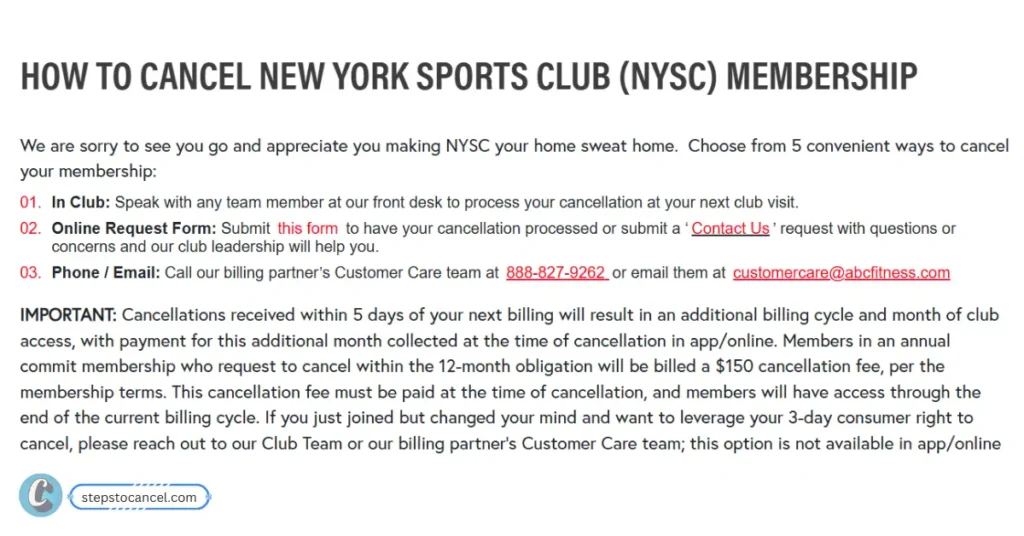
    New York Sports Club (NYSC) memberships can be canceled in-person, online, via phone, or through email and mail.

    Key Information

    AspectDetails
    Notice Period5 business days before the next billing cycle.
    Cooling-Off PeriodWithin 3 days of signing, cancel with no penalty and receive a full refund within 10 business days.
    Cancellation Fees1. No cancellation fee for Month-to-month memberships with proper notice.
    2. Early cancellation fee of $150 for Annual memberships (12-month term) if canceled within the term.
    Freezing Option1-12 months (after 90 days of enrollment)
    Freeze Fee$15/month, varies by state

    How to Cancel Your New York Sports Club Membership

    NYSC officially groups its cancellation methods into three main categories (In Club, Online, Phone/Email), but here is exactly how you can execute them:

    Methods to Cancel New York Sports Club Membership

    1. Cancel New York Sports Club Membership Online

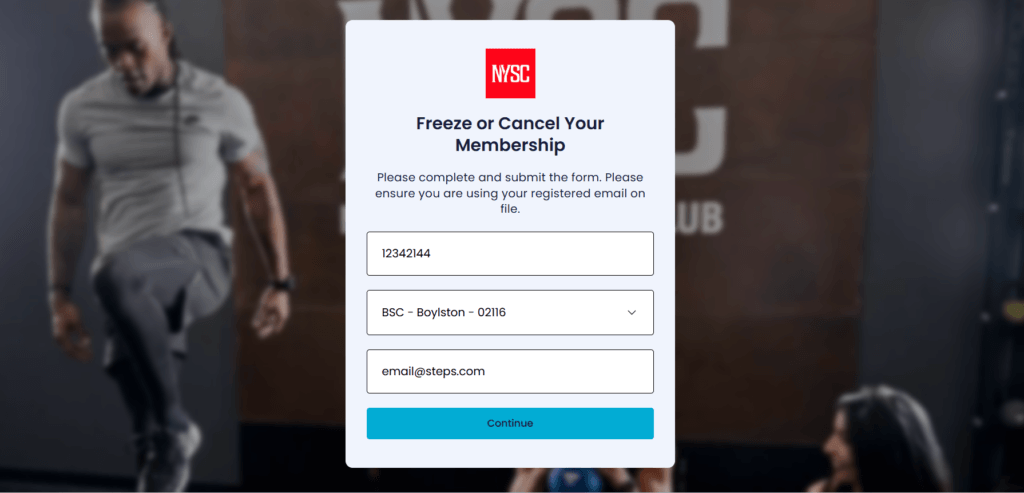
    image 1

    You must submit cancellation request form at least 5 days before your next billing period, follow the steps listed below.

    1. Visit NYSC “cancellation page
    2. Enter your barcode, email, and home club (all of this information is available in your NYSC member app) to verify and complete your request.
    3. Then tap on “Continue” button.

    Note: Add-on services like personal training or locker rentals cannot be canceled online. You must speak directly with your club team for these.

    2. In-Person Visit to Club

    1. Visit any NYSC club (call ahead to confirm hours and cancellation process).
    2. Bring your ID, membership card, and membership details.
    3. Sign a Notice of Cancellation and request a copy for your records.

    Tip: NYSC accepts cancellatin from any location not just your home club, so if you moved to a new city then visit the nearest location. Also, Confirm billing has stopped before leaving.

    3. Submit Cancellation Request via Contact Us Form

    1. Visit www.newyorksportsclubs.com/contact-us.
    2. Fill out the form with your membership details which includes:
      • Subject: Select “Cancel Membership Inquery
      • Feedback: Choose your experience
      • Club Name: Select your “Home Club” where you registered.
      • Comment: Add reason why you need to cancel.
      • Email: Your reqistered, to receive confirmation mail.
      • Name: As provided in the club.
      • Phone Number: You
    3. Then submit your cancellation request.

    4. Cancellation via Phone Call

    To cancel your New York Sports Club Membership through phone you need to call ABC Fitness which is NYSC’s official billing partner. Follow rhe 3 steps listed below. 

    1. Call Customer Care at 888-827-9262 (9 AM–5 PM EST, seven days a week).
    2. Provide your full name, membership number, and billing address for verification.
    3. Clearly state your intent to cancel and request email confirmation.

    Tip: Be firm, as representatives may try to upsell.

    5. Send an Email

    Write an cancellation requst email and send it to customercare@abcfitness.com. ABC Fitness is the official billing partner of NYSC, who manages the membership billings.

    Use our Cancellation Letter Generator to write professional mail.

    6. Cancellation via Certified Mail

    If you failed to cancel your NYSC membersip via in-person visit, phone call, online form, or sending email then try sending a Certified Mail to their corportate office.

    1. Write a letter including your name, membership number, contact details, home club, and reason for cancellation.
    2. Send to: New TSI Holdings, Inc., 100 Duffy Avenue, Hicksville, NY 11801, or email to memberservices@tsiclubs.com or customercare@abcfitness.com.
    3. Use certified mail for proof of delivery and keep a copy of the letter.
    4. Request written confirmation.

    This is not an official method but according to our research, some users were able to cancel their membership by send a mail to their corporate office.

    Tip: Send at least 7-10 days before the billing cycle to avoid delays and extra charges.

    NYSC Cancellation Policy

    • Notice Period: Provide at least 5 business days’ notice before the billing cycle to avoid an additional month’s charge.
    • Membership Types: Month-to-month memberships cancel without fees. Obligation-term memberships (e.g., 12 months) may incur early termination fees unless canceled for medical or relocation reasons with documentation.
    • Cooling-Off Period: Cancel within 3 days of signing for no penalty, with refunds within 10 business days.
    • Legal Protections: New York law allows cancellations for relocation (25+ miles), medical disability, or service changes, with refunds processed quickly.

    Freezing Your Membership

    Want a break for uncertain reason? how about freeze your membership instead of cancelling it? New York Sports Club allows users to freeze their membership for 1 to 12 months only after 90 days of enrollment for a fee (e.g., $15/month).

    To freeze your subscription use any of the avaailbale methods like contact form, contacting customer care at 888-827-9262, email at customercare@abcfitness.com, or visit a club.

    If you are from “Pennsylvania” this location offers free medical freezes but need to provide a valide doctor’s note.

    Refund Eligibility

    NYSC memberships are generally nonrefundable and non-transferable, meaning you won’t receive money back if you simply choose to stop using the gym. However, new members are eligible for a full refund if they cancel within the first 3 days of signing up — this is part of NYSC’s money-back guarantee.

    In addition, certain situations allow for refunds under local state laws (like New York). These may include permanent gym closures, relocation more than 25 miles away, or medical conditions that prevent continued use of the facility. Keep proof of your cancellation and any medical/relocation documents to dispute unauthorized charges.

    Tip: Keep proof of cancellation to dispute unauthorized charges

  • Everything you need to know about cancelling Village Gym Membership

    Everything you need to know about cancelling Village Gym Membership

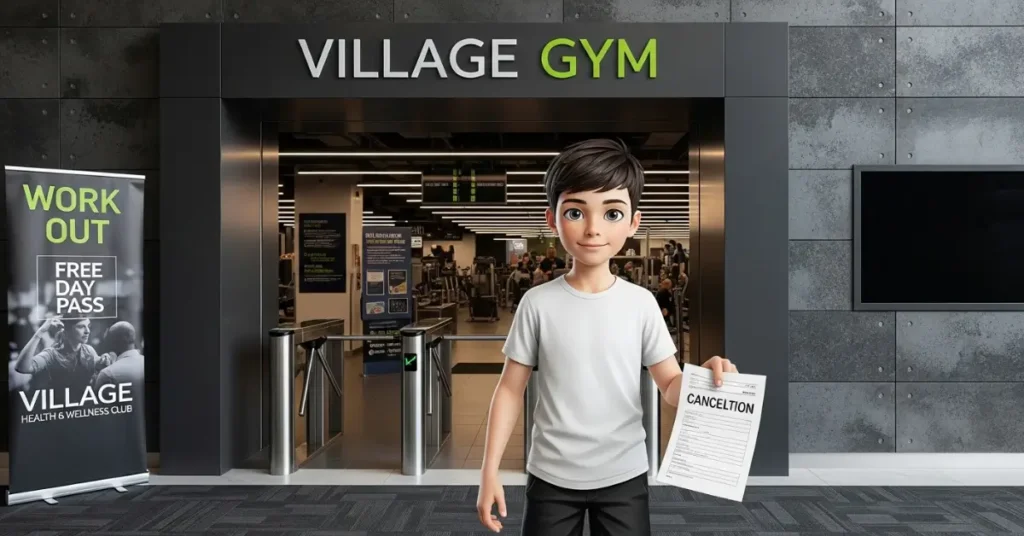
    Village Gym is a well-known UK-based health and fitness club, offering services across multiple locaton providing premium fitness experience.

    But members may need to cancel gym memberships for reasons like relocation, financial difficulties, dissatisfaction, or lack of time. The cancellation process can be complex due to specific policies, notice periods, and membership types.

    Whatever the reasons, our step by step guide can help you cancel your membership.

    Understanding Village Gym Memberships

    Village Gym offers various membership types, including:

    1. Results Membership: Fixed-term contracts with 6 or 12 months with specific cancellation rules.
    2. Flexible Membership: Requires a 90-day paid notice period for those joined after June 3, 2019.
    3. Advance Paid Membership: Includes 1-month memberships that expire automatically or longer-term options with restricted cancellation.

    Reasons for cancellation vary, but common ones include moving away, financial constraints, or finding a better alternative. Understanding your membership type is important, as it affects the cancellation process.

    Cancellation Methods

    methods ot cancel village gym membership

    Village Gym provides 3 primary methods to cancel your membership: via the website, phone, or email. Below are the detailed steps for each, based on official sources.

    1. Cancelling via the Website

    1. Visit the Official Village Gym’s Website: https://www.villagegym.co.uk/.
    2. Login to your account using your credentials.
    3. Tap on the “My Account” section.
    4. Select the “My Membership” option.
    5. Provider your “Reasons for cancellation” and feedback then submit.

    After staff will review your request and process the cancellation. Look for a confirmation email from the GYM to confim, if not received do contact your gym.

    Source: Village Gym Membership FAQs

    2. Cancelling via Phone

    If you prefer to cancel the membership by directly contacting the staff of the Village Gym, you can also contact them through phone number to cancel your membership. Follow these steps to cancel your Village Gym Membership via phone:

    1. Find the phone number for your local Village Gym on the Locations Page.
    2. Call the gym and speak with a staff member to cancel your membership.
    3. Provide your details (Name, Address, and Membership ID) for verifcation.
    4. Then the staff will process your cancellation request.

    A confirmation email will be sent once the cancellation is complete.

    Note: Each gym has its own contact number, so ensure you call the correct location.

    3. Cancelling via Email

    To cancel your Village GYM membership, write an email including your full name, membership ID, and reason for cancellation then send it to memberservices@village-hotels.com.

    After the customer service staff receives your cancellation query, they will respond to you and guide you through the cancellation process.

    Use our Cancellation Cover Letter Generator to write professional email in seconds, just proivide necessary detailes and you are good to go.

    Cancellation Policy

    Village Gym’s cancellation policies vary by membership type and timing.

    Membership TypeMinimum TermCancellation During Minimum TermCancellation After Minimum TermNotice PeriodRefund Policy
    Results6 or 12 monthsNot allowed, except for exceptional circumstances (e.g., illness, job loss).1 month’s notice for expiry; 90 days’ paid notice if joined after June 3, 2019.1 month or 90 daysNo refunds except for serious breach by gym; £15 fee within 10 days if no joining fee.
    Flexible3 months (post-June 3, 2019)Not allowed during 90-day notice period, except exceptional circumstances.90 days’ paid notice.90 daysSame as Results.
    Advance Paid1, 6, or 12 months1-month expires automatically; others not cancellable except exceptional circumstances.N/A for 1-month; others per terms.N/A or per termsSame as Results.
    Village GYM Cancellation Policy Table

    Cooling-Off Period: Within 10 days of joining, you can cancel by paying the joining fee or a £15 fee if no joining fee was charged.

    Exceptional Circumstances:

    1. You may cancel early for:
      • Long-term illness or injury.
      • Pregnancy.
      • Loss of livelihood.
      • Significant change in work or home location.
    2. Requires reasonable evidence (e.g., medical certificate, proof of address change).
    3. If approved, a 1-month notice period applies.

    Key Notes You Should Remember:

    • Only the named membership holder can request cancellation; third-party cancellations are not allowed.
    • Cancelling your direct debit is not a valid cancellation method and may incur fees.
    • Requests made after the 20th of the month may not be processed until the following month.

    Source: Village Gym Membership Terms

    How to Freeze Village Gym Membership?

    If you’re not ready to cancel permanently, freezing your membership is an alternative:

    1. Submit a request via the Freeze Request Form.
    2. Pay an admin fee of £10 per calendar month (waived for medical, student, or young person memberships).
    3. Requests must be made by the 20th of the month for the following month.

    Note for Juniors: Junior memberships (under 18) must be frozen individually; they are not automatic.

    You’ll receive a confirmation email once the freeze is processed, avoid sending multiple emails, as this may delay processing.

    FAQ

    Can I freeze my membership instead of cancelling?

    Yes, for £10 per month (free for medical, student, or young person memberships) via the Freeze Request Form.

    What is the cooling-off period?

    Within 10 days of joining, you can cancel by paying a £15 fee (or joining fee).

    Can I get a refund?

    Refunds are not typically offered, except in cases of serious breach by the gym (e.g., prolonged closure).

    What if I can’t afford the membership?

    Contact Member Services with evidence of financial hardship for potential early cancellation (Contact Form).
    Alternative Methods (Not Official)

    While not officially endorsed, some users suggest alternative approaches:

    1. Claiming Relocation: Informing the gym you’ve moved far away (with proof like a bank statement) may qualify for early cancellation under exceptional circumstances.
    2. Disputing Charges: If charged after cancellation, contact your bank or credit card company to dispute unauthorized charges.
    3. Caution: These methods may not always work and could lead to disputes or fees if not aligned with the terms.
  • How Can I Cancel My Planet Fitness Membership? [In-Person, Mail & Online]

    How Can I Cancel My Planet Fitness Membership? [In-Person, Mail & Online]

    Picture this: You signed up for Planet Fitness with big workout goals, but now you’re moving across the country, or maybe those gym fees are pinching your budget.

    Whatever the reason, you’re ready to cancel your Planet Fitness membership—and you want to do it without the headache of surprise fees or endless hoops. Sound familiar? You’re not alone.

    Whether it’s a relocation, a switch to home workouts, or just wanting to cut costs, canceling a gym membership can feel frustrating and overwhelming. Many people find the process difficult and unfair, especially when companies make it harder than it should be.

    But don’t worry—this guide will help you cancel your Planet Fitness membership smoothly and avoid any unexpected charges.

    Deadlines and fees to watch out before cancelling Planet Fitness

    To avoid unwanted charges, here’s what you need to know:

    1. Monthly Billing Cancellation Deadline: Notify Planet Fitness by the 10th of the month to avoid charges on the 17th (allow 7 business days for processing).
    2. Annual Fee Deadline: To skip the $49 annual fee, cancel by the 25th of the month before the fee is due (check your membership agreement for the exact date).
    3. Cancellation Fees: If you’re on a 12-month contract and cancel early, expect a $58 buyout fee. Month-to-month plans typically have no cancellation fee.
    4. Other Costs: If you have unpaid dues, you’ll need to settle those before canceling. Late payments may also incur additional fees, so check your contract for details.
    5. Refunds: Planet Fitness does not offer refunds for unused membership time.

    Tip: Check your contract for specific terms, as policies may vary by location. In some cases, fees may be waived for medical reasons, relocation (over 25 miles from a Planet Fitness), military deployment, or death with proper documentation.

    3 Official Ways to Cancel a Planet Fitness Membership

    Planet Fitness offers three main ways to cancel your membership, though availability depends on your location and membership type:

    1. In-Person: Visit your home club (the one you signed up at) to cancel directly.
    2. By Mail: Send a certified letter to your home club with your cancellation request.
    3. Online (Limited): Some members, particularly in California or with specific membership types, may cancel online via their account or a third-party service.

    Let’s break down each method so you can choose the one that works best for you.

    1. How to Cancel My Planet Fitness Membership In-Person?

    Illustration of a Man Cancelling Planet Fitness Membership In-Person at GYM

    Canceling in person is often the fastest and most straightforward option. Here’s how to do it:

    1. Visit Your Home Club: Go to the Planet Fitness location where you signed up during staffed hours (typically 9 AM–5 PM, Monday–Friday).
    2. Request a Cancellation Form: Ask a staff member at the front desk for the cancellation form.
    3. Fill Out the Form: Provide your name, membership ID, and reason for cancellation. Double-check all details for accuracy.
    4. Submit the Form: Hand it back to the staff member and settle any outstanding fees (e.g., unpaid dues or the $58 buyout fee for early cancellation).
    5. Ask for written confirmation: (e.g., email or printed receipt) to verify cancellation.

    Tip: Bring documentation (e.g., medical note or proof of relocation) if seeking a fee waiver.

    If you’re no longer near your home club then you need to send you cancellation request thrbut requires careful timing.

    2. How to Cancel My Planet Fitness Membership by Mail?

    Illustration of a Man sending a notice mail to cancel planetfitness membership

    If you can’t visit your home club—say, you’ve moved far away—you can cancel by mail. Here’s how:

    1. Write a Cancellation Letter: Write a one-page letter stating your intent to cancel. Include your full name, address, phone number, membership ID, and desired cancellation date. Sign the letter.
    2. Find Your Home Club’s Address: Click here to find your home club’s mailing address.
    3. Send via Certified Mail: Use USPS certified mail to ensure delivery and get a tracking receipt. Send it to your home club by the 10th of the month to avoid the next billing cycle.
    4. Follow Up: Call your home club after 5–7 business days to confirm they received and processed your request.

    We recommend you keep the certified receipt of delivery in case you need to dispute collections. As, sometimes the staffs ignores or forgets to check your written notice. You can call and show them proof of certified mail by providing Tracking Nuber.

    If you don’t hear back within a week, call your home club or Planet Fitness customer service at 1-888-818-6056.

    Letter Template Format: Write mail to cancel planet fitness membership

    Dear Planet Fitness Customer Service,
    
    I am writing to formally request the cancellation of my Planet Fitness membership, effective [desired cancellation date]. My details are as follows:
    
    - Name: [Your Full Name]
    - Address: [Your Address]
    - Phone Number: [Your Phone Number]
    - Membership ID: [Your Membership ID]
    - Last 4 Digits of Payment Method: [Last 4 Digits]
    
    Please process this cancellation as soon as possible and provide written confirmation. Kindly inform me of any fees or charges associated with this cancellation.
    
    Sincerely,
    [Your Signature]
    [Your Printed Name]
    

    3. How to Cancel Planet Fitness Membership Online?

    Planet Fitness Membership Cancellation Dasnboard

    To cancel planet fitness membership online, follow the steps listed below.

    1. Signin or create new account at https://www.myiclubonline.com/iclub/members/signin
    2. Tap on “My Account” and Click on “My Agreement Info” from left menu bar.
    3. Click on “Request Cancel” link.
    4. Select “Reason for cancelling” from dropdown menu.
    5. Review your due and fees, then click on “Submit Request Cancel” button.
    6. Finaly, download confirmation by clicking on “Print” button.

    California Loophole: California law requires gyms to offer online cancellation. You can try changing your home club to a California location via your online account at myiclubonline.com or the Planet Fitness website. Steps include:

    How to fix “Cancel Not Available Online” in Planet Fitness? [Try at your Own Risk]

    planet fitness online cancelling attempt failed

    If you are unable to cancel online then or no links shows but then try this loop hole submitted by Reddit user that uses California’s rule to be able to cancel any membership Online.

    Follow the steps listed below to cancel PF account online.

    1. Login to your account at myiclubonline.com.
    2. Click on “My Personal Info” from left menu bar.
    3. Change to any address in California. (If unable to change, Try using free VPN)
    4. Wait untill, you receive home club transfer confirmation email (Few minutes to an hour).
    5. Click on “My Agreement Info” from left menu bar.
    6. Click on “Request Cancel” link.
    7. Select “Reason for cancelling” from dropdown menu.
    8. Review your due and fees, then click on “Submit Request Cancel” button.
    9. Finaly, download confirmation by clicking on “Print” button.

    Just wait for the email that says your transfer is successful, then it will allow you to cancel instead of telling you that you need to contact them to manage membership.

    Pro Tip: Keep records of all communications (e.g., emails, letters, or call logs) and check your statements for 1-2 billing cycles post-cancellation to confirm no further charges.

    Alternatives to Cancellation

    Not ready to fully cancel? Planet Fitness offers two alternatives that might save you money:

    • Membership Freeze: You can freeze your membership for up to 3 months, often for medical reasons or temporary relocation. Contact your home club in person or by phone to request a freeze. Fees vary by location, and the annual fee may be deferred until the freeze ends.
    • Membership Transfer: If you’re moving, you can transfer your membership to another Planet Fitness location after 3 months of membership. Visit your home club to initiate a transfer, which may involve a small fee.

    These options can be great if you plan to return to Planet Fitness later without paying start-up fees again.

    Understanding Planet Fitness Contract Terms

    Planet Fitness contract terms can vary by location and whether the gym is franchised or corporate-owned. Below is a summary of key terms to help you understand your obligations:

    AspectDetails
    Membership TypeClassic and Black Card
    Contract TypeMonthly or Minimum 12 months term
    Cancellation Fees$58 buyout fee for early termination of minimum-term contracts (e.g., 12 months).
    No fee for month-to-month memberships.
    Annual Fee$49, charged a few months after joining (date varies by signup).
    Notice Period7 days’ notice for monthly billing (by the 10th to avoid charges on the 17th).
    30 days’ notice for annual fee (by the 25th of the prior month).
    Pause/FreezeAvailable for medical reasons (up to 3 months at some clubs).
    RefundsNo refunds for unused membership time or canceled memberships.
    Fee WaiversPossible for medical issues, relocation (>25 miles), military deployment, or death (requires documentation).
    Transfer/DowngradeTransfer to another club after 3 months (may incur a fee). Downgrade in-person only.

    FAQs About Canceling Your Planet Fitness Membership

    What’s the best way to cancel my Planet Fitness membership?

    The best way to cancel Planet Fitness membership is by visiting your home club in-person (where you signed up) and filling out a cancellation form during staffed hours.

    Can I cancel my Planet Fitness membership at any location?

    No, you must cancel at your home club (where you signed up). Other locations cannot process cancellations for your membership.

    Why can’t I cancel my Planet Fitness membership online?

    Online cancellation is not universally available and depends on your membership type and home club location (e.g., some California members may have access).

    How can I avoid the $58 cancellation fee?

    To avoid the $58 buyout fee (for minimum-term contracts), provide proof of eligibility for a fee waiver, such as medical issues, relocation (>25 miles from a Planet Fitness), military deployment, or death.

    How do I avoid the $49 annual fee?

    Yes, cancel by the 25th of the month before your annual fee date (typically $39–$49, charged ~60 days after signup; check your contract) to avoid the charge.

    What if I owe money when canceling?

    If you owe dues (e.g., unpaid monthly or annual fees), Planet Fitness may require you to settle them before processing your cancellation. Contact your home club to resolve outstanding balances.

    Can someone else cancel my membership?

    No, only the account holder can cancel, requiring verification (e.g., membership ID) in-person or via certified mail.

    Will I have access to the gym after canceling?

    Yes, your membership remains active until the end of the current billing cycle. No prorated refunds are offered.

    Why am I still charged after cancellation?

    If you are still charged after cancellation Verify cancellation with your home club. If confirmed but charges continue, contact corporate at 1-844-880-7180 or dispute charges with your bank, providing cancellation proof.

    How do I cancel a Black Card membership?

    Black Card memberships follow the same cancellation process: in-person at your home club, via certified mail, or online (if available, e.g., in California). The $58 buyout fee applies to minimum-term contracts unless waived.

    Can I cancel my Planet Fitness membership over the phone or email?

    No, cancellations must be done in-person, via certified mail, or online (limited to certain memberships, e.g., in California). Phone or email can provide guidance but cannot process cancellations.
  • How to Cancel Workout Anytime Membership?

    How to Cancel Workout Anytime Membership?

    Looking for ways to cancel your workout anytime membership and all you hear is stories of unexpected fees or difficulty getting a response? If you’re worried about early cancellation fees, overdue charges, or being sent to collections, don’t stress—we’ve got answers.

    Things to know before Canceling

    You should know these things before canceling your gym membership.

    1. Early Termination Fees – If you have an annual membership, you may be charged a cancellation fee.
    2. Timing Matters – To avoid being charged for another billing cycle, submit your cancellation request at least 30 days in advance.
    3. Policies Vary by Location – Each Workout Anytime location may have different rules.
    4. Freezing Instead of Canceling – If you’re unsure about canceling, you can freeze your membership temporarily instead of paying a termination fee.
    5. Unpaid Balances Must Be Cleared – If you owe any fees, pay them first to avoid being sent to collections or facing additional charges.

    How to Cancel Workout Anytime Membership

    In-Person at Home Club

    Visit your homeclub, to cancel your Workout Anytime membership.

    1. First, go to your 24/7 Workout Anytime home club during staffed hours (GYM you signed up).
    2. Ask the reception to “cancel your membership”.
    3. Fill up “cancellation form” usually Full Name, MembershipID and Reason.
    4. Some studios need “managerial or owner’s approval”. (Where most of you will struggle)
    5. Clear pending payments and cancellation fees (based on gym contract).
    6. Finally, request cancellation receipt (keep it safe for future disputes).

    Sending a Certified Mail

    If you have relocated and need to cancel your Workout Anytime club subscription, then follow the steps listed below.

    1. Send a cancellation notice to your Workout Anytime Location or their Headquarters
      • 2325 Lakeview Parkway, Suite 200, Alpharetta, Georgia 30009, United States – Source
    2. Include your Full Name, Membership ID, Contract Type, Reason for Cancellation.
    3. You might be charged “overdue” or “early termination” fees on your credit or debit card.
    4. Receive your cancellation form, sign it and send it back to complete the process.

    Address

    NameLocationAddress
    Anniston Plaza Shopping CenterAnniston3214 McClellan Blvd, Anniston, AL 36201
    AthensAthens611 US-72, Athens, AL 35611
    Calera Crossings Shopping CenterCalera225 Supercenter Dr, Calera, AL 35040
    Clanton (Coming Soon)Clanton728 Scott Drive, Clanton, AL 35045
    Cloverdale VillageFlorence992 Cox Creek Pkwy, Florence, AL 35630
    Village East Shopping Center (Pre-Selling)Irondale7525 Crestwood Blvd, Birmingham, AL 35210
    Jacksonville CrossingJacksonville1555 Pelham Rd S, Ste D, Jacksonville, AL 36265
    Leeds PlazaLeeds7480 Parkway Drive, Ste 100, Leeds, AL 35094
    Muscle ShoalsMuscle Shoals300 S Wilson Dam Rd, Muscle Shoals, AL 35661
    Gateway PlazaOpelika501 2nd Ave, Opelika, AL 36801
    Shoppes of Pell CityPell City613 Martin St N, Ste 100, Pell City, AL 35125
    Franklin Center (Pre-Selling)Russellville14001 Highway 43, Ste 10, Russellville, AL 35653
    Marble City Towne CenterSylacauga544 W Fort Williams St, Sylacauga, AL 35150
    ACE CenterValley3731 20th Ave, Valley, AL 36854
    Madera VillageTucson9115 E Tanque Verde Rd, Ste 7, Tucson, AZ 85749
    The Shoppes At HilltopJonesboro3410 E Johnson Ave, Ste V, Jonesboro, AR 72401
    ParagouldParagould1704 Linwood Dr, Ste 1, Paragould, AR 72450
    The Shops at ParkerSouthwest-Jonesboro3106 Southwest Dr, Ste D, Jonesboro, AR 72404
    98 PalmsDestin981 Highway 98 E, Ste 8, Destin, FL 32541
    Rainbow SquareDunnellon11352 N Williams St #201, Dunnellon, FL 34432
    Duval StationJacksonville731 Duval Station Rd, Ste 115, Jacksonville, FL 32218
    Edgewater CommonsEdgewater2984 South Ridgewood Ave, Ste B, Edgewater, FL 32141
    Linkside ShoppesFort Pierce1487 S US Highway 1, Fort Pierce, FL 34950
    Uptown StationFort Walton Beach99 Eglin Pkwy NE, Ste 28A, Fort Walton Beach, FL 32548
    Green CoveGreen Cove Springs1425 S Orange Ave, Green Cove Springs, FL 32043
    Biscayne ShoppesHomestead28600 SW 137th Ave, Homestead, FL 33033
    Jacksonville OakleafJacksonville9526 Argyle Forest Blvd, Ste B7, Jacksonville, FL 32222
    Indrio CrossingLakewood Park4806 N. Kings Hwy, Fort Pierce, FL 34951
    Merritt Island Shopping CenterMerritt Island123 E Merritt Ave, Merritt Island, FL 32953
    Palm PlazaNiceville1033 John Sims Pkwy E, Niceville, FL 32578
    Pearl Britain PlazaNorth Ocala2683 NE 35th St, Ocala, FL 34479
    Okeechobee PlazaOkeechobee3278 US HWY 441 S, Okeechobee, FL 34974
    Marketplace at Palm BayPalm Bay5270 Babcock St NE, Palm Bay, FL 32905
    Panama City BeachPanama City Beach12117 Panama City Beach Pkwy, Panama City Beach, FL 32407
    Countryside Shopping CenterPort Orange3840 South Nova Rd, Ste C, Port Orange, FL 32127
    St. John’s PlazaTitusville3265 Garden St, Ste 65B, Titusville, FL 32796
    Venice PlazaVenice478 US Highway 41 Bypass North, Venice, FL 34285
    Clay PlazaOrange Park1339 Blanding Blvd, Suite A, Orange Park, FL 32065
    Haynes Bridge MarketAlpharetta / Johns Creek3000 Old Alabama Rd, Ste 128B, Alpharetta, GA 30022
    BlairsvilleBlairsville294 Highway 515 W, Blairsville, GA 30512
    Howell Mill SquareBuckhead1715 Howell Mill Rd NW, Ste B1, Atlanta, GA 30318
    CalhounCalhoun516 W Belmont Dr, Calhoun, GA 30701
    Riverstone PlazaCanton1449 Riverstone Parkway, Ste 109, Canton, GA 30114
    Workout anytime location addresses | Source: GYM’s Website

    Related Articles

    How to Cancel Workout Anytime Online? [Alternative Method]

    To cancel your 24/7 Workout Anytime membership online, follow the steps listed below.

    1. Visit “myiclubonline.com”
    2. Login or Create a new account (Need Agreement Number)
    3. Click on “My Account” from the menu bar.
    4. Click on “Cancel” link on the screen.
    5. Check and confirm your fees and dues.
    6. Click on “Submit Cancel Request” button from the bottom.
    7. Print “confirmation”.
    8. Follow-upo with your Home Club to confirm your cancellaiton.

    You can try canceling through Workot Anytime’s official payment processing partner “ABC Fitness“. They support online payment, change in pay methods, membership details and also cancellation (only if the gyms support).

    Unlike GYMs like Retro Fitness, they have not listed it on their terms and conditions. Please check your gym contarct for more information or call ABC fitness directly.

    Contact

    CategoryDetails
    Cancellation Methods🏢 In-Person, 📩 Certified Mail
    Payment Processor📞 (888) 827-9262 (ABC Fitness)
    Headquarters📞 +1 770-809-1401
    Contact Form📝 Workout Anytime Contact Form
    Corporate Email📧 contactus@workoutanytime.com
    Payment Processor📧 customercare@abcfitness.com
  • 3 Simple Methods to Cancel your LVAC Fitness Membership

    3 Simple Methods to Cancel your LVAC Fitness Membership

    Las Vegas Athletic Club (LVAC) offers 24-hour access across seven locations, plus pools, weight training, group fitness, and personal training—all at an affordable price. But when it comes to canceling your membership, things can get frustrating.

    Many members feel trapped by confusing policies, hidden fees, and endless payments even after submitting cancellation requests.

    Thing to Know Before Joining:

    Before signing up, always review your contract for cancellation terms, notice periods, and fees, as verbal assurances from staff may not be binding. Key points to check:

    1. Cancellation Reasons: Medical issues or relocation beyond 25 miles may allow termination with proper documentation (e.g., doctor’s note or relocate proof).
    2. Contract Type: Confirm whether your membership is month-to-month or fixed-term (e.g., 12 months), as this affects cancellation fees.
    3. Cooling-Off Period: Nevada law grants a 3-day cooling-off period to cancel a health club contract with a full refund.

    Fees in LVAC

    Fee TypeAmountsNotes/When Applied
    Basic MembershipFrom $25/monthVaries by plan and promotion
    Annual Fee$49.99Charged even post-cancellation if billed before termination
    Decline Fee$25Charged if auto autopay fails
    Late Fee$10–$25Varies; check contract
    Downgrade Fee$35For switching to lower-tier plan
    Enrollment Fee$0 – $99For new members only
    Early Termination Fee$50–$100For fixed-term contracts; depends on remaining term

    How to Cancel LVAC Membership?

    Cancel LVAC Membership

    To cancel your LVAC Membership, follow the steps listed below.

    1. Visit your GYM: Visit LVAC gym location during office hours. (Although LVAC is a 24-hour gym, it is advised you visit between 8 am – and 5 pm for better customer support). 
    2. Talk to the Representative: Tell the reception staff you want to cancel your subscription. You might need to talk with the manager.
    3. Fees payment: You might have to pay early termination or annual fees according to your contract.
    4. Cancellation Form: Fill the cancellation form and add your signature.
    5. Ask for Confirmation: take your receipt and do as if the cancellaiton process is compete.

    Payment and Confirm Cancellation: Your process is complete after you pay any remaining dues and cancellation fees and sign the paperwork.

    How to Cancel Las Vegas Athletic Club by Corporate

    Man calling from home to cancel his LVAC membership, with a receptionist responding at the gym office.

    Follow the steps listed below If you are out of state, request for cancellation by calling LVAC corporate office or your local gym.

    1. Make a Phone Call: Dial corporate number: (702) 933-0937 or (702) 734-8944
      • Week Days: Monday – Friday
      • Office Hours: 8:00 AM – 5:00 PM
    2. Request Termination: Ask for support to cancel your Membership or if termination is available.
    3. Give Membership Details: Provide your name, MemberID and reasons.
    4. Payment and Dues: You must clear all your dues and pay termination fees before canceling.
    5. Cancellation Date: Provide them with the date you want your membership to end.
    6. Confirmation: They will email you about your cancellation procedure.

    Review at BBB.org: A member reported a nightmare experience facing multiple failed attempts to update autopay, unexpected charges piling up, and even getting hung up on by corporate when asking for help through call support.

    How to Cancel Your LVAC Membership via Certified Mail

    Step 1: Write Your Cancellation Letter

    Draft a clear cancellation letter with your full name, Member ID, contact info, and a specific cancellation date (at least 30 days ahead, as per LVAC policy). State your reason for canceling (relocation, medical, or personal), and mention if you’re including supporting documents (e.g., doctor’s note or proof of new address). Request written confirmation.

    Example:
    “I, [Your Name], Member ID [XXXX], request to cancel my LVAC membership effective [Date, 30 days from now]. Please send confirmation to [Your Email]. I’ve included documentation for [relocation/medical reason, if applicable].”

    Step 2: Gather Documentation (If Needed)

    For medical or relocation (beyond 25 miles) cancellations, attach a doctor’s note or proof of new address. Keep copies for your records.

    Step 3: Send via Certified Mail

    Mail your letter to LVAC’s corporate office (2655 S Maryland Pkwy STE 201, Las Vegas, NV 89109) using certified mail with return receipt. Keep the receipt and tracking number.

    Step 4: Pay Any Outstanding Fees

    Check for annual or early termination fees. Contact LVAC at (702) 853-7440 to confirm your balance and settle any dues.

    Step 5: Follow Up

    After sending your letter, call or email LVAC within a week to confirm receipt. Request written confirmation and monitor your bank statements for unauthorized charges. Dispute any issues with your bank if needed.

    How to Contact LVAC?

    Filling up conatct form of LVAC to inquary or follow up on cancellation process
    Cancelling LVAC Membership using online form

    To contact LVAC gym’s corporate follow the simple steps.

    1. Visit the official contact us page.
    2. Select “Cancellation Information” from dropdown.
    3. Enter your Full Name, as in membership detail.
    4. Enter contacts like Phone Number and Email Address.
    5. Type your gym MemberID.
    6. Add you “Message” related to cancellation.
    7. Finally, solve Captcha and click on Send button.

    Cancellation by online contact form is not mentioned in official document, but send direct message to corporate office. You can try requesting. And please do let us know your experience to improve our information.

    Contact Details

    1. Contact Form: https://www.lvac.com/about-us/contact-us/
    2. Corporate Number: (702) 734-8944
    3. Payments Support Number: (702) 933-0937
    4. Support email: customerservice@lvac.com
    5. Office Hours: Monday – Friday 8:00 AM – 5:00 PM
    6. Corporate Address: 2655 South Maryland Parkway Ste 201 Las Vegas, NV 89109-1666

    FAQs

    How much is cancellation fee?

    The cancellation fee depends on your contract terms. All members including month to month are required to pay annual fee of $49.99.

    How to freeze my LVAC membership?

    To freeze your Las Vegas Athletic Club call or visit your home club and request to hold your membership with valid reason and proper documentation.

    How long can I freeze my LVAC Membership?

    You can freeze your LVAC membership for minimum 30 days and a maximum of 180 days paying a $10 freezing fees per month.

    Does Las Vegas Athletic Club refund?

    No, Las Vegas Athletic Club does not provide any refunds to their members on cancellation.

    Can i cancel LVAC Membership through email?

    No, LVAC does not accept membership cancellation via email, but you can ask questions.
  • How to Cancel Chuze Fitness Membership? [Fees, Refund, & Freeze]

    How to Cancel Chuze Fitness Membership? [Fees, Refund, & Freeze]

    Canceling your Chuze Fitness membership shouldn’t feel like a battle, yet many find themselves frustrated and stuck. Some follow the steps, only to be told they need to come in person. Others cancel but still see unexpected charges.

    Why is this so confusing? You’re not alone—many feel lost, wondering if they’ll ever stop being billed.

    The good news? There’s a way out. Whether you’re looking for a refund, freeze option, or early cancellation, understanding the policy is key. Let’s break it down—when to cancel, how to avoid extra fees, and what to expect next.

    TIPS

    All GYM branches under chuze work independently and provide membership agreements including cancellation. Where they mention early termination fees, notice period, cooloff period, and more.

    Sending a cancellation notice, or signing form does not fully terminate your account. You must confirm is it has been approved and ask for printed receipt for proof as security to dispute future charges.

    About Cancellation Notice and Fee

    Notice Period: You must provide a written notice or an online cancellation request 10 day prior to any monthly billing date. Example: If your next billing date is March 15, 2025, submit your cancellation request before March 5, 2025, to avoid being charged for another month.

    Cancellation Fees: Chuze Fitness does not charge early cancellation fees for monthly memberships. However, if you have a 12-month contract and want to terminate before completing the commitment, you may be charged a $50 fee.

    Full Refund: To receive a full refund, you must notify your home club and request cancellation within 5 business days of joining.

    Best Ways to Cancel Chuze Fitness Membership in 2025

    By Visiting Any Chuze Fitness Location

    You can cancel your Chuze Fitness by visiting any location, just follow the steps below.

    1. Visit any Chuze fitness: Go to the “nearest chuze gym branch” during staffed hours. 
    2. Talk to a receptionist: Request staff “I want to cancel my subscription”. 
    3. Fill Cancellation Form: Fill out a “cancellation form and signature”.
    4. Calculate Dues and Fees: If you have an early cancellation or payment remaining, they will notify you of this.
    5. Manager’s Signature: Some centre need manager’s approval.
    6. Confirmation Receipt: Most location provide you with a copy of your cancellation form.

    Ask for Cancellation Proof: If they do not provide a confimation receipt then ask them to send you an email or message to prevent any future wrongly charged subscription renewal.

    By myiclubonline.com

    To cancel your Chuze fitness membership online, follow the 5 steps listed below.

    1. Visit billing portal: Open myiclubonline.com and log in to your account.
    2. Click on Account: After logging in, click on the “Account” option from the top of the dashboard. 
    3. Billing Option: Under your Account details, look for your Billing options. 
    4. Cancel Membership: Click on the “Cancel” option next to your current active subscription.
    5. Review your Dues and Fees: Check remaining payment you need to make, talk to your club if find any wrongful charges.
    6. Confirm and Print: Click on “request cancellation” then print your termination letter.

    Cancellation via online is a formal request to cancel, if you have pending payment you must first clear those to sucessfully cancel your account. Follow-up on with your GYM via email or call to avoid future conflicts.

    Few other popular GYMs in the United States like Retro Fitness and  Fitness 19 uses the same management portal to manage their membership.

    Contact Customer Support

    InformationDetails
    Contact Pagehttps://chuzefitness.com/contact/
    Customer Support emailinfo@chuzefitness.com
    Customer Support Phone(619) 780-0141
    Contact Chuze Fitness Corporate Support

    About Freeze/Hold Chuze Fitness Membership

    The fitness company allows their memberships to freeze their subscription by providing documents as proof for 2 reasons:

    1. Medical Condition: If the member is hospitalized or cannot utilize the facility for a specified time.
    2. Military: Reason If an military personal is transfered or deployed more than 25 miles from any Chuze Fitness location. 

    How to freeze Chuze Fitness membership?

    To freeze your Chuze fitness membership follow the steps listed below:

    1. Visit your Local Chuze Fitness branch during office hours.
    2. Requst saff “i would like to freeze membership”.
    3. Provide your account details and membership plan, as well as any other information they require. 
    4. Give your reason and documents of proof for pausing.
    5. Ask for a print of confirmation after freezing your account.

    You can also downgrade your membership plan by visiting the local branch.