Category: Cancel Gym Memberships

Gym memberships are among the hardest subscriptions to cancel. Most health clubs require a specific cancellation method — in-person visit, certified mail, or written notice — and charge an extra month if you miss the notice window. Some contracts include early termination fees of $50 to $175 if you cancel before the commitment period ends.

Every guide in this category explains exactly how to cancel, what notice period applies, how to calculate any buyout fees, how to request a membership freeze as an alternative, and how to get written confirmation so you’re protected against continued billing.

Covered clubs include Planet Fitness, LA Fitness, Anytime Fitness, 24 Hour Fitness, Orangetheory Fitness, Chuze Fitness, Retro Fitness, Snap Fitness, Workout Anytime, Burn Boot Camp, LVAC, New York Sports Club, In-Shape Fitness, Onelife Fitness, Fitness 19.

All guides are verified against each club’s current cancellation policy and updated when procedures change.

  • How to Cancel Burn Boot Camp (In-Gym or On Demand)

    How to Cancel Burn Boot Camp (In-Gym or On Demand)

    The Burn Boot Camp app can’t cancel an in-gym membership, so contact your home gym, whose membership agreement sets the notice period, any fee and whether you can pause.[1][2] Burn On Demand works differently: cancel it in the app or by logging in and opening My Profile, and you keep access until the end of the period you’ve paid for.[3][4] Ask your gym to confirm the cancellation date in writing, and screenshot any On Demand confirmation.

    Which Burn Boot Camp membership are you canceling?

    Burn Boot Camp sells three things that people call a membership, and each one cancels in a different place. Canceling one doesn’t cancel the others: an On Demand membership doesn’t include in-person camps, so it’s billed separately from the gym.[4]

    What you pay forWhere you cancel
    In-gym membership (camps at a Burn Boot Camp location; pricing varies by gym)[2]Your home gym only, not the app[1]
    On Demand add-on to a gym membershipThe app (My Settings → Manage Membership) or your gym[5]
    Burn On Demand on its own ($29.99/month or $159/year after the free trial)[3]Your account (My Profile), the app, or the App Store or Google Play if you subscribed there[3][4]

    How to cancel a Burn Boot Camp gym membership

    Each Burn Boot Camp location is independently owned and operated, and the corporate support team doesn’t handle in-gym membership questions.[7][8] The gym where you signed up cancels the membership.

    1. Find your home gym with the Burn Boot Camp location finder (search by address, city or ZIP code).[9]
    2. Call the number on the gym’s page or use its Contact Us button, or ask at the front desk, and say you want to cancel your membership.[6]
    3. Ask what your agreement requires: the notice period, any fee, and which payment will be your last.
    4. Get the cancellation and your final payment date in writing (an email from the gym is enough), and keep it.
    5. Check your next card or bank statement; if a charge appears after the final date, send the gym its written confirmation.

    Tip: if you also pay for the On Demand add-on, ask the gym to cancel it in the same request.

    Burn Boot Camp cancellation policy: notice, fees and freezes depend on your gym

    Burn Boot Camp corporate doesn’t publish one cancellation policy for all gyms. Membership options and prices vary by location, and your local gym explains them.[2] So the notice period, any early-cancellation fee, refunds for prepaid months and whether you can freeze come from the agreement you signed at your gym.

    Ask the gym for a copy of that agreement before you cancel, and have it answer these points in writing:

    • How much notice it needs, and whether that means one more payment.
    • Whether you’re still inside a minimum term, and what leaving early costs.
    • Whether a freeze or hold is available instead, and what it costs.
    • Whether any prepaid months are refunded.

    Anytime Fitness works the same way: canceling at an Anytime Fitness club also runs through the home club and the agreement you signed there. If you belong to another gym as well, start with our cancellation guides for other fitness franchises.

    Not the same as a missed-class fee: Burn Boot Camp says it has no cancellation fee for missed workouts.[2] That’s about skipping a camp, not ending your membership, so still ask your gym about a membership cancellation fee.

    RELATED
    Cancel Orangetheory Fitness Membership

    How to Cancel Your Orangetheory Fitness Membership

    How to cancel Burn On Demand

    On Demand add-on to your gym membership

    1. Open the Burn Boot Camp app and go to My Settings.[5]
    2. Select Manage Membership.
    3. Cancel the On Demand add-on, and screenshot the confirmation.

    You can also ask your gym to cancel the add-on for you.[5] Your gym membership stays active either way.

    Burn On Demand on its own

    1. Log in to your account on the Burn On Demand page or in the app.[3]
    2. Open My Profile, where you manage the membership.
    3. Choose the cancel option and keep a screenshot of the confirmation.[4]

    Tip: cancel a free trial before it ends, or it turns into a paid monthly or annual membership.

    If the cancel option isn’t there, contact Burn Boot Camp through the app’s in-app support feature and ask it to cancel your On Demand membership; the On-Demand terms allow canceling by contacting the company.[4]

    Subscribed through the App Store or Google Play?

    On Demand can be bought through Apple’s App Store or the Google Play Store, and that store then handles the billing.[4] If the charge shows up in your Apple or Google subscriptions, cancel it in that store’s subscription settings rather than with Burn Boot Camp.

    What happens after you cancel Burn On Demand

    You keep using On Demand until the end of the month or year you’ve already paid for, and it doesn’t renew after that.[4] There’s no prorated refund for the unused part of that period.

    Monthly plans are charged on or about the same day each month, and annual plans renew for another year unless you cancel.[4] Cancel a few days before that date so the renewal doesn’t go through.

    Report a wrong charge within 60 days

    Report a billing error through the app’s in-app support within 60 days of the billing date. After that, Burn Boot Camp gives no refund or credit except where the law requires.[4]

    This 60-day window covers On Demand billing only. For a gym membership charge, contact your gym with its written cancellation confirmation instead.

    Burn Boot Camp cancellation FAQs

    Can I cancel my Burn Boot Camp membership in the app?

    Only On Demand. A gym membership can’t be canceled in the app, so contact your home gym.[1]

    Can I freeze my Burn Boot Camp membership instead of canceling?

    Ask your gym. Burn Boot Camp doesn’t publish a company-wide freeze option, so whether a hold exists and what it costs depends on your gym’s agreement.[2]

    Does canceling Burn On Demand cancel my gym membership?

    No. On Demand is a separate membership without in-person camps, so cancel the gym membership with your gym as well if you want both to stop.[4]

    Can I get a refund after canceling?

    For On Demand, not for the rest of the current period: On Demand payments are non-refundable apart from billing errors reported within 60 days.[4] For a gym membership, ask your gym, since its agreement decides refunds.

    References

    1. Burn Boot Camp App Support, Can I cancel my in-gym membership through the app?
    2. Burn Boot Camp, Memberships (FAQs).
    3. Burn Boot Camp, Burn On Demand.
    4. Burn Boot Camp, On-Demand Membership Terms.
    5. Burn Boot Camp App Support, Can I cancel the On Demand add on?
    6. Burn Boot Camp, example gym location page (Northville, Mich.), showing the gym phone and Contact Us button.
    7. Burn Boot Camp, Terms of Use (last updated April 2, 2026).
    8. Burn Boot Camp App Support, FAQ.
    9. Burn Boot Camp, Find a Burn Boot Camp Location.
  • How to Cancel Your In-Shape Fitness Membership (App, Email, Mail or Club)

    How to Cancel Your In-Shape Fitness Membership (App, Email, Mail or Club)

    The quickest way to cancel an In-Shape Fitness membership is in the In-Shape app: Profile → Manage Membership → Cancel Membership. You can also use the cancellation request form on inshape.com/how-to-cancel, email cancelme@inshape.com, mail a letter to Member Services in Stockton, or cancel at a club. Cancellation takes effect 30 days after In-Shape receives your request, and you are billed a prorated amount for that 30-day period.

    In-Shape Fitness (In-Shape Health Clubs) runs gyms in California. The rules below come from its self-service cancel page and its membership terms & conditions, both checked on October 5, 2026. New members also have a 5-business-day cancellation window (Sundays and holidays excluded) at the start of the contract.

    Here is each official method, step by step, plus what to do if your cancellation is not confirmed.

    Overview: Things to know before cancelling your Membership

    DetailKey Information
    Cancellation MethodsApp, online request form, email, first-class mail or in person
    Notice PeriodEffective 30 days after In-Shape receives your request; you keep access and are billed (prorated) for those 30 days
    Cancellation FeeNone listed in the membership terms & conditions; some BBB complainants (Nov–Dec 2025) report $40 or $250 fees, so check your own agreement
    Refund PolicyVerified disability or death: prorated refund of prepaid fees. Moving 25+ miles from every club (no transfer possible): released from future payments, proof due within 10 days
    Membership HoldUp to 6 months after 30 days of active membership, at In-Shape’s discretion; monthly hold fee, and the Annual Fee is still charged if it falls due
    Contactcancelme@inshape.com; In-Shape Fitness Member Services, 6507 Pacific Ave. #344, Stockton, CA 95207

    Cancellation Methods

    Methods to Cancel Cancel InShape GYM Membership Online and Offline
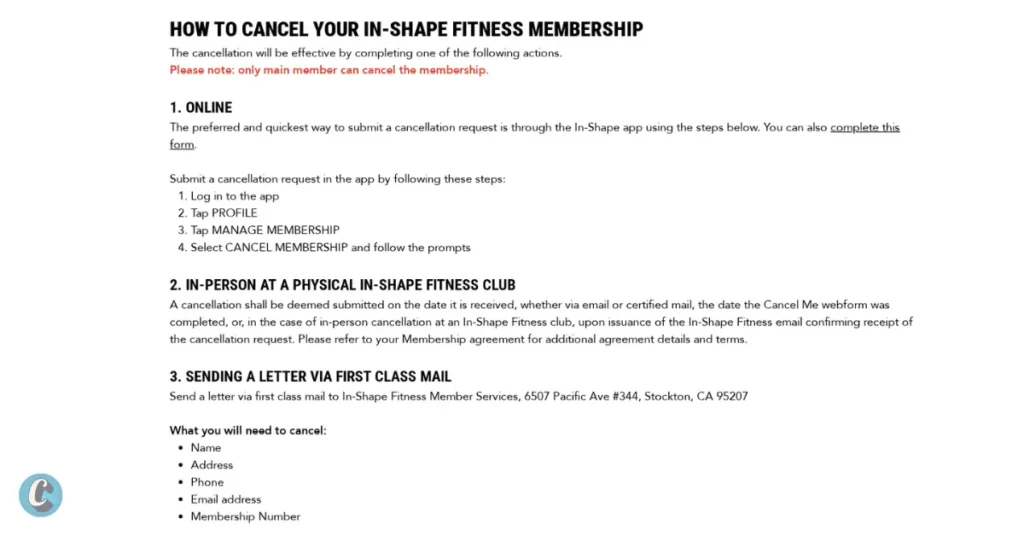
    Screenshot: Cancellation Guide from inshape.com/how-to-cancel

    In-Shape lists its cancellation methods on its self-service cancel page, and the membership terms add email, mail and in-person requests. Each method is below.

    1. Cancellation via In-Shape Mobile App

    In-Shape calls the app the preferred and quickest way to submit a cancellation. Download it from App Store or Google Play if you don’t already have it.

    Follow the steps listed below:

    1. Log in to the In-Shape app.
    2. Tap “Profile”.
    3. Tap “Manage Membership”.
    4. Select “Cancel Membership” and follow the prompts to confirm.

    Take a screenshot of the final screen and keep any confirmation email In-Shape sends. The same Manage Membership area is where you can request a hold instead of cancelling.

    2. Cancel in Person at a Club

    cancel in shape membership in person
    Cancelling an In-Shape membership in person (representative image)
    1. Go to the front desk at an In-Shape Fitness club.
    2. Say you want to cancel your membership.
    3. Give your name and membership number, and check the email address on your account.
    4. Wait for In-Shape’s email confirming receipt; an in-person cancellation counts as submitted only once that email is issued.

    If the confirmation email does not arrive, your 30-day notice has not started yet. Ask the club to resend it, or send your request to cancelme@inshape.com the same day so it has a receipt date.

    3. Use the Online Cancellation Request Form

    1. Open In-Shape’s How to Cancel page.
    2. Open the cancellation request form linked on that page.
    3. Enter your name, address, phone number, email and membership number.
    4. Submit the form and save a screenshot of the confirmation.

    In-Shape does not list a phone number for cancellations on its cancel page or in its membership terms, so use the app, the form, email, mail or a club visit rather than calling.

    4. Email cancelme@inshape.com

    The membership terms accept cancellation requests by email:

    1. Write an email with your full name, address, phone number, home club, and membership ID.
    2. Use a clear subject line, e.g., “Membership Cancellation Request – [Your Name].”
    3. Send it to cancelme@inshape.com and keep a copy in your sent folder.

    An emailed request counts from the date In-Shape Member Services receives it, and the cancellation takes effect 30 days later.

    Some BBB complainants (late 2025) say In-Shape answered only by email or was slow to reply. Send your request at least 30 days before the date you want billing to stop, and if no reply comes, back it up with a letter or a club visit.

    Important: Use Cancellation Letter Generator to write a clear cancel request.

    5. Mail a Letter to In-Shape Member Services

    The membership terms accept requests sent by first-class mail to Member Services. Certified mail is optional, but it gives you proof of the delivery date.

    1. Write a letter asking to cancel your membership.
    2. Include your name, address, phone number, email and membership number.
    3. Mail it to In-Shape Fitness Member Services, 6507 Pacific Ave #344, Stockton, CA 95207.
    4. Keep a copy of the letter and your mailing receipt.

    A mailed request counts from the day Member Services receives it, not the day you post it, so allow for delivery time. If you hear nothing back, email cancelme@inshape.com with the date you mailed the letter.

    If Your In-Shape Cancellation Isn’t Confirmed

    These steps come from member reports on Reddit and BBB, not from In-Shape. Use them only after you have a dated cancellation request on record.

    1. Dispute Charges with Your Bank

    One prorated bill for the 30-day notice period is expected. If In-Shape keeps charging you after that period ends, you can ask your bank or card issuer about disputing the charges.

    1. Gather proof of cancellation attempts (emails, app screenshots, certified mail receipts).
    2. Call your bank to dispute charges or block payments.
    3. Follow up with a formal cancellation request via email or certified mail to avoid collections.

    Warning: the terms say prorated fees and any unpaid balance must be paid by the end of the 30-day period, and members report balances being sent to collections. Settle what you owe for the notice period before disputing anything.

    2. File a BBB or Attorney General Complaint

    If your requests go unanswered, you can file a complaint with the Better Business Bureau or the California Attorney General. In-Shape’s BBB profile showed 79 complaints in the last 3 years when checked on October 5, 2026.

    1. File at bbb.org or oag.ca.gov/consumers with dates and evidence.
    2. Follow up with In-Shape, referencing your complaint number.

    Cancellation Policy

    • After the first 5 business days of the contract, cancellations need at least 30 days’ notice.
    • You keep access and pay a prorated final bill for the 30-day period. In-Shape’s example: $99 monthly dues, cancelled on the 20th, gives one final bill of $66.
    • Disability or death: released from the contract with a prorated refund of prepaid fees; In-Shape may ask for a health care provider’s confirmation within 10 days.
    • Moving: if you move more than 25 miles from every In-Shape club and can’t transfer, you are released from future payments; send proof within 10 days or the cancellation date moves back.

    Keep a copy of all communications, especially if mailing your request.

    IssueDescriptionSolution
    No Email ReplyMembers report slow or no replies from cancelme@inshape.com.The request counts from the date it is received. Keep your sent email, then back it up with a first-class letter or a club visit.
    Cancellation FeesBBB complainants (Nov–Dec 2025) report being charged $40 or $250 when cancelling. The published terms & conditions don’t list a cancellation fee.Check your own membership agreement for a term commitment, and ask Member Services in writing what you owe before you cancel.
    In-Person Request Not RecordedAn in-person cancellation counts only once In-Shape issues its confirmation email.Don’t leave the club without checking the email address on file, and email cancelme@inshape.com the same day if nothing arrives.
    Charges After CancellingOne prorated bill for the 30-day period is expected. Members report charges beyond that, and some report collections notices (BBB, Nov 2025).Keep confirmation emails, bank statements, and dispute charges via your bank or credit card provider if billing continues.
    30-Day Notice on Monthly PlansA month-to-month member told BBB (Oct 2025) they didn’t expect a 30-day notice. The terms apply it to every cancellation after the first 5 business days.Cancel at least 30 days before the date you want billing to stop, and review your membership agreement for any commitment period.

    FAQs

    How do I know it’s really canceled?

    Keep the app confirmation, your sent email or your mailing receipt. For an in-person request, In-Shape’s confirmation email is what marks the request as submitted, so follow up by email if it never arrives.

    Can I put my membership on hold or freeze?

    Yes. After 30 days of active membership you can request a hold of up to 6 months in the app; In-Shape approves holds at its discretion. You pay a monthly hold fee, and the Annual Fee is still charged if it falls due during the hold.

    Can I get a refund?

    In-Shape’s terms give a prorated refund of prepaid fees when a member becomes verifiably disabled or dies. Moving more than 25 miles from every club (with no transfer possible) releases you from future payments. Otherwise you pay the prorated bill for the 30-day notice period.

    What if I’m charged after canceling?

    One prorated bill for the 30-day notice period is normal. For anything after that, gather your proof (emails, screenshots, mailing receipts) and email cancelme@inshape.com or ask at your club. If it stays unresolved, you can file a BBB complaint or ask your bank about a dispute.

    Use the In-Shape app if you can, keep proof of whichever method you use, and plan for one prorated bill covering the 30-day notice period. Did this guide help you cancel your membership? Let us know!

  • 5 Methods to Cancel your New York Sports Club Membership

    5 Methods to Cancel your New York Sports Club Membership

    New York Sports Club (NYSC) memberships can be canceled in-person, online, via phone, or through email and mail.

    Key Information

    AspectDetails
    Notice Period5 business days before the next billing cycle.
    Cooling-Off PeriodWithin 3 days of signing, cancel with no penalty and receive a full refund within 10 business days.
    Cancellation Fees1. No cancellation fee for Month-to-month memberships with proper notice.
    2. Early cancellation fee of $150 for Annual memberships (12-month term) if canceled within the term.
    Freezing Option1-12 months (after 90 days of enrollment)
    Freeze Fee$15/month, varies by state

    How to Cancel Your New York Sports Club Membership

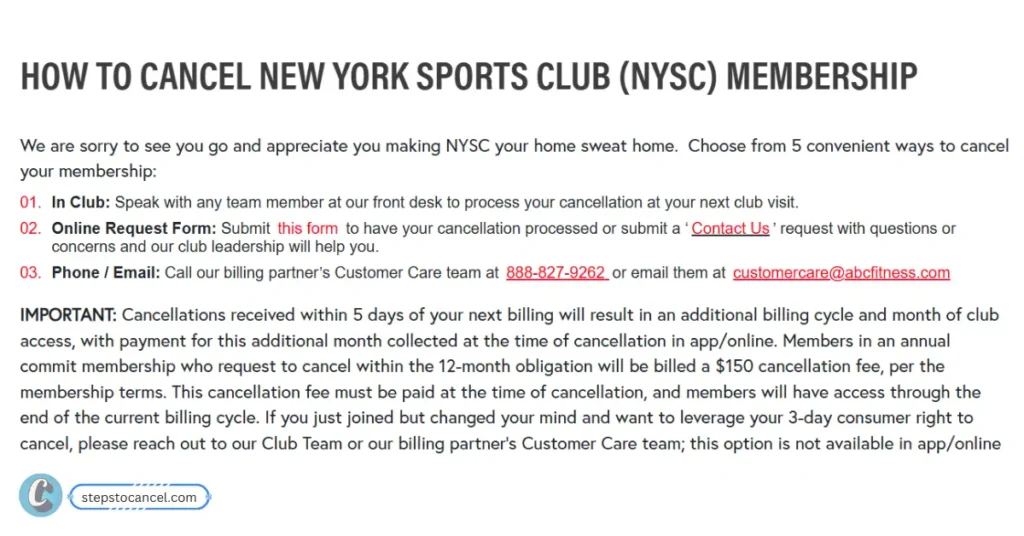
    NYSC officially groups its cancellation methods into three main categories (In Club, Online, Phone/Email), but here is exactly how you can execute them:

    Methods to Cancel New York Sports Club Membership

    1. Cancel New York Sports Club Membership Online

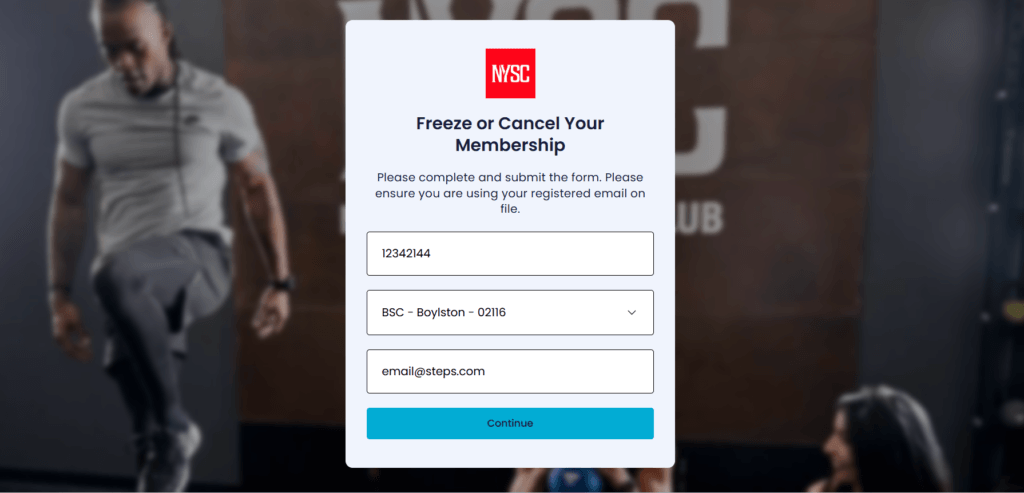
    image 1

    You must submit cancellation request form at least 5 days before your next billing period, follow the steps listed below.

    1. Visit NYSC “cancellation page“
    2. Enter your barcode, email, and home club (all of this information is available in your NYSC member app) to verify and complete your request.
    3. Then tap on “Continue” button.

    Note: Add-on services like personal training or locker rentals cannot be canceled online. You must speak directly with your club team for these.

    2. In-Person Visit to Club

    1. Visit any NYSC club (call ahead to confirm hours and cancellation process).
    2. Bring your ID, membership card, and membership details.
    3. Sign a Notice of Cancellation and request a copy for your records.

    Tip: NYSC accepts cancellatin from any location not just your home club, so if you moved to a new city then visit the nearest location. Also, Confirm billing has stopped before leaving.

    3. Submit Cancellation Request via Contact Us Form

    1. Visit www.newyorksportsclubs.com/contact-us.
    2. Fill out the form with your membership details which includes:
      • Subject: Select “Cancel Membership Inquery“
      • Feedback: Choose your experience
      • Club Name: Select your “Home Club” where you registered.
      • Comment: Add reason why you need to cancel.
      • Email: Your reqistered, to receive confirmation mail.
      • Name: As provided in the club.
      • Phone Number: You
    3. Then submit your cancellation request.

    4. Cancellation via Phone Call

    To cancel your New York Sports Club Membership through phone you need to call ABC Fitness which is NYSC’s official billing partner. Follow rhe 3 steps listed below. 

    1. Call Customer Care at 888-827-9262 (9 AM–5 PM EST, seven days a week).
    2. Provide your full name, membership number, and billing address for verification.
    3. Clearly state your intent to cancel and request email confirmation.

    Tip: Be firm, as representatives may try to upsell.

    5. Send an Email

    Write an cancellation requst email and send it to customercare@abcfitness.com. ABC Fitness is the official billing partner of NYSC, who manages the membership billings.

    Use our Cancellation Letter Generator to write professional mail.

    6. Cancellation via Certified Mail

    If you failed to cancel your NYSC membersip via in-person visit, phone call, online form, or sending email then try sending a Certified Mail to their corportate office.

    1. Write a letter including your name, membership number, contact details, home club, and reason for cancellation.
    2. Send to: New TSI Holdings, Inc., 100 Duffy Avenue, Hicksville, NY 11801, or email to memberservices@tsiclubs.com or customercare@abcfitness.com.
    3. Use certified mail for proof of delivery and keep a copy of the letter.
    4. Request written confirmation.

    This is not an official method but according to our research, some users were able to cancel their membership by send a mail to their corporate office.

    Tip: Send at least 7-10 days before the billing cycle to avoid delays and extra charges.

    NYSC Cancellation Policy

    • Notice Period: Provide at least 5 business days’ notice before the billing cycle to avoid an additional month’s charge.
    • Membership Types: Month-to-month memberships cancel without fees. Obligation-term memberships (e.g., 12 months) may incur early termination fees unless canceled for medical or relocation reasons with documentation.
    • Cooling-Off Period: Cancel within 3 days of signing for no penalty, with refunds within 10 business days.
    • Legal Protections: New York law allows cancellations for relocation (25+ miles), medical disability, or service changes, with refunds processed quickly.

    Freezing Your Membership

    Want a break for uncertain reason? how about freeze your membership instead of cancelling it? New York Sports Club allows users to freeze their membership for 1 to 12 months only after 90 days of enrollment for a fee (e.g., $15/month).

    To freeze your subscription use any of the avaailbale methods like contact form, contacting customer care at 888-827-9262, email at customercare@abcfitness.com, or visit a club.

    If you are from “Pennsylvania” this location offers free medical freezes but need to provide a valide doctor’s note.

    Refund Eligibility

    NYSC memberships are generally nonrefundable and non-transferable, meaning you won’t receive money back if you simply choose to stop using the gym. However, new members are eligible for a full refund if they cancel within the first 3 days of signing up — this is part of NYSC’s money-back guarantee.

    In addition, certain situations allow for refunds under local state laws (like New York). These may include permanent gym closures, relocation more than 25 miles away, or medical conditions that prevent continued use of the facility. Keep proof of your cancellation and any medical/relocation documents to dispute unauthorized charges.

    Tip: Keep proof of cancellation to dispute unauthorized charges

  • Everything you need to know about cancelling Village Gym Membership

    Everything you need to know about cancelling Village Gym Membership

    Village Gym is a well-known UK-based health and fitness club, offering services across multiple locaton providing premium fitness experience.

    But members may need to cancel gym memberships for reasons like relocation, financial difficulties, dissatisfaction, or lack of time. The cancellation process can be complex due to specific policies, notice periods, and membership types.

    Whatever the reasons, our step by step guide can help you cancel your membership.

    Understanding Village Gym Memberships

    Village Gym offers various membership types, including:

    1. Results Membership: Fixed-term contracts with 6 or 12 months with specific cancellation rules.
    2. Flexible Membership: Requires a 90-day paid notice period for those joined after June 3, 2019.
    3. Advance Paid Membership: Includes 1-month memberships that expire automatically or longer-term options with restricted cancellation.

    Reasons for cancellation vary, but common ones include moving away, financial constraints, or finding a better alternative. Understanding your membership type is important, as it affects the cancellation process.

    Cancellation Methods

    methods ot cancel village gym membership

    Village Gym provides 3 primary methods to cancel your membership: via the website, phone, or email. Below are the detailed steps for each, based on official sources.

    1. Cancelling via the Website

    1. Visit the Official Village Gym’s Website: https://www.villagegym.co.uk/.
    2. Login to your account using your credentials.
    3. Tap on the “My Account” section.
    4. Select the “My Membership” option.
    5. Provider your “Reasons for cancellation” and feedback then submit.

    After staff will review your request and process the cancellation. Look for a confirmation email from the GYM to confim, if not received do contact your gym.

    Source: Village Gym Membership FAQs

    2. Cancelling via Phone

    If you prefer to cancel the membership by directly contacting the staff of the Village Gym, you can also contact them through phone number to cancel your membership. Follow these steps to cancel your Village Gym Membership via phone:

    1. Find the phone number for your local Village Gym on the Locations Page.
    2. Call the gym and speak with a staff member to cancel your membership.
    3. Provide your details (Name, Address, and Membership ID) for verifcation.
    4. Then the staff will process your cancellation request.

    A confirmation email will be sent once the cancellation is complete.

    Note: Each gym has its own contact number, so ensure you call the correct location.

    3. Cancelling via Email

    To cancel your Village GYM membership, write an email including your full name, membership ID, and reason for cancellation then send it to memberservices@village-hotels.com.

    After the customer service staff receives your cancellation query, they will respond to you and guide you through the cancellation process.

    Use our Cancellation Cover Letter Generator to write professional email in seconds, just proivide necessary detailes and you are good to go.

    Cancellation Policy

    Village Gym’s cancellation policies vary by membership type and timing.

    Membership TypeMinimum TermCancellation During Minimum TermCancellation After Minimum TermNotice PeriodRefund Policy
    Results6 or 12 monthsNot allowed, except for exceptional circumstances (e.g., illness, job loss).1 month’s notice for expiry; 90 days’ paid notice if joined after June 3, 2019.1 month or 90 daysNo refunds except for serious breach by gym; £15 fee within 10 days if no joining fee.
    Flexible3 months (post-June 3, 2019)Not allowed during 90-day notice period, except exceptional circumstances.90 days’ paid notice.90 daysSame as Results.
    Advance Paid1, 6, or 12 months1-month expires automatically; others not cancellable except exceptional circumstances.N/A for 1-month; others per terms.N/A or per termsSame as Results.
    Village GYM Cancellation Policy Table

    Cooling-Off Period: Within 10 days of joining, you can cancel by paying the joining fee or a £15 fee if no joining fee was charged.

    Exceptional Circumstances:

    1. You may cancel early for:
      • Long-term illness or injury.
      • Pregnancy.
      • Loss of livelihood.
      • Significant change in work or home location.
    2. Requires reasonable evidence (e.g., medical certificate, proof of address change).
    3. If approved, a 1-month notice period applies.

    Key Notes You Should Remember:

    • Only the named membership holder can request cancellation; third-party cancellations are not allowed.
    • Cancelling your direct debit is not a valid cancellation method and may incur fees.
    • Requests made after the 20th of the month may not be processed until the following month.

    Source: Village Gym Membership Terms

    How to Freeze Village Gym Membership?

    If you’re not ready to cancel permanently, freezing your membership is an alternative:

    1. Submit a request via the Freeze Request Form.
    2. Pay an admin fee of £10 per calendar month (waived for medical, student, or young person memberships).
    3. Requests must be made by the 20th of the month for the following month.

    Note for Juniors: Junior memberships (under 18) must be frozen individually; they are not automatic.

    You’ll receive a confirmation email once the freeze is processed, avoid sending multiple emails, as this may delay processing.

    FAQ

    Can I freeze my membership instead of cancelling?

    Yes, for £10 per month (free for medical, student, or young person memberships) via the Freeze Request Form.

    What is the cooling-off period?

    Within 10 days of joining, you can cancel by paying a £15 fee (or joining fee).

    Can I get a refund?

    Refunds are not typically offered, except in cases of serious breach by the gym (e.g., prolonged closure).

    What if I can’t afford the membership?

    Contact Member Services with evidence of financial hardship for potential early cancellation (Contact Form).
    Alternative Methods (Not Official)

    While not officially endorsed, some users suggest alternative approaches:

    1. Claiming Relocation: Informing the gym you’ve moved far away (with proof like a bank statement) may qualify for early cancellation under exceptional circumstances.
    2. Disputing Charges: If charged after cancellation, contact your bank or credit card company to dispute unauthorized charges.
    3. Caution: These methods may not always work and could lead to disputes or fees if not aligned with the terms.
  • How to Cancel Planet Fitness Membership (Online, Mail or In Person)

    How to Cancel Planet Fitness Membership (Online, Mail or In Person)

    Planet Fitness has to receive your cancellation at least 8 days before your next billing date, so check that date first. You can then cancel online in the member portal at planetfitness.com, in person at your home club, or by a letter mailed to your home club.[1] Keep the confirmation, the receipt or the mailing record until your next statement shows no charge.

    Cancel Planet Fitness online in the member portal

    Planet Fitness lets you end your membership by logging in to the member portal on its website.[1] It’s the quickest route if you’re not near your home club.

    1. Go to planetfitness.com/login (the MY ACCOUNT page) and select LOG INTO YOUR ACCOUNT.[4]
    2. Open My Billing Info & Balance in the account menu and note your next billing date and annual fee date.[1]
    3. Open your membership settings and choose the option to end your membership. Planet Fitness doesn’t publish the button names, so we can’t list them.
    4. Screenshot or save the confirmation screen and any confirmation email.

    Planet Fitness notes that some policies vary by location and state.[1] If your portal doesn’t show a way to end the membership, use one of the two methods below rather than any workaround.

    Cancel at your Planet Fitness home club

    Illustration of a member canceling a Planet Fitness membership at the gym

    You can end your membership in person at your home club. Planet Fitness also calls the home club your best source for billing questions while it’s open.[1]

    1. Go at least 8 days before both your next billing date and your annual fee date, since the club must receive your request by then to stop each charge.[1]
    2. Bring your PF Club Pass number and photo ID, and tell the front desk you want to end your membership.
    3. Ask the club to confirm that the annual fee is stopped too, and get a printed or emailed confirmation before you leave.

    Cancel Planet Fitness by mail (letter template)

    Illustration of a member mailing a cancellation letter to a Planet Fitness home club

    Planet Fitness accepts written notice mailed to your home club.[1] It suits members who’ve moved away, as long as the letter arrives in time.

    1. Fill in the letter template below and sign it.
    2. Find your home club’s street address under Our Clubs on planetfitness.com.
    3. Send it with tracking, such as USPS Certified Mail, so you can prove when the club received it.
    4. Count the 8 days from the delivery date, not the day you post it, because the club must receive your notice at least 8 days before your billing date.[1]
    5. If you haven’t had a confirmation a few days after delivery, call or visit the club with your tracking number.
    6. Check your next statement, and keep the tracking record until it shows no charge.
    To: Planet Fitness [club name], [club street address]
    
    Date: [today's date]
    
    Please end my Planet Fitness membership.
    
    Name on the membership: [full name]
    PF Club Pass number: [number]
    Phone and email on the account: [phone] / [email]
    Last 4 digits of the card or account billed: [####]
    
    Please stop all billing, including the annual fee, and send written
    confirmation of the cancellation to the email address above.
    
    Signature: ____________________

    Planet Fitness cancellation notice: 8 days before your billing date

    To stop your next monthly payment, the club must receive your request at least 8 days before your next billing date, because billing changes can take up to 7 days.[1] The annual fee has its own deadline: the club must receive your request at least 8 days before the annual fee date.

    Worked example: if your next billing date is the 17th, the club needs your request by the 9th. If your annual fee date is in the same month, count 8 days back from that date too, and use whichever deadline comes first, plus several extra days if you mail a letter.

    Your billing dates are in the member portal, or in the PF App under My Billing Info & Balance, and on your membership agreement.[1][2] Check both dates before you cancel.

    RELATED
    Steps to cancel 24 Hour Fitness membership

    How to Cancel 24 Hour Fitness Membership (Step-by-Step Guide)

    Planet Fitness cancellation fee: when the $58 buyout applies

    Planet Fitness charges a $58 buyout fee if your membership has a minimum term and you end it before that term is over.[1] Planet Fitness says memberships “may include 12-month commitment”, so check your agreement for a minimum term.[3]

    MembershipStarting priceClub accessAnnual fee
    Classic$15/monthYour home club$49
    PF Black Card$24.99/monthAny club, plus a guest anytime$49
    From Planet Fitness’s membership page, checked Oct. 1, 2026. Prices may vary by location.[3]

    A Black Card lets you visit any club, but you still cancel through your own home club, its mailing address or the member portal.[1][3]

    Moving? Transfer your Planet Fitness home club instead

    If there’s a Planet Fitness near your new home, you can move your membership online in a few clicks instead of canceling.[1] You can transfer online if all of these are true:

    • You’re not a minor.
    • You’ve been a member for at least 90 days.
    • You haven’t transferred in the past 90 days.
    • You don’t owe dues or fees at your current club, and the membership has no financial cosigner or third-party subsidy.
    • Your membership is billed monthly, not Paid in Full.

    Planet Fitness says to contact your home club for help if you aren’t eligible to transfer online.[1] If you’re leaving for another chain, its rules may differ; our gym membership cancellation guides cover other clubs.

    RELATED
    Cancel Anytime Fitness membership

    How to Cancel an Anytime Fitness Membership Through Your Home Club

    Downgrade to Planet Fitness Classic or pause instead of canceling?

    If PF Black Card costs more than you want to pay, Planet Fitness says to stop by your club to downgrade, and a team member can help.[1] Classic starts at $15 a month against $24.99 for PF Black Card, and prices vary by location.[3] Planet Fitness’s FAQ doesn’t describe pausing a membership, so ask your home club whether that’s possible.

    Canceling a Planet Fitness membership for someone else, or for a member who has died

    Planet Fitness doesn’t publish a process for this. Mailed written notice and a visit to the home club don’t need the member’s login, so contact the home club and ask what it needs from you. If the home club is closed, Planet Fitness’s Member Services department takes questions Monday to Friday, 9 AM to 6 PM Eastern.[1]

    If Planet Fitness keeps charging you after you cancel

    1. Contact your home club first. Planet Fitness calls the home club your best source for billing questions while it’s open; Member Services covers it when the club is closed.[1] Have your confirmation, receipt or tracking number ready.
    2. Escalate to headquarters. The number on Planet Fitness’s BBB headquarters profile is (844) 880-7180. On Oct. 1, 2026, that profile showed 141 complaints in the last 3 years and an F rating, citing a failure to respond to 36 complaints.[5]
    3. Dispute the charge with your card issuer. Under federal rules for US credit cards, the CFPB says to send a written billing error notice within 60 calendar days after the charge appeared on your statement (CFPB page last reviewed April 15, 2024).[6] Attach your cancellation proof; this is general information, not legal advice.

    Beyond your club’s own number and the headquarters number above, be wary of phone numbers on third-party pages labeled as Planet Fitness cancellation lines. Phone isn’t one of the three ways Planet Fitness lists for ending a membership.[1]

    Planet Fitness cancellation FAQs

    Can I cancel Planet Fitness in the PF App?

    Planet Fitness lists the member portal on its website, not the PF App, for ending a membership. The app is still useful for checking your billing dates under My Billing Info & Balance.[1]

    Can I cancel Planet Fitness by phone or email?

    Neither is one of the listed methods. Use the member portal, a visit to your home club or a mailed letter.[1]

    Will Planet Fitness refund unused time?

    Planet Fitness doesn’t publish a refund policy in its FAQ, so check your membership agreement or ask your home club. If you’re charged after canceling on time, follow the dispute steps above.

    Can I still use the gym after I cancel?

    Planet Fitness doesn’t say whether access continues until your next billing date. Ask when you cancel, and make sure the end date is on your confirmation.

    How do I pay a balance before I cancel?

    You can make a payment online or in the PF App under My Billing Info & Balance.[1] An unpaid balance also blocks an online home club transfer.

    Can I cancel at any Planet Fitness location?

    The in-person and mail options both go through your home club.[1] If you can’t get there, cancel online in the member portal instead.

    References

    1. Planet Fitness, Membership FAQs, checked Oct. 1, 2026.
    2. Planet Fitness, Customer Service, checked Oct. 1, 2026.
    3. Planet Fitness, Gym Memberships (prices and fine print), checked Oct. 1, 2026.
    4. Planet Fitness, My Account, checked Oct. 1, 2026.
    5. Better Business Bureau, Planet Fitness (Headquarters) profile, checked Oct. 1, 2026.
    6. Consumer Financial Protection Bureau, How do I dispute a charge on my credit card bill?, checked Oct. 1, 2026.
  • How to Cancel Workout Anytime Membership (App or Home Club)

    How to Cancel Workout Anytime Membership (App or Home Club)

    Workout Anytime handles cancellations in its member app: open your membership, choose Cancel Membership, review the amount due and confirm.[1][2] If the app doesn’t work for you, contact the staff at your home club. Screenshot the final message, which tells you how long you keep club access, and keep it until a statement arrives with no new dues.

    How to cancel Workout Anytime in the member app

    Workout Anytime’s own cancellation directions walk through these screens in the app.[2] Clear any unpaid balance first, so the request isn’t held up (see the section on charges below).

    1. On the app home screen, tap the three-circle menu in the bottom right-hand corner to open your Account page.[2]
    2. Tap MEMBERSHIP, then the three dots in the top right-hand corner of the Membership page.[2]
    3. Choose Cancel Membership in the pop-up.[2]
    4. Give your reason for canceling and review the Given Amount Due to Cancel.[2]
    5. Tap CANCEL MEMBERSHIP and confirm that you want to cancel.[2]
    6. Read the message saying your cancellation has been requested and how much longer you can use the club, then check that your membership page shows the new status.[2]

    Tip: screenshot the amount due and the final message before you close the app.

    Workout Anytime cancellation notice and the amount due

    Workout Anytime doesn’t publish a notice period or a cancellation fee on its website; your membership agreement sets both. The app shows the amount due before you confirm, so that screen is where you see what you’ll still pay.[2]

    Members have reported a 30-day notice period (BBB complaint, December 2024).[5] Cancel well before your next draft date rather than the day before.

    Can’t cancel in the app? Contact your home club

    Workout Anytime clubs are franchised, and your home club is the one you signed up at. If you need help canceling, contact the staff there.[1][4]

    To reach them, pick your club on the Workout Anytime contact page, or ask the staff in person at the club.[1][3] Ask for the cancellation in writing, including the date your access ends and any amount still due.

    Freeze or downgrade instead of canceling

    If you only need a break, Workout Anytime lets you freeze for up to 90 days, once in a 12-month period, at $5 a month. Your account has to be current on all payments before the freeze starts.[1]

    The FAQ lists exceptions for a medical reason with a doctor’s note, military leave and a mission trip; ask your home club how they apply to you.[1]

    If the price is the problem, you can move from Premium to Basic. A downgrade fee may apply depending on when you bought your membership, so ask your home club for the amount first.[1]

    RELATED
    Cancel Planet Fitness Membership

    How to Cancel Planet Fitness Membership (Online, Mail or In Person)

    Still charged after you cancel?

    A few members describe charges or collection notices after canceling: one said online cancellation was blocked until a balance was paid (February 2024), and another reported dues for months after a June 2025 cancellation, followed by collections (June 2026).[5][6]

    If a charge appears after your access end date, send your home club the screenshot from the app and ask for a correction in writing. If that doesn’t resolve it, your bank or card issuer can tell you how to dispute a charge.

    Workout Anytime and Anytime Fitness are different gyms

    Workout Anytime is franchised by Workout Anytime Franchising Systems, LLC, headquartered in the Atlanta area.[3][4] If your card statement or key tag says Anytime Fitness, you’re a member of a different chain, and the steps in our Anytime Fitness guide apply instead.

    Leaving to join another gym? Check its rules first in our cancellation guides for other gym chains.

    Workout Anytime cancellation FAQs

    Can I cancel Workout Anytime online?

    Yes, in the member app. If the app won’t let you, use the contact page to reach your home club.[2][3]

    Is there a Workout Anytime phone number for canceling?

    Workout Anytime doesn’t list a corporate phone number for canceling. Message your home club through the contact form (choose your club first), or ask staff at the club.[1][3]

    How much is it to freeze a Workout Anytime membership?

    $5 a month, for up to 90 days once in a 12-month period.[1]

    References

    1. Workout Anytime, Frequently Asked Questions.
    2. Workout Anytime, Canceling Membership (in-app directions).
    3. Workout Anytime, Contact.
    4. Workout Anytime, Terms & Conditions (last updated Sept. 13, 2023).
    5. Better Business Bureau, Workout Anytime complaints (member reports).
    6. Trustpilot, workoutanytime.com reviews (member reports).
  • How to Cancel LVAC Membership

    How to Cancel LVAC Membership

    LVAC doesn’t publish a cancellation procedure online, and we found no online cancel button on lvac.com. Members report canceling at their home club or through the Corporate Office at (702) 734-8944 (Monday–Friday, 8 AM–5 PM), with 30 days’ notice.[1][2][3]

    Ask for the cancellation and your final draft date in writing, and keep it until a statement arrives with no new charge.

    Month-to-month or contract? Check your LVAC agreement first

    LVAC’s sign-up page says “All memberships are month-to-month, NO CONTRACT” for the plans it sells today.[4]

    Older or promotional memberships can work differently. Members report term contracts that roll to month-to-month after the term, and an early-exit “Walk Away Friends” fee of $102 (BBB complaint, July 2026).[5]

    The terms page on lvac.com won’t settle it, because it covers only the website: “THIS IS NOT YOUR CONTRACT THAT YOU SIGNED FOR MEMBERSHIP.”[6] Ask your club for a copy of the agreement you signed before you cancel.

    How to cancel an LVAC membership: three ways to ask

    The Corporate Office is closed on weekends, while the clubs are open 24 hours, so on a Saturday or Sunday start at your club or with the contact form.[1]

    At your home club

    1. Go to the front desk of the club you joined and say you want to cancel your membership.
    2. Ask which date your last monthly draft will be, and whether the $49.99 annual fee will still bill.[4]
    3. Ask for a printed or emailed confirmation that shows the cancellation and your final draft date.

    By phone with the Corporate Office

    1. Call the Corporate Office at (702) 734-8944, Monday to Friday between 8:00 AM and 5:00 PM; it’s closed on weekends.[1]
    2. Say you want to cancel, and give your full name and your home club.
    3. Write down the date, the time and the name of the person you spoke with.
    4. Ask them to email you a confirmation that shows your final draft date.

    In writing through the contact form

    1. Open the LVAC contact page and scroll to the form.[1]
    2. Choose Cancellation Information as the subject.
    3. In the message, say you want to cancel and give your name, phone number and home club.
    4. Screenshot the completed form before you send it, and call the Corporate Office if no one replies within a few business days.

    LVAC cancellation notice and the $49.99 annual fee

    Members report that LVAC asks for 30 days’ notice, so plan for one more billing after you give notice; ask the club to confirm your final draft date in writing.[2][3]

    Every LVAC membership includes a $49.99 annual fee, due 45 days after sign-up.[4] Members also reported in 2025 and 2026 being charged the annual fee around the time they canceled.[3] If you’re switching gyms, compare LVAC’s yearly fee with how other gyms handle cancellation before you sign elsewhere.

    Example: You joined on March 1, so your first annual fee is due 45 days later, on April 15. If you give notice on March 20, a 30-day notice period runs to April 19, past that fee date. Ask the club in writing whether the fee will still bill before you sign anything.

    RELATED
    Cancel Planet Fitness Membership

    How to Cancel Planet Fitness Membership (Online, Mail or In Person)

    Nevada rules that cover some LVAC contracts

    Nevada’s health club law applies only to some contracts: ones that bind you for more than 3 months and require fees more than 3 months in advance, ones with an initiation or membership fee over $75, or ones where the club takes more than $100 at one time.[7] Check your agreement’s payments against those thresholds first.

    Under NRS 598.950 (Nevada Revised Statutes, 2025 edition), you can cancel a covered contract within 3 business days after you receive a copy, by written notice delivered in person or by mail postmarked by midnight of the third business day. The club must return all money you paid within 15 days after it receives the notice.[8]

    If a physician confirms in writing that a disability will keep you from using the club for more than 3 months, NRS 598.954 lets you suspend a covered contract for that time. A permanent disability allows cancellation with a pro-rata refund.[9]

    Moving house isn’t covered the same way. NRS 598.958 lets you rescind with a pro-rata refund only if the club location closest to the home address listed in your contract moves more than 20 miles farther from that address than it was when you signed.[10]

    This is general information, not legal advice.

    LVAC phone numbers and hours

    Call the Corporate Office about canceling and Account Payments about a charge. Each club also has its own line, and all locations are open 24 hours.[1]

    LinePhoneHours
    Corporate Office(702) 734-8944Mon–Fri 8:00 AM–5:00 PM; closed Sat–Sun
    Account Payments(702) 933-0937Mon–Thu 9:00 AM–6:00 PM; Fri 8:00 AM–5:00 PM; closed weekends
    Central club(702) 734-5822Club open 24 hours
    Green Valley club(702) 853-5822Club open 24 hours
    Henderson club(702) 566-5822Club open 24 hours
    North club(702) 647-5822Club open 24 hours
    Northwest club(702) 835-5822Club open 24 hours
    Southwest club(702) 798-5822Club open 24 hours
    West Sahara club(702) 364-5822Club open 24 hours

    The Corporate Office address is 2655 South Maryland Parkway, Ste 201, Las Vegas, NV 89109-1666.[1] If you mail the 3-day notice described above, use a trackable service and keep the receipt.

    RELATED
    steps to cancel 24 hour fitness membership

    How to Cancel Your 24 Hour Fitness Membership (Online, Club or Phone)

    LVAC cancellation FAQs

    Can you cancel LVAC online?

    Use the contact form’s “Cancellation Information” subject, or call the Corporate Office at (702) 734-8944.[1] We found no online cancel button on lvac.com.

    How much does it cost to cancel LVAC?

    LVAC doesn’t publish a cancellation fee. On a month-to-month plan, budget for the reported extra month and possibly the $49.99 annual fee; on a term contract, ask the club for any exit fee in writing before you agree to it.[4][2][5]

    Can you cancel LVAC anytime?

    Yes on current month-to-month plans, which LVAC sells with no contract, though members report a 30-day notice period.[4][2] If you signed a term contract, its end date and exit terms apply.

    How do I cancel an LVAC contract?

    Ask your club for a copy of your signed agreement to see its term and exit terms; the terms page on lvac.com covers only the website.[6] If you signed within the last 3 business days and Nevada’s health club law covers your contract, cancel by written notice delivered in person or mailed by midnight of the third business day after you received your copy.[8]

    References

    1. LVAC, Contact Us.
    2. Trustpilot, Lvac reviews (member reports).
    3. Better Business Bureau, Las Vegas Athletic Club customer reviews (member reports).
    4. LVAC, Start Sign Up.
    5. Better Business Bureau, Las Vegas Athletic Club complaints (member reports).
    6. LVAC, Terms of Use.
    7. Nevada Revised Statutes § 598.942 (2025), via Justia.
    8. Nevada Revised Statutes § 598.950 (2025), via Justia.
    9. Nevada Revised Statutes § 598.954 (2025), via Justia.
    10. Nevada Revised Statutes § 598.958 (2025), via Justia.
  • How to Cancel Your Chuze Fitness Membership (In Club, Online or App)

    How to Cancel Your Chuze Fitness Membership (In Club, Online or App)

    You can cancel a Chuze Fitness membership three ways: sign the cancellation form at any Chuze location, cancel from your account at memberservices.chuzefitness.com, or cancel in the Chuze app (membership photo → Membership → Cancel). Chuze requires 10 days’ written notice before your monthly billing date, and cancelling inside a 12-month commitment may cost a $58 cancellation fee (Chuze Fitness FAQ, checked 5 October 2026).

    Two billing details are worth checking before you cancel. Your annual fee is charged 45 days after your enrollment date and then once a year after that. And a $2.99 processing fee is added each time dues, annual fees or other recurring charges are billed to a credit card; Chuze says paying by bank account (ACH) avoids it.

    If you only need a break, Chuze offers a paid freeze for up to 6 months in a calendar year, plus medical and military holds with documentation. Each option is covered below.

    TIPS

    Your membership agreement sets the exact terms for your plan, including any 12-month commitment. Chuze’s FAQ refers you to the agreement for freeze terms, so keep your copy handy.

    Keep proof of every cancellation: a copy of the signed form, or a screenshot or email from the portal or app. BBB complaints filed June–August 2026 include members billed after cancelling; in its published replies Chuze confirmed the accounts were closed and, in one case, issued a $143.09 refund (BBB, checked 5 October 2026).

    Chuze Fitness Notice Period, Cancellation Fee and Refund

    Notice period: Chuze requires “a 10 day written notice prior to any monthly billing date to cancel and avoid any future charges.” Example: if your next billing date is November 15, cancel by November 5. The same 10-day notice applies if you are on a 12-month commitment. 

    Cancellation fee: If you cancel within a 12-month commitment, “you may be subject to a $58 cancellation fee prior to cancellation.” Chuze’s FAQ does not mention a cancellation fee for other memberships.

    Refund: Brand-new memberships have a 5-day buyer’s remorse window: “If you notify Chuze Fitness of your intent to cancel within 5 business days, you will receive a full refund.” Outside that window, the FAQ does not describe refunds of dues already billed.

    Ways to Cancel Your Chuze Fitness Membership

    By Visiting Any Chuze Fitness Location

    Chuze’s FAQ says you may cancel “by coming in to any Chuze location and signing our cancellation form.” It does not have to be your home club.

    1. Go to any Chuze location: Visit the club nearest to you while it is open. 
    2. Ask to cancel: Tell the front desk you want to cancel your membership. 
    3. Sign the cancellation form: Complete and sign Chuze’s cancellation form at least 10 days before your next billing date.
    4. Check for a commitment fee: If you are still inside a 12-month commitment, ask whether the $58 cancellation fee applies to you.
    5. Keep a copy: Ask for a copy of the signed form and note the date.

    If you have questions after cancelling, Chuze’s FAQ says to email info@chuzefitness.com or call your home location.

    Online at memberservices.chuzefitness.com or in the Chuze App

    Chuze calls the member services site “the easiest option” if you can’t cancel in person. The screens sit behind your member login, so the labels you see may differ slightly from the steps below.

    1. Sign in: Go to memberservices.chuzefitness.com and log in to your member account.
    2. Find the cancel option: Open your membership details and choose to cancel. 
    3. Follow the prompts: Complete each screen until the request is submitted, at least 10 days before your next billing date. 
    4. Save proof: Screenshot the final screen and keep any confirmation email. 

    In the Chuze app: tap your membership photo in the top right-hand corner, then Membership, then Cancel, and follow the prompts. Save a screenshot of the last screen.

    Billing portal vs. cancellation: myiclubonline.com is Chuze’s billing portal for updating payment details or paying a bill. Chuze’s FAQ points cancellations to memberservices.chuzefitness.com, the app or a club instead. Other gyms, such as Retro Fitness, also use myiclubonline for billing. 

    Contact Customer Support

    InformationDetails
    Contact Pagehttps://chuzefitness.com/contact/
    Email (questions and issues)info@chuzefitness.com
    PhoneCall your home location (Chuze’s contact page lists no central phone number)
    Chuze Fitness contact options (checked 5 October 2026)

    Freeze or Hold Instead of Cancelling

    Paid freeze: any member can freeze “for a discounted monthly fee for up to a maximum of 6 months at a time in a calendar year,” for any reason and without documentation. The annual fee is still charged on its original date, and if you are in an agreement term, the contract is extended by the number of months frozen. Medical and military holds need documentation:

    • Medical: a temporary medical situation in which you are unable to use the facility for a specified amount of time.
    • Military: a temporary active-duty transfer or deployment to a location more than 25 miles from a Chuze Fitness location. 

    How to Freeze or Hold Your Chuze Membership

    Chuze handles freezes and holds at your home club or in the Chuze Fitness Mobile app.

    1. Choose where: Stop by your home club or open the Chuze Fitness Mobile app.
    2. Ask for the freeze or hold: Request a paid freeze (up to 6 months in a calendar year) or a medical or military hold.
    3. Give your details: Provide your account details and the months you want to freeze. 
    4. Add documentation for a hold: Medical and military holds need documentation; the paid freeze does not.
    5. Keep confirmation: Note the freeze start and end dates, and remember the annual fee still bills on its usual date.

    Downgrade option: You can downgrade in the club with 10 days’ notice before your billing date. Chuze charges a $10 downgrade fee, and “certain term limits may also remain.”

  • How to Cancel Retro Fitness Membership

    How to Cancel Retro Fitness Membership

    A Retro Fitness cancellation takes effect seven days after you submit it, and a payment that falls due in those seven days is still processed. The quickest official route is the Manage Membership button on retrofitness.com; you can also cancel through your home club by phone, email or mail, or hand the manager a signed letter.[1] Save the confirmation screen or your sent email as proof of the date you asked.

    Which Retro Fitness membership do you have? It decides when you can cancel

    Before you pick a method, check your membership agreement for the plan type. The cancellation steps are the same for everyone, but whether you can stop paying right away depends on the contract.

    Your situationWhat the policy says
    Signed up in the last 3 business daysYou can cancel without any penalties.[1]
    Month-to-month contractYou can cancel at any time.[1]
    Other installment planYou need to complete the payments in your agreement before canceling, unless otherwise permitted by law.[1]
    Paid in FullFull term, with no refunds.[1]

    If you’re on an installment plan and want to leave early, ask your home club for the remaining balance in writing before you cancel.

    RELATED
    cancel one life fitness membership

    How to Cancel Onelife Fitness Membership

    How to cancel Retro Fitness online (Manage Membership)

    1. Go to retrofitness.com and select Manage Membership on the main page.[1]
    2. Log in to your member account.[1]
    3. Open the cancellation section and follow the steps shown.[1]
    4. Save or screenshot the final screen, and keep any email you receive about the request.

    A payment due in the next 7 days still goes through

    The cancellation takes effect seven days after you submit it.[1]

    Cancel by email, phone or mail through your home club

    Retro Fitness also accepts cancellations by phone, mail or email, handled by your home club.[1] Email is the better choice of the three, because the sent message is your written record.

    1. Look up your home club’s email address and phone number with the Find a Gym page.[3]
    2. Email your home club, or the central address listed on the cancellation policy page, and say you want to cancel your membership.[1]
    3. Include your full name, your home club and the email or phone number on your account, since Retro Fitness may ask for a small amount of information to confirm your identity.[1]
    4. Ask the club to reply with the date your cancellation takes effect, and keep that reply.

    Tip: if you call instead, ask the club to confirm the cancellation by email.

    To cancel by mail, send your letter to your home club’s address from the club finder.[3] Certified mail isn’t required, but a trackable service shows when the letter arrived.[1]

    Cancel in person with a signed letter

    Bring a signed and dated cancellation letter to your home gym’s manager.[1] Put these details in the letter:

    • Your full name and the email or phone number on your account
    • Your home club
    • A clear line saying you’re canceling your membership
    • The date and your signature

    Ask the manager for a copy of the letter with the date it was received.

    Retro Fitness cancellation notice: 7 days (3 days in New York)

    Cancellations generally need seven days’ notice, and they take effect seven days after you submit them. A payment due during that period is processed.[1]

    Members in New York state need to give only three days’ notice.[1]

    Example: your monthly payment is due on the 15th. If you cancel on the 10th, the cancellation takes effect on the 17th, so the payment on the 15th still goes through. Cancel by the 7th and it takes effect before that payment date.

    Freeze or transfer instead of canceling

    Membership freezes are available; contact your club to set one up and ask what it costs.[2]

    A freeze may not pause every charge: in an April 2025 reply to a member, Retro Fitness said the annual fee still applied during a freeze period, so ask your club before you freeze.[4]

    If you’ve moved closer to another Retro Fitness, a transfer may suit you better. Check in at least 7 times in a calendar month with at least 60% of those check-ins at the new club, and your membership transfers automatically the following month.[2]

    RELATED
    Methods to Cancel Fitness Membership

    How to Cancel LA Fitness Membership

    Still charged after you cancel?

    Proof of your request matters most here. In an April 2026 reply to a member’s complaint, Retro Fitness declined to waive that member’s past-due balance because it had no cancellation form on file.[4]

    Send your request to your current home club. In a June 2025 case, a member’s letter went to an address that Retro Fitness said was not the correct location.[4]

    If your club won’t process the request by phone, email the central address on the cancellation policy page and keep a copy.[1]

    As of October 4, 2026, Retro Fitness’s BBB profile showed 11 complaints in the last 3 years, 4 of them in the last 12 months.[4] If you’re thinking of joining another chain instead, compare cancellation rules at other gyms before you sign.

    Retro Fitness cancellation FAQs

    Can I cancel my Retro Fitness membership on the app?

    The cancellation policy doesn’t list the app. Use the Manage Membership button on retrofitness.com, or contact your home club by phone, email or mail, or with a signed letter.[1]

    Is there a Retro Fitness cancellation fee?

    Not for a month-to-month contract or within three business days of signing. On other installment plans you finish the payments in your agreement unless the law allows otherwise, so ask your club for the amount in writing.[1]

    Can I cancel my Retro Fitness membership over the phone?

    Yes. Call your home club, using the number on the Find a Gym page, and ask for an email confirming the date the cancellation takes effect.[1][3]

    When is the Retro Fitness annual fee charged?

    Check your membership agreement or ask your home club for the date and amount. If you plan to freeze rather than cancel, ask whether the annual fee still applies during the freeze.

    References

    1. Retro Fitness, Membership Cancellation Policy.
    2. Retro Fitness, FAQ.
    3. Retro Fitness, Find a Gym Near Me.
    4. Better Business Bureau, Retro Fitness complaints (company responses; profile figures as of Oct. 4, 2026).