Category: Cancel Gym Memberships

Gym memberships are among the hardest subscriptions to cancel. Most health clubs require a specific cancellation method — in-person visit, certified mail, or written notice — and charge an extra month if you miss the notice window. Some contracts include early termination fees of $50 to $175 if you cancel before the commitment period ends.

Every guide in this category explains exactly how to cancel, what notice period applies, how to calculate any buyout fees, how to request a membership freeze as an alternative, and how to get written confirmation so you’re protected against continued billing.

Covered clubs include Planet Fitness, LA Fitness, Anytime Fitness, 24 Hour Fitness, Orangetheory Fitness, Chuze Fitness, Retro Fitness, Snap Fitness, Workout Anytime, Burn Boot Camp, LVAC, New York Sports Club, In-Shape Fitness, Onelife Fitness, Fitness 19.

All guides are verified against each club’s current cancellation policy and updated when procedures change.

  • How to cancel Orangetheory Fitness Membership

    How to cancel Orangetheory Fitness Membership

    Canceling an Orangetheory Fitness (OTF) membership can feel like a nightmare. Many members fear the process due to unclear policies, hidden fees, and unhelpful staff.

    Some locations require a 30-day notice, while others make it needlessly difficult by insisting that only a manager—who’s often unavailable—can approve cancellations. This has left many feeling frustrated, stuck, and even cheated when unexpected charges show up.

    If you’re stressed about canceling, you’re not alone. Whether you’re dealing with delays, ignored emails, or confusing rules, this guide will help you take control of the process and cancel without extra charges.

    Methods to Cancel Your Orangetheory Fitness Membership Online

    From Website

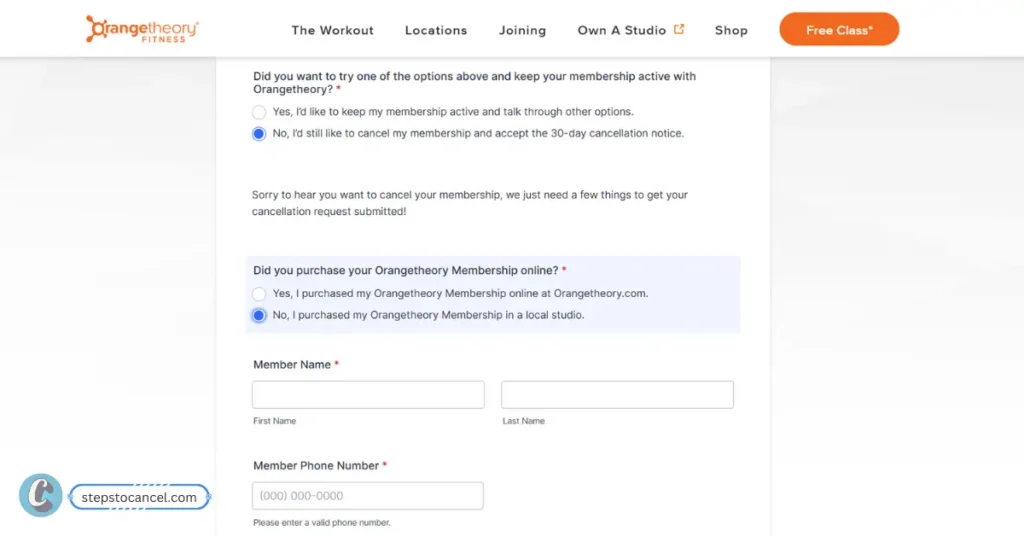
    Cancel Orangetheory Fitness Membership Online
    Process to Cancel your Orangetheory Fitness Membership Online

    You can cancel your Orangetheory fitness Membership online by submitting an online cancellation form through their website. Follow the steps listed below.

    1. Open Cancellation WebPage – “https://www.orangetheory.com/en-us/cancellation-information“.
    2. Scroll down and choose “No, I’d still like to cancel my membership and accept the 30-day cancellation notice” option. 
    3. Choose how you Purchased your orangetheory membership: “Online or Local Studio”.
    4. Fill information associated with Orangetheory Fitness like “Name, Email, Phone Number”.
    5. Find your home studio where your monthly membership is charged – “State and Locaiton”.
    6. Now select, “Reason” from drop-down menu.
    7. Check on “Terms & Conditions” box.
    8. Finally, click on “submit my cancellation request”.

    After submitting your cancellation form, home studio will verify and confirm your request. If don’t receive a confirmation calls or email, we recommend contacting them directly.

    Many locations still require you to visit in person to sign a form, even if you submit the request online.

    By Email

    Avoid in-person visit by sending an cancellation request through email. Follow the steps and copy email template listed below.

    1. First, find your home studio’s email address.
    2. Write an email requesting a cancellation [use email template below]
    3. Send Email and wait for confirmation.
    4. Some orangetheory centre will process it while other might ask you to visit gym and sign a form.

    Email Template for Cancellation

    Subject: Request for Membership Cancellation – [Your Full Name]

    Dear [Studio Manager’s Name],

    I am requesting the cancellation of my Orangetheory Fitness membership at [Studio Location]. As per my agreement, I am providing the required [X]-day notice. Please process my cancellation effective [Last Billing Date or Required Date].

    My membership details:

    • Full Name: [Your Name]
    • Membership ID (if available): [Your ID]
    • Registered Email: [Your Email]
    • Phone Number: [Your Contact Number]
    • Reason: [Why you want to cancel]

    Please confirm the cancellation in writing and let me know if any further action is required. I would appreciate a response to avoid unnecessary charges.

    Thank you,
    [Your Name]

    The problem with email is that many studios ignores it or delay responses, so you must follow-up to avoid any extra charges. If fitness centre in your location does not support it then you must visit in person.

    In-Person Cancel

    Orangetheory can be cancelled by visiting their local club and filling cancellation form, follow the step listed below.

    1. Visit your GYM: Visit Orangetheory studio during office hours.
    2. Talk to Front Desk: Ask to cancel your membership.
    3. Fill out a Cancellation Form: Full name, address, contact number, and the last 4-digits of your credit card for OTF payment.
    4. Confirmation: Finally, ask for a written or e-confirmation.

    Some locations need studio manager’s signature to finalize the cancellation, in that case you must follow up with them to confirm your cancellation.

    Related:

    1. Cancel Snap Fitness GYM Membership
    2. How to Cancel 24 Hour Fitness Membership Online

    How can I cancel a booked class on Orangetheory?

    If you feel like you cannot make it to the training session that you booked earlier, then you have the option of cancelling it. However, customers are required to cancel a booked session 8 hours before the session begins to avoid a late fee. 

    1. Visit “Orangetheory website” or open their mobile app.
    2. Sign into your “Account”.
    3. Navigate to the section that displays your scheduled classes. 
    4. Choose the class that you want to cancel. 
    5. Tap or click on the “Delete Class” option that is displayed next to the selected class. 
    6. Follow further steps on the screen to confirm your cancellation.

    FAQs

    Do I get a refund when I cancel my membership?

    Orangetheory only provides refunds to new customers within 30-day window period to cancel their subscription and get a full refund but they have to complete 12 sessions and if they are not satisfied can get a full refund. 

    Can I return my Orange-theory heartbeat monitor?

    Yes, you can return their heartbeat monitor only if the item is in original condition and returned within 60 days period. Also, a a 10% restocking fees is charged. 

    Does Orangetheory charge cancellation fee? 

    No, Orangethrory does not charge any cancellation fee. But you must send a prior 30 days (about 4 and a half weeks) notice.

    Is there late cancel fee?

    Orangethrory does not charge late cancel fee but will charge you with full membership fee if you fail to send them a cancellation notice 30 days before.

  • How to Cancel your Snap Fitness?

    How to Cancel your Snap Fitness?

    Snap Fitness membership can feel like a trap. Many members report being charged months after canceling, dealing with recurring payments they never agreed to, and feeling stuck in a cost-of-living crisis.

    This might be because of their terms and conditions you signed while joining. If you’re tired of the runaround and just want a straight answer, this guide will show you exactly how to cancel you Snap Fintess Membership.

    Snap Fitness is a popular gym operating over 20 countries including the United States, Australia, and the United Kingdom with over 1,000 gym branches. These studios work independently and have their own cancelation policy making it difficult to provide exact details.

    Understanding Cancellation Policies

    Cancellation Policy
    Source: Snap Fitness NZ Terms and Condition

    To cancel your membership, you must provide a written notice at least 30 days in advance if you have a month-to-month or minimum term membership.

    And if you hold a term membership, you must submit your cancellation request before your term auto-renews.

    Snap Fitness charges cancellation fees based on membership type, country and location:

    1. Prepaid memberships are generally non-refundable, except in specific cases where applicable. If an early cancellation is allowed, 25% of the remaining fees will be deducted on a pro-rata basis.
    2. Term memberships require a £75 early cancellation fee if canceled before the term ends.

    Membership Terms and Contion of the fitness club was not found for United States are taken from UK, Australia and Ireland. (Source above)

    Notice Period or Cancellation Fees might be different for your location, we recommend you to check your Membership Agreement or contact your local gym for more information.

    4 Methods to Cancel Snap Fitness Membership

    You can cancel your snap fitness membership by visiting your home club, by emailing, by delivering or mailing certificated mail to the Club.

    Cancel In Person

    Snap Fitness In-Person Cancellation Process

    Visit your Snap Fitness home club during staffed hours and request the front desk “I want to cancel my gym membership.”

    You should be prepared to answer question like “Why” or “Is there a good reason?” as these are mandatory process for staffs. You can give Medical, Relocation, Work, Financial or any other genuine reason.

    Based on your location, they might proceed with your membership card or you might need to fill up a cancellation form or provide a written notice (Check your agreement).

    They will check for remaining payments, any cancellation fees. Once everything is confirmed ask for print or request them to email for future proof.

    Cancel by Email

    Find Snap Fitness GYM Location

    To cancel your snap fitness membershi by email, follow the steps listed below.

    1. Visit Find GYM’s Near You Page. (Skip if you have email address)
    2. Type your Home Club address and select. (Skip if you have email address)
    3. Email “membership cancelation request” with following details.
      • Name
      • Reason for cancellation
      • Effective date
      • Access Card Number / Member’s Door Card (7-8 digits)
      • Cancellation Fees and
      • Eligible Refunds
    4. Wait for Response: Gyms usually ask for confirmation or additional details.
    5. Review thier message and send reply accordingly.
    6. Finally, wait for Confirmation Email and Approval from GYM.

    Note: Sending notice via email is does gurantee cancellation, you must wait for confirmation email from your Home Club. Also ask for proof for future records.

    Related to GYM and Cancellation:

    1. Anytime Fitness
    2. Onelife Fitness
    3. Fitness 19

    Cancel by Phone

    Most Snap Fitness locations does not cancel membership by phone calls, but if you are far from your location then try this method.

    1. First, call your Local GYM or Find GYM Number Here
    2. Request customer support to “cancel your Membership“.
    3. Provide details like Name, Access Card Number, and Reason.
    4. If your Home Club support cancellation by Phone call then, it will be processed if not try other method.

    Note: Phone, Text Message and all social media channels are not accepted formal communication methods outside United States and many locations.

    Cancel by Certified Mail: To cancel your Snap Fitness Membership through mail first, find your gym’s mailing address then write a formal cancellation notice and send it to your homeclub mailing address.

    How to Cancel Snap Fitness Membership Online?

    Snap Fitness Online cancellation Form

    To cancel your Cannon Falls, Zumbrota, Duluth Snap Fitness membership online follow the steps listed below.

    1. Visit Cancellation Page: Duluth or Cannon Falls / Zumbrota.
    2. Fill all the details that are marked “*” (important).
    3. Select “Cancel” as change to membership.
    4. Submit your Form and wait for confirmation or Phone call.
    5. Review cancellation terms they send (fees and other payment)
    6. Accept and Cancel your Membership.

    Online method are only available on selected location and are not tested – try at your own.

  • How to Cancel 24 Hour Fitness Membership (Step-by-Step Guide)

    How to Cancel 24 Hour Fitness Membership (Step-by-Step Guide)

    Canceling your 24 Hour Fitness membership shouldn’t be this complicated. You don’t need to make up stories, cancel cards, or jump through hoops.

    They have updated thier terms and policies making exit simple and we have listed all the available methods to cancel your GYM Membership anytime, without all the frustration others have experienced.

    Note: 24 Hour Fitness Club is availabe in more than 400 location in the United States of America (US) working independently. Cancelling may require some additional documents or process based on membership type and agreement.

    InformationDetails
    GYM Name24 Hour Fitness
    Phone Number1-866-308-8179 or Call your Club
    Emailcancel@24hourfitness.com
    Cancellation MethodOnline, Contact Form, Club, and Phone
    Cancellation FeeYes, Depend on Contract
    RefundsCooling-Off Periods Only (3-5 days)
    FreezeAvailable (Condition Apply)
    Freeze Duration3 – 6 months

    Ways to Cancel Your 24 Hour Fitness Membership

    Check out 4 methods listed below to cancel your Fitness Membership.

    1. Cancel Online via 24HourFitness.com

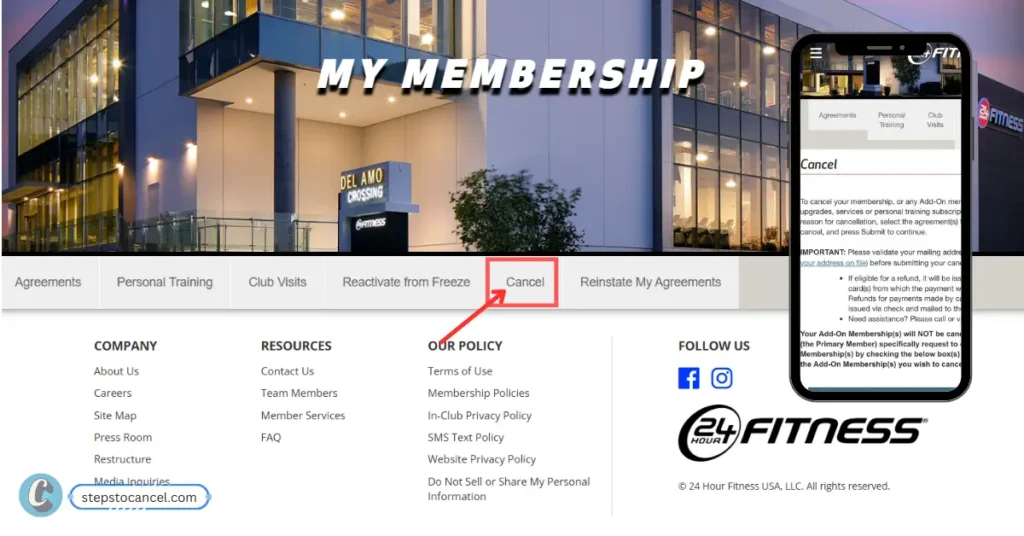
    process to cancel 24 hour fitness membership online
    Source: screenshot from 24hourfitness.com

    Canceling online via 24HourFitness.com is a breeze. Just click two buttons, and your cancellation will go through immediately, follow these steps below:

    1. Visit the 24-Hour Fitness website.
    2. Click on “Login” from top menu bar to access your account.
    3. Tap on “My Account” in the upper-right corner to see the full menu of options.
    4. Select “Cancel”.
    5. Now, choose “resaon for cancellation” and “agreement” you wish to cancel.
    6. Finally, press on “Submit” to continue.

    ABC Fitness is the official payment partner who also manages studio like Retro fitness and Workout Anytime Membership to Cancel. You can create an account using your membership agreement or Check-In Code [check your gym card] and entering your Birth Date.

    Sounds easy, right? this is the recommended option for every subscribers. But if you are not able to process then try contacting your home club.

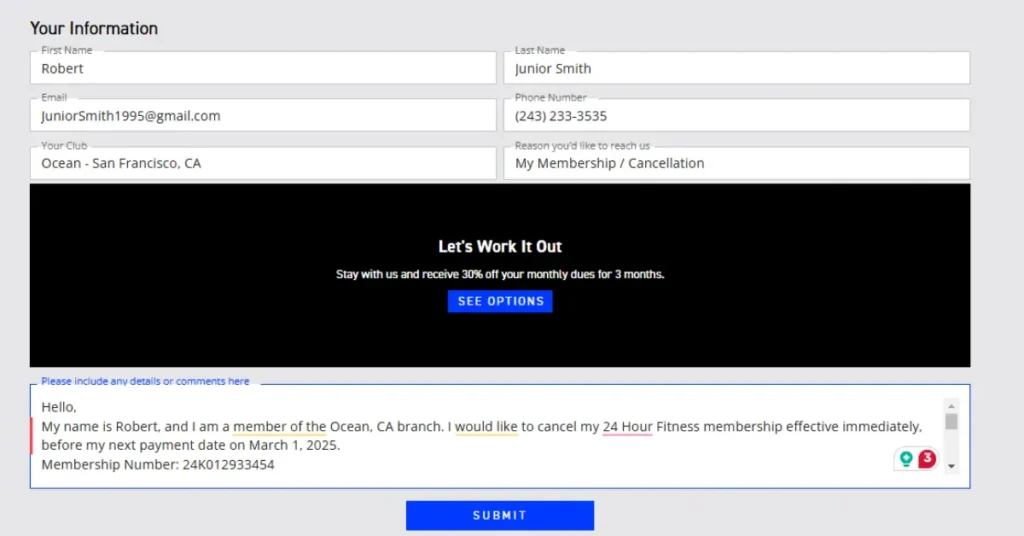
    2. Cancel Through the Contact Us Page

    Cancel Through the Contact Us Page
    1. Visit the Contact Us page.
    2. Fill out the form Name, Email, Phone Number and Email.
    3. Select your Local Club.
    4. Choose “My Membership / Cancellation” under “Reasons you’d like to reach us”
    5. Write a cancellation request along with your Membership Number or Check-In Code.
    6. Finally click on “Submit”.

    3. Cancel by Phone

    1. Call your Local Club or customer service at 1-866-308-8179.
      • Monday–Friday: 8:00 AM – 6:00 PM PST
      • Saturday: 9:00 AM – 5:00 PM PST
    2. Request membership cancellation.
    3. Provide your Name, Club Location, Membership ID and Birthdate for confirmation.
    4. Customer support will ask for “Reason for cancellation” be prepared.
    5. If all this go well they will provide cancellation confirmation.
    6. Ask for confirmation email or receipt for your records.

    4. Cancel In Person at Your Local Gym

    1. Visit your GYM and Request front desk to “Cancel your Membership”.
    2. Provide your membership details.
    3. Explain why you would like to cancel your membership.
    4. Inquiry about Cancellation fees and Refunds.
    5. You might have to fill a cancellation form, submit it.
    6. Keep the confirmation receipt for your records.

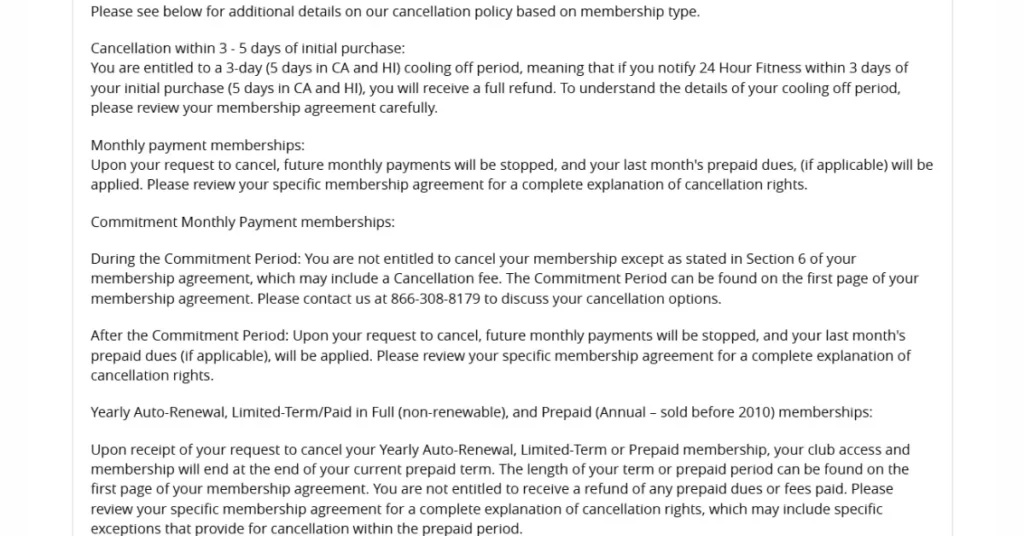
    24 Hour Fitness Cancellation Policy

    24 Hour Fitness cancellation policy
    Source: screenshot from 24hourfitness.com

    Cooling-Off Period (Full Refund Eligibility)

    You can cancel within 3 days of purchase (5 days in CA and HI) for a full refund. Check your membership agreement for details.

    Monthly Membership Cancellation Rules

    1. Standard Monthly Memberships: Cancel anytime to stop future payments. Any prepaid last-month dues will be applied.
    2. Commitment Memberships:
      • During the Commitment Period: Cancellation isn’t allowed unless specified in Section 6 of your agreement, which may include a fee. Call 866-308-8179 for options.
      • After the Commitment Period: Cancel anytime to stop future payments. Any prepaid last-month dues will be applied.

    Add-On Memberships and How They Work

    1. Add-On memberships remain active unless canceled separately. Fees and dues continue to accrue.
    2. Add-On members must pay any outstanding balance and update payment info to stay active.
    3. If the balance isn’t paid or a new payment method isn’t provided, the Add-On may be canceled and will need to rejoin at current rates.
    4. If you’ve authorized payment for another member’s dues and want to revoke it, you must either cancel that membership or notify 24 Hour Fitness to remove the authorization.
    5. Canceling the primary membership does not automatically cancel Add-On memberships.

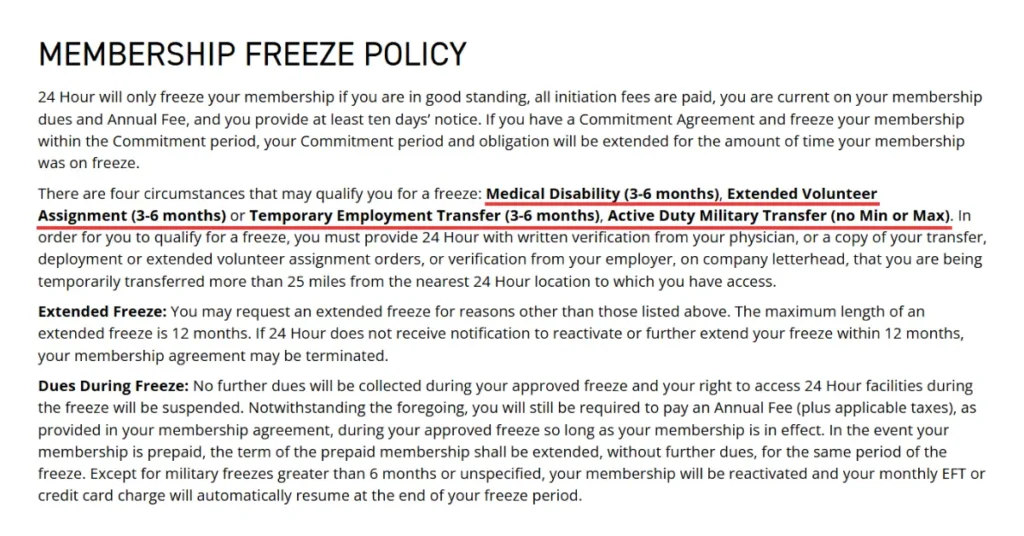
    How to Freeze your 24 Hour Fitness Membership

    Freeze 24 Hour Fitness Membership

    To freeze your 24 hours gym membership,

    1. Login to your “Fitness 24 Account“.
    2. Click on “My Account” to see the menu of options.
    3. Select “Freeze“.
    4. Choose your “Reason” and “Duration“.
    5. Click on “Submit” to process.

    To request a hold, visit your club or email with your membership number/check-in code, reason for the hold, and requested duration.

    Who can Freeze or Hold Membership?

    You can request a hold for 3-6 months only if your membership is active and in good standing.

    Freeze is available for those who have:

    1. Medical – Temporary health issues preventing club use.
    2. Work Transfer – Temporary job relocation 25+ miles from a club.
    3. Volunteer Work – Extended volunteer program 25+ miles from a club.
    4. Military – Active-duty transfer or deployment 25+ miles from a club.

    How to Reactivate (Unfreeze) Your Membership?

    Your membership will unfreeze automatically after the pre-determined time is over, but if you want to unfreeze it before that, then you can contact your local club or follow the steps below.

    1. Login to your account
    2. Click on My Account
    3. Select reactivate from the freeze.

    FAQs

    Will I receive refund?

    Yes, according to their refund policy, you will be eligible for a refund only if you cancel your membership within a 3 to 5-day cooling-off period.
    The cooling-off period might differ depending on where you live. Please contact your local gym for more information.

    Is there a cancellation fee?

    No, 24 Hour Fitness does not charge their members a cancellation fee upon discontinuing.
    But you need to cancel it before next month’s due date to avoid further payment. Do check your agreement for confirmation.

    How to view or download my membership agreement?

    To view your membership agreement of 24 Hour Fitness, follow the steps below:
    First, Log in to My24 with your credentials.
    Click on My Account to see the menu of options.
    Then click on Agreements.
    You will see agreements attached to your account.
  • Simple Ways to Cancel your La Fitness Membership – Step by Step Guide

    Simple Ways to Cancel your La Fitness Membership – Step by Step Guide

    Canceling your LA Fitness membership can feel like a real headache. Many members have shared their frustrations online—citing a confusing process, lack of clear answers, and difficulty getting support.

    To make things easier, we’ve broken down the cancellation process into simple steps. Whether you prefer to cancel online, visit a club in person, send a written cancellation letter, or contact the corporate office, we’ve got you covered.

    👉 Switching gyms? You might also be interested in how to cancel your Planet Fitness membership.

    If you have a month-to-month membership, you can cancel at any time. But if your membership has a contract (3+ months) then you must wait untill initial term ends for no penalty or end before the term before the term with a cancellation fee.

    (Weekends and public holidays are not considered business days. So, make sure your mailing date accounts for these.)

    Example: If your next billing date is on 1st MArch 2025 then Send your cancellation notice by February 24, 2025, to avoid being billed.

    How to Cancel La Fitness Membership – Step by Step Guide

    To Cancel your La Fitness Membership you must send a notice at least 5 business days before your next billing date. Follow any of the official methods mention below.

    1. By visiting your Nearest GYM in-person [Recommended]

    LA Fitness Front Desk to Cancel your Membership
    1. Visit Any LA Fitness Branch – Go in person during business hours.
    2. Request to Cancel – The front desk staff will likely tell you they can’t process cancellations directly.
    3. Meet the Operations Manager – Only they have the authority to approve cancellations (Available Monday–Friday, 9 AM–5 PM).
    4. Fill Out the Cancellation Form – Be prepared to provide written notice with your membership details.
    5. Demand a Receipt – Get proof of cancellation to avoid disputes later.

    If the manager is “conveniently unavailable”, ask for alternative solutions.

    2. By sending a Cancellation Form through Certified Mail

    LA Fitness Membership Cancellation Form

    Canceling your LA Fitness membership can be a frustrating process due to their cancellation policies.

    Follow these steps to send cancellation mail for smooth process:

    1. Log in to your LA Fitness account:
    2. Access LA Fitness Cancellation Form:
      • Click on “Member Tools” section at the bottom.
      • Select “My LA Fitness”.
      • Click on “Cancellation Form”.
      • Fill out the form with your membership information and Print it.
    3. Send the Cancellation Form via Certified Mail: Fitness PO Box 54170 Irvine, CA 92619-4170

    Make sure postmark date on the mail should be at least 5 business days before the next billing date. Also, weekends or holidays don’t count as business days—plan your mail accordingly.

    3. Through La Fitness Web Portal Online [Limited to few Clubs]

    LA Fitness Online Membership Cancellation Form

    To cancel La Fitness Membership Online, follow the steps listed below.

    1. Log into Your LA Fitness Account:
    2. Go to Account Settings:
      • Click on the personal icon in the upper left corner.
      • This will bring you to the Account Summary page.
    3. Access the Cancellation Option:
      • Next to “Account Summary,” click on the three-bar menu.
      • Select “Cancel Membership” under “Check-In History.”
    4. Complete the Cancellation: Follow the on-screen instructions to finalize your cancellation.

    Please note that LA Fitness has been known to make the cancellation process intentionally complicated. If you encounter difficulties, consider contacting their corporate office directly or sending a certified mail request to ensure your membership is canceled.

    What to do after submitting Cancellation Request?

    1. Confirm Cancellation: It is important to confirm if you subscription has been terminated sucessfully.
    2. Save Receipt: Keep copies of the form and mailing receipt as proof.
    3. Monitor Your Bank Statements: LA Fitness has a reputation for continuing charges even after cancellation. If you’re still being billed, consider a backcharge or reporting it to your bank.

    Related Articles:

    1. How to Cancel Onelife Fitness Membership
    2. How to Cancel Anytime Fitness Membership
    3. How to Cancel Fitness 19 Membership

    Alternative Methods

    LA Fitness GYMs for Members

    If you failed to cancel your La Fitness subscription using official methods, then try ending it using through corporate or bank.

    1. Call at corporate office phone number to cancel your LA Fitness

    Cancel LA Fitness corporate office to cancel

    Although LA Fitness does not officially list phone cancellations, a “users” have reported success by calling corporate customer service.

    It is important to to try canceling according to your Local Club contract but if it failed the call LA Fitness Corporate.

    1. First, Dial (949) 255-7200 during business hours.
    2. Explain your situation: Unable to cancel via Mail and relocated to different state, so unable to visit in-person.
    3. Request to Cancel – Politely explain you attempted all official methods and help you cancel your subscription.
    4. Account Details – Proivde your Name, Phone Number and Email Address for verification.
    5. Confirmation – Check for cancellation confirmation on your registered email.

    Tip: We suggest calling multiple times or speaking with a supervisor if you face resistance. Use positive reinforcement like “I heard corporate has great customer service” may also work in your favor.

    2. File a Complaint at LA Fitness’s Business Bureau Profile (BBB)

    File a Complaint at LA Fitness's Business Bureau Profile (BBB)

    If you genuinely tried and failed to cancel your membership and still getting charged then click here to leave a compaint against LA Fitness in BBB. As LA Fitness actively response to customer’s complaint and provide solution to save its social reputation.

    Tip: If you tell LA Fitness that you plan to dispute the charge or block payments, they might be more willing to cancel your membership right away.

    3. Contact Your Bank/Credit Card Provider to block Payment [Last Resort, Not Recommended]

    Contact Your Bank_Credit Card Provider to block Payment

    If you tried all possible ways to cancel your LA Fitness GYM membership, but still getting charged? the gather all proof inlcuding cancellation, compalints and mails and request your bank to block LA Fitness.

    • Request a Dispute for unauthorized billing.
    • Explain that you tried to cancel, but the gym is still charging, refused or made it difficult.
    • Some banks allow you to block future charges from specific merchants.

    How to Find LA Fitness Charges on a Credit Card

    Here is how to check if LA Fitness is charging you. formats to quickly identify and confirm LA Fitness charges in various formats on credit card statement.

    CHECKCARD LA FITNESS IRVINE CA
    
    CHECKCARD LA FITNESS IRVINE CA ON
    
    DEBIT CARD PURCHASE – LA FITNESS xxx-xxx-7200 CA
    
    DEBIT CARD PURCHASE – LA FITNESS xxxxxxx8100 CA
    
    Debit Card Purchase – LA FITNESS 09492558100 CA
    
    Debit Purchase – Visa La Fitness 949-255-8100ca
    
    Debit Purchase – Visa La Fitness 949-255-7200ca
    
    Electronic Withdrawal L A Fitness
    
    ebit Purchase – Visa La Fitness 949-255-7200ca (likely typo: "ebit" should be "Debit")
    
    L A FITNESS 9492558100
    
    L A FITNESS 9492558100 PPD ID: 1330774939
    
    LA FITNESS 09492558100 CA
    
    LA FITNESS 09492558100 CA 92612 USA
    
    LA FITNESS 949-255-7200 CA
    
    LA FITNESS 949-255-7200 CA 92612 US
    
    LA FITNESS 949-255-8100
    
    LA FITNESS 949-255-8100 CA
    
    LA FITNESS 949-255-8100 CA 92612 USA 949-255-7200
    
    LA FITNESS 9492558100 CA
    
    LA FITNESS xxx-xxx-7200 CA
    
    LA FITNESS xxxxxxx8100 CA
    
    LA FITNESS-CORP WEB IRVINE CA
    
    LA FITNESS-CORP WEB LAI IRVINE CA
    
    LA FITNESS-LAKE SUCC NEW HYDE PARK NY
    
    PENDING – LA FITNESS IRVINE CA
    
    POS DEBIT LA FITNESS IRVINE CA
    
    RECURRING CHECK CARD PURCHASE LA FITNESS 09492558100 CA
    
    VISA DDA PUR 449215 LA FITNESS 949 255 7200 * CA
    
    : LA FITNESS 949-255-7200 CA
    
    : LA FITNESS 949-255-8100 CA

    FAQs

    Why does canceling a gym membership feel impossible?

    Many gyms, including LA Fitness, make cancellation difficult on purpose to keep billing you longer.

    Can I cancel over email?

    Yes, send your cancellation mail at contact@fitnessintl.com.

    Can I Cancel my LA Fitness Membership on App?

    No, you cannot cancel your LA Fitness membership through App.

    Can I cancel over the Phone?

    No, you cannot cancel over phone. But contact customer support if you need assistance.

    Will LA Fitness keep charging me even after I cancel?

    No, if you get a confirmation email or mail from the Compay then you will not get charged. But many members report unexpected charges even after canceling, so keep proof of your cancellation!

    Does La Fitness charge cancellation fee?

    No, La Fitness does not charge any cancellation fee but will ask to pay any due payments.
  • How To Cancel Anytime Fitness Membership?

    How To Cancel Anytime Fitness Membership?

    Signing up for a GYM membership feels like a great decision at first. Motivated and ready to achieve your fitness goals.

    But over time, things change—you might get too busy with work, need to relocate, take on new responsibilities, face medical issues, or simply lose interest. Also, canceling your Anytime Fitness membership isn’t always straightforward since policies vary by location.

    My suggestion is to check your membership agreement contract, It explains the cancellation process, fees, and other important details for each location or call your GYM. It will help you avoid unexpected charges and make process smoother.

    Understanding Anytime Fitness Agreements

    If you’re wondering why canceling Anytime Fitness is so difficult, you should first check your gym membership agreement. Members are offered ongoing or fixed-term contract, typically lasting 12 or 24 months.

    12 or 24 months are minimum term which you are bound to stay as a member and pay the subscription fees as agreed, the higher the term the higher cheaper membership price.

    As for the payment frequency most branches charges every two weeks (bi-weekly) meaning over a full year (52 weeks), you will make 26 payments in total, excluding other fees.

    But if you now want to cancel it then there are different fees related to “During and After the Minimum Term“.

    How To Cancel Anytime Fitness Membership?

    Anytime Fitness GYM

    The gym is available in over 5000 location working independently and having their own cancellation process but written notice, in-person visit, email and through online are some common ways.

    Send Cancellation Notice via Email, In-Person or Post

    To cancel your Anytime Fitness Membership you must send a written notice to your local gym through any means including visiting in-person, by post or email.

    Cancellation E-mail Template

    Subject: Cancellation of Anytime Fitness Membership

    Dear [Manager’s Name],

    I am writing to request the cancellation of my Anytime Fitness membership. Below are the details for your reference:

    • Full Name: [Your Full Name]
    • Membership Number: [Your Membership Number]
    • Club Location: [Your Club Name and Location]
    • Reason for Cancellation: [State your reason]

    As per the membership agreement, I am providing a 30-day notice, and I request that the cancellation be effective on [Cancellation Date].

    Please confirm receipt of this letter and the cancellation process. If you need any additional information, feel free to contact me at [Your Phone Number] or [Your Email].

    Thank you for your cooperation.

    Best regards,
    [Your Full Name]

    Cancelltion by visiting GYM In-Person

    1. Visit nearby local Anytime Fitness Club during staffed hours.
    2. Speak to the front desk and request for Canceling your membership.
    3. Ask for Fees and clear all Due Payments.
    4. Fill up the cancellation form and Submit
    5. Request a confirmation.

    Cancellation Over the Phone:

    1. Find your GYM’s number from your membership card or Find your GYM’s Number
    2. Dial the number and connect with representative.
    3. Request membership cancellation and provide reasons.
    4. Ask for fees you need to pay and clear all due payments.
    5. Confirm your cancellation.

    It is best to visit them or provide written notice.

    Request Cancellation via App

    If you are using AF app and has linked your membership, then try the following:

    1. Go to AF App and Login from your smartphone.
    2. Tap on your profile (Top RIght)
    3. Select “GYM Membership”
    4. Click on “Link Membership” then tap on “Help” icon.
    5. Now, Click on “My Gym Membership” and choose “cancel membership”
    6. Add reason and your attach if you have any documents nand sent it.

    Related Top GYM Membership: How to Cancel Planet Fitness Membership

    When to Cancel? – Understanding Cancellation Policy and Fees

    Inside Anytime Fitness - Equipments

    The gym charges fees to cover administration costs, and reimburse them for the reduced fees you’ve been paying as part of the minimum term. Different location chanrges different fees, some common fees are:

    1. 30 days’ membership fees.
    2. 50% of your remaining contract balance, OR
    3. From $100 to $250 (Based on month left on your contract)

    Cancelling During the Minimum Term

    Cooling-Off Period

    If you joined recently and are on a Cooling-Off Period then you can cancel within 7 days (Check your’s on Agreement) of signing up by providing written notice. Also you will be eligible for Joining and Membership Fees refunds but need to pay for Fob Key and fees for any services or products already supplied for you.

    No Reasons (Want to Quit)

    You can cancel by paying a cancellation fee, whichever is higher:

    • 50% of your remaining contract balance, OR
    • 30 days’ membership fees.

    Medical

    You can cancel your gym membership, If you develop a serious illness or permanent condition, but a doctor approved by Anytime Fitness must confirm it. You’ll also need to pay an administration fee equal to 30 days’ membership fees.

    Relocation

    You can cancel your Anytime Fitness Membership if you relocate and that area has no branch within its 10 miles by providing your new address proof with 30 days’ notice.

    Things you need to know

    Is there a Cancellation fees on Anytime Membership?

    Yes, you will need to pay a cancellation fee but it fees vary by location and membership contract. But mostly it is 50% of the balance due for the Minimum Term or a sum equal to 30 days of Membership Fees, whichever is higher.

    Consult with your club or check the agreement page for more information.

    Notice Period

    Pay attention to the notice period required by your gym. Some may require 30 days’ notice before your cancellation becomes effective. Plan your cancellation timing accordingly to avoid additional charges.

    Cancellation Confirmation

    After submitting your cancellation request, whether in person, by mail, or online, request a confirmation. This can be a receipt, an email confirmation, or a signed acknowledgment. Having proof of your cancellation request is important for your records.

    Membership Payments

    Ensure that any pending membership payments are settled according to the gym’s policies. Failure to pay outstanding dues might impact your cancellation process.

    Follow Up

    If you don’t receive a confirmation or acknowledgment of your cancellation within a reasonable time frame, follow up with the gym’s management or customer service to ensure your membership has been canceled as intended.

    Return Gym Access Card

    If your gym provided an access card or key fob, return it to the gym once your cancellation is confirmed. This ensures there are no misunderstandings or access issues in the future.

    Relocating or Want a Medical Break?

    You can always cancel your 24 hour fitness membership or take a break from the gyms if you need medical attention.

    Like many other GUYS in the United States, you also have the option to freeze your membership.

    Which will cost you $8/week, waived in case of medical or relocation reasons as well.

    The same procedure applies; send in your request one month in advance with supporting documentation.

    Can I transfer my membership to another club location?

    Yes, if you are moving to another location and if there is a club franchise nearby your new location, then you transfer within having to pay for relocation fee.

  • How to Cancel Fitness 19 Membership (Step-by-Step Guide)

    How to Cancel Fitness 19 Membership (Step-by-Step Guide)

    Are you a Fitness 19 member looking to cancel your membership? Whether you’re moving, switching gyms, or simply taking a break, canceling your Fitness 19 membership is possible through several methods: online, in-person, by phone, or via mail.

    Fitness 19 is a popular gym chain with over 38 locations across the United States, offering a range of services to support your fitness journey. However, canceling your membership can sometimes be challenging due to their policies and agreements.

    Don’t worry—we’ve got you covered. In this guide, we’ll walk you through the simple steps to cancel your Fitness 19 membership smoothly and stress-free

    3 Methods to Cancel Fitness 19 Membership

    Fitness 19 Membership offers cancellation via Online, Call and In-Person Visit:

    Before canceling, prepare these documents.

    1. GYM Membership Card
    2. Personal information
    3. Reason for canceling
    4. Fitness 19 membership contract

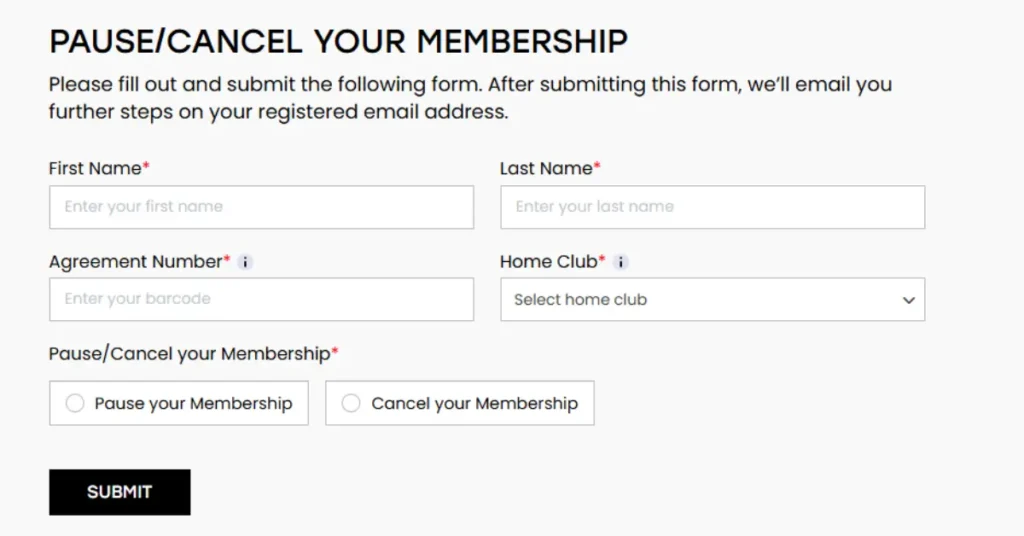
    1. Cancellation Through Fit19 Website Online

    cancel fitness 19 via website

    To cancel your FIT 19 membership online, follow 5 steps listed below:

    1. Go to Cancellation page at https://cancel.fit19.com/
    2. Enter your “First and Last Name” (Must match the contract)
    3. Enter your “Agreement Number” (Check your membership contract)
    4. Select your “Home Club” (Your GYM Location)
    5. Choose “Cancel your Membership” and Click on Submit.

    You cannot cancel your Fitness 19 membership via their official website, but here’s what you can do to cancel your Fitness 19 membership online.

    cancel via myiclubonline [Method 2]:

    cancel fitness 19 via myiclubonline

    If you cannot find your location or cancel your Fitness 19 membership via their official website, Follow these steps:

    1. Go to MyiClubOnline Website
    2. Register using your Agreement Number, Full Name, and Zip/Postal Code.
    3. After logging in, go to the “My Agreement Info.”
    4. Follow the instructions and proceed to cancel your membership

    If you do not know your agreement number, have misplaced or lost your contract, I suggest canceling by phone.

    2. Cancellation by Phone Call

    Cancelling your Fitness 19 membership through phone call is easy and quick way to end your GYM membership,

    1. First, find the gym number for your location: https://www.fitness19.com/convenient-locations/.
    2. Dial the number and keep pressing 0 until you reach a representative.
    3. Request cancellation and mention any issues you faced online
    4. You might need to provide your name, address, membership details, agreement, and payment method.
    5. Once verified, your request will be processed.
    6. Finally, request a confirmation email or text.

    If you cannot cancel via phone, visit your gym.

    3. Cancellation by Visiting GYM

    Visit your local Fitness 19 gym during operating hours with your membership contract or card to request cancellation.

    You might need to fill out a form (at some locations). They will process your cancellation and provide verbal confirmation. So it is better to follow up and ask if your gym membership has been cancelled or not.

    Cancellation policies might differ according to states.

    What to Know Before Cancelling Your Fitness 19 Membership

    Make sure to get confirmation after cancellation of gym membership and document it. As, few members have faced such issues after canceling. where they are told that their membership is canceled, but continue to be charged.

    To avoid such a situation, always confirm your cancellation by loggin in to the online portal of the gym and confirm your membership status.

    Are There Cancellation Fees for Fitness 19 Membership?

    Fitness 19 may charge an early termination fee if you cancel within the contract period. Additionally, you must provide a 30-day notice before canceling your membership.

    How Long Does It Take to Process a Fitness 19 Membership Cancellation?

    The time to process the cancellation of a Fitness 19 membership may vary between different locations.

    Generally, it takes about a week to process a cancellation request, but certain locations may require extra time, while other locations may have a quicker cancellation time.

    To ensure a smooth cancellation process, you should call the Fitness 19 gym directly or go to your local gym to find information about the processing time for cancellation of membership.

    Will I Receive a Refund if I Cancel My Fitness 19 Membership?

    Fitness 19 does not offer refunds for monthly memberships. Any fees you’ve already paid are non-refundable.

    If you have a 12-month contract and cancel after a certain period, you may qualify for a partial refund for unused months. For this information, too, it is important for you to go through your membership contract or call Fitness 19 directly.

    How to Freeze or Pause Your Fitness 19 Membership

    You can freeze or pause your Fitness 19 membership by calling, emailing, or visiting in person. This option is available twice a year, and you can pause your membership for 1 to 4 months each time.

    Who is this for? If you plan to return after a short break, pausing your membership is a better option than canceling. During this period, you cannot use any Fitness 19 gym services.

    If you cancel during the freeze period, you must provide a 30-day notice and pay the next monthly fee along with any due annual fee.

  • How to Cancel Onelife Fitness Membership [2025]

    How to Cancel Onelife Fitness Membership [2025]

    Canceling a gym membership can feel harder than a workout itself—especially when you’re met with delays, fine print, and unhelpful support. If you’re wondering how to cancel your Onelife Fitness membership, you’re not alone.

    Whether you’re relocating, facing health issues, or simply not using the gym anymore, paying $29.99/month or more for unused access doesn’t make sense. Onelife Fitness, with over 58 locations across the U.S., may offer great amenities like swimming and personal training—but if it no longer fits your routine, it’s time to move on.

    In this guide, we’ll walk you through the exact steps to cancel your Onelife Fitness membership quickly and correctly. Plus, we’ve included helpful tips from real members so you can avoid common mistakes and avoid unnecessary fees.

    Thing to know before Onelife Fitness Cancellation

    You can cancel you Onelife Fitness at any time but here are few points you need to keep in mind.

    1. Contract Type: Check your contract if you have a Monthly or an Annual membership.
    2. Cancellation Method: Written notice via email or mail
    3. Notice Period: Submit 30 days’ written notice + pay fee (3x monthly dues).
    4. After Initial Term: Submit written notice between the 25th and last day of the month.
    5. Cancellation Fee:
      • Initial term: 3x monthly dues
      • Waived for relocation/military service (with documentation)
    6. Refund Policy:
      • Full refund within 3 days of signing (presale agreements)
      • Prorated refund after cancellation (if applicable)
    7. Freeze Policy: Not specified in policy

    Policies may vary by location—check your membership agreement/contract or contact your local club to get more information.

    How to Cancel Onelife Fitness Membership?

    onelife fitness cancel membership guide
    3 Methods to Cancel Onelife Fitness Membership

    To cancel your Onelife Fitness membership, you must provide a written notice with at least 30 days’ advance warning. An administrative fee may apply, and all outstanding dues must be paid in full for the cancellation to be processed.

    You can submit your cancellation request using any of the following methods:

    1. In Person

    1. Prepare a written cancellation notice including your name, membership ID, and desired termination date.
    2. Visit your Onelife Fitness club and deliver the notice directly to the Club Manager or Assistant Manager (if permitted).
    3. Request a dated receipt or written confirmation that your cancellation notice was received.
    4. Pay any outstanding dues and the required administrative fee (three times your monthly membership dues if within the initial term).

    By Mail

    1. Write a formal cancellation letter with your name, membership ID, and the effective cancellation date.
    2. Address the letter to:
      1441 Beaver Creek Commons Dr,
      Apex, North Carolina 27502,
      Attention: General Manager
    3. Send the letter via certified mail with return receipt requested.
    4. Retain the mailing receipt and any confirmation of delivery.
    5. Ensure all dues and fees are paid as required.

    3. By Email

    1. Draft an email including your name, membership ID, and the date you wish to terminate your membership.
    2. Send your email to: memberservices@onelifefitness.com
    3. Request a confirmation of receipt and keep a copy of your sent email.
    4. Pay any outstanding balances and applicable administrative fees.

    Onelife Fitness Cancellation Request Letter Sample

    Subject: Membership Cancellation Request – [Your Full Name]
    
    To: Onelife Fitness
    Address (for mail only remove if sending via email)Date
    
    Dear Onelife Fitness Team,
    I am writing to formally request the cancellation of my gym membership with Onelife Fitness. My name is [Your Full Name], and my membership number is [Your Membership ID or last 4 digits]. I can be reached at [Your Phone Number] or [Your Email Address], and I am submitting this request on [Today’s Date].
    
    If possible, I would like the cancellation to take effect on [Preferred Cancellation Effective Date]. I am canceling due to [brief reason – e.g., relocation, medical reasons, or personal circumstances], and I kindly ask that you confirm the cancellation in writing and let me know if any further steps are required.
    
    Attached my Document for Fee Waiver for [relocation or military]
    
    Thank you for your assistance.
    
    Thank you,
    [Your Name]

    What to Do After Cancelling Your Onelife Fitness Membership

    After you’ve submitted your cancellation request, here’s a short checklist to make sure everything is finalized smoothly:

    1. Confirm Receipt:
      Follow up with your club to ensure they received and are processing your cancellation request.
    2. Get Written Confirmation:
      Request a confirmation email or letter stating your membership has been cancelled and noting your final day of access.
    3. Check Final Payment:
      Your last payment will typically be on your next billing date, and your membership will remain active until the end of the following month.
    4. Monitor Bank Statements:
      Watch your bank account to make sure no further charges are made after your membership end date.
    5. Keep Documentation:
      Save all emails, letters, receipts, and confirmation messages related to your cancellation in case of future billing disputes.

    Articel you might be Interested: How to Cancel Planet Fitness Membership

    How can I Contact Onelife Fitness Customer Service?

    Below is the updated table with all Location-Specific contact information, focusing on Support and General Inquiries contact details for Onelife Fitness, based on official webite.

    CategoryContact TypeDetails
    SupportPhoneToll-Free: 1-888-233-3730 (24/7, best for activation/cancellation, payments, and account issues)
    SupportOperatingMonday–Friday: 5:00 AM–10:00 PM EDT
    Saturday: 7:00 AM–7:00 PM EDT
    Sunday: 8:00 AM–6:00 PM EDT
    SupportEmailmemberservices@onelifefitness.com (General inquiries)
    SupportClub ContactFind your Club Contact Details

    Find: Location Specific Phone number and Email Address

    Virginia Fitness Clubs – Phone Number and Email address

    Onelife Fitness has the most branches in Virginia, the state of the United States; it is available in 25 locations. Their phone numbers and email addresses are listed below.

    NamePhone NumberEmail
    Onelife Fitness – Va Beach Blvd.(757) 340-4800
    Onelife Fitness – Hampton(757) 516-7530hampton@onelifefitness.com
    Onelife Fitness(571) 317-1600alexandria@onelifefitness.com
    Onelife Fitness – Woodbridge(703) 897-0200woodbridge@onelifefitness.com
    Onelife Fitness – Greenbrier Gym(757) 424-1600greenbrier@onelifefitness.com
    Onelife Fitness – Gainesville(703) 753-1818gainesvilleheritagevillage@onelifefitness.com
    Onelife Fitness – Stafford(540) 659-3488stafford@onelifefitness.com
    Onelife Fitness Crystal Park(703) 486-3380crystalpark@onelifefitness.com
    Onelife Fitness – Princess Anne(757) 471-6900
    Onelife Fitness – Skyline(703) 820-4100skyline@onelifefitness.com
    Onelife Fitness – Ballston(703) 816-8800ballston@onelifefitness.com
    Onelife Fitness – Norfolk(757) 248-4800
    Onelife Fitness – Tech Center(757) 881-1300TechCenter@onelifefitness.com
    Onelife Fitness Tysons(703) 442-9150tysons@onelifefitness.com
    Onelife Fitness(703) 548-6822oldtown@onelifefitness.com
    Onelife Fitness – Red Mill(757) 350-7300RedMill@onelifefitness.com
    Onelife Fitness – Brambleton(703) 774-9500brambleton@onelifefitness.com
    Onelife Fitness – Reston(703) 904-7600reston@onelifefitness.com
    Onelife Fitness – Winchester(540) 667-4653winchester@onelifefitness.com
    Onelife Fitness McLean(703) 556-6550mclean@onelifefitness.com
    Onelife Fitness – Newport News Gym(757) 599-1888
    Onelife Fitness – Sterling(571) 287-2895sterling@onelifefitness.com
    Onelife Fitness – Chesapeake Square Gym(757) 465-6900
    Onelife Fitness – Manassas(703) 575-2400manassas@onelifefitness.com
    Onelife Fitness – Burke(703) 455-5433burke@onelifefitness.com
    Onelife Fitness Club Virginia’s Phone and Email

    Georgia Fitness Clubs – Phone Number and Email address
    NamePhone NumberEmail
    Onelife Fitness – Austell+1 678-504-7928austell@onelifefitness.com
    Onelife Fitness – Perimeter+1 770-415-5700perimeter@onelifefitness.com
    Onelife Fitness – Lexington+1 770-487-4273lexington@onelifefitness.com
    Onelife Fitness – Holly Springs+1 678-752-1400hollysprings@onelifefitness.com
    Onelife Fitness – Lawrenceville+1 770-817-1650lawrenceville@onelifefitness.com
    Onelife Fitness – Crabapple Gym+1 770-360-9997crabapple@onelifefitness.com
    Onelife Fitness – Douglasville+1 770-949-1116douglasville@onelifefitness.com
    Onelife Fitness Woodstock+1 678-445-9140woodstock@onelifefitness.com
    Onelife Fitness – Windermere Gym+1 770-888-0022windermere@onelifefitness.com
    Onelife Fitness – Newnan Sports Club Gym+1 770-251-9909newnan@onelifefitness.com
    Onelife Fitness – Vickery Gym+1 770-844-1774vickery@onelifefitness.com
    Onelife Fitness – Carrollton Gym+1 770-838-2211carrollton@onelifefitness.com
    Onelife Fitness – Dawsonville+1 706-541-8114dawsonville@onelifefitness.com
    Onelife Fitness Commerce+1 770-631-8004commerce@onelifefitness.com
    Onelife Fitness – Newnan Express Gym+1 770-251-9950express@onelifefitness.com
    Onelife Fitness Club Georgia’s Phone and Email

    Maryland Fitness Clubs – Phone Number and Email address
    NameAddressPhone NumberEmail
    Hagerstown Valley Mall17301 Valley Mall Rd, Hagerstown, MD 21740+1 301-733-0980
    Rockville1407 Research Blvd, Rockville, MD 20850+1 240-599-8383rockville@onelifefitness.com
    Clinton8401 Mike Shapiro Dr, Clinton, MD 20735+1 240-398-3634clinton@onelifefitness.com
    Olney17821 Georgia Ave, Olney, MD 20832+1 301-358-6698olney@onelifefitness.com
    Hunt Valley126 Shawan Rd, Cockeysville, MD 21030+1 410-885-4242huntvalley@onelifefitness.com
    Germantown20500 Seneca Meadows Pkwy, Germantown, MD 20876+1 240-686-4500germantown@onelifefitness.com
    North Frederick2500 Osprey Way S, Frederick, MD 21701+1 301-668-2940northfrederick@onelifefitness.com
    South Frederick5728 Buckeystown Pike, Frederick, MD 21704+1 301-698-4653southfrederick@onelifefitness.com
    Bethesda4400 Montgomery Ave, Bethesda, MD 20814+1 301-656-9570bethesda@onelifefitness.com
    Pike&Rose11594 Old Georgetown Rd, Rockville, MD 20852+1 301-245-3908pikeandrose@onelifefitness.com
    Fort Totten5198 South Dakota Ave NE, Washington, DC 20017+1 202-459-4664forttotten@onelifefitness.com

    North Carolina, West Virginia, and Washington D.C. – Phone Number and Email address
    LocationPhone NumberEmail Address
    Apexapex@onelifefitness.com
    Martinsburg(304) 264-4653martinsburg@onelifefitness.com
    Capitol Hill(202) 234-5678capitolhill@onelifefitness.com
    Fort Totten(202) 459-4664forttotten@onelifefitness.com
    Northwest / Tenleytown(202) 244-6090northwest@onelifefitness.com
    Tenleytown(202) 800-8201tenleytown@onelifefitness.com
    Location, Phone Number and Email Address

    FAQs

    How can I cancel my One Life Fitness Club membership?

    You can cancel your Onelife Fitness membership online by sending a cancellation request Email to corporate service at memberservices@onelifefitness.com 30 days before next month’s notice.

    Is there a Cancellation fee for Onelife Fitness?

    Yes, Onelife Fitness does charge early cancellation fees if you terminate your subscription before the contract period ends.

    How to avoid cancellation fees?

    If your reason for cancellation complies with the Membership agreement, then you can avoid fees.

    Does Onelife Fitness refund?

    Mostly No. According to Onelife Fitness’s terms, the company will not refund membership fees, joining fees, activation charges, or guest user fees under any circumstance.

    What Is the OneLife Fitness Cancel Membership Number?

    To contact corporate service for cancellation, call: (888) 233-3730. It is important to know, all locations has their own number.
  • Information on XSport Fitness Membership Cancellation

    Information on XSport Fitness Membership Cancellation

    Important Update: LA Fitness acquired Xsport Fitness on July 16, 2024

    Xsport Fitness was acquired by Fitness International, parent company of LA Fitness. As most of the GYMs under Xsport has already re-branded into try contacting your homeclub and try canceling using LA Fitness methods.

    OLD ARCHIVE

    XSport Fitness Club was one of the fastest-growing GYM chains in Chicago, Washington, and New York. Unlike traditional gyms, it provides many more services to its customers, such as group fitness classes, group training, child’s play, and sports facilities, to help you achieve your fitness goals.

    Their membership plan starts at $9.95 per month. You are in the right place if you need to cancel your XSport Fitness Membership.

    How to Cancel XSport Fitness Membership?

    XSport Fitness

    Submit your cancellation request using 3 different methods, including:

    1. Calling customer support through phone calls,
    2. Visiting the local branch and,
    3. Sending a Written Cancellation Letter through mail. 

    How To Cancel Membership With XSport Fitness In-Person

    The easiest method is to visit your GYM during office hours, 9 a.m. – 5 p.m. from Monday to Friday central time, and follow the steps below:

    • Go to the counter and tell them you want to cancel your membership. The representative will provide you with a cancellation sheet.
    • Fill out the Cancellation sheet with all your account details and a valid reason for cancellation.
    • Submit the sheet to the customer’s desk and follow their instructions.
    • Ask them to send you a copy of your cancellation sheet and a confirmation email or text. 

    Note: Office Hours and timing may vary according to state and branch. 

    XSport Fitness Cancellation through Phone Call

    The best way to Xsport membership Cancellation is by calling the customer support phone call:

    • Call the customer service at 877-417-1450.
    • After your call connects, tell customer support you want to cancel your membership.
    • You must provide a valid reason for cancellation and your membership details.
    • Customer support will guide you through the next steps. After You Cancel, ask them to send you a confirmation email or text regarding your membership. 

    Cancellation via Mail

    If you wish to cancel your membership the old-fashioned way, you can send a handwritten mail. 

    • Write a Letter that contains your Membership details and personal details.  
    • Include a valid reason for your cancellation and the date from which you want your cancellation to take effect. Also, include the title as “Membership Cancellation Request “.
    • Sign the letter and mail it to “Capital Fitness Inc. P.O. Box 4012, Aurora, Illinois 60507. “

    Note: This method can take a longer time. You must wait a few days to receive an update from the company regarding your Membership. 

    Important

    Any cancellation request requires 30 days (about 4 and a half weeks) prior notice, meaning that if you were to cancel today, it would only take effect 30 days from now. 

    Unfortunately, if another billing period occurs during the 30-day notice period for the cancellation to take effect, you must pay for it. So, canceling your GYM membership as soon as possible is better.

    XSport Fitness: Cancellation Policy and Fees 

    Cancellation policies require appointments to be canceled at least 24 hours in advance to avoid a cancellation fee.

    If you cancel your appointment on the same day or miss it without canceling, you will be responsible for the cost of the service. To cancel or change your appointment, you can contact customer support.

    Refunds 

    Upon researching the refund policy, we discovered that some customers receive their refund while others don’t. This depends on whether your state has laws that require gyms to offer refunds under certain circumstances and your membership type and length.

    You can try contacting customer support and inquire about this. They may deny you at first. However, you must be persistent and ask to speak with a supervisor.

    If successful, your refund can be processed in up to 30 days (about 4 and a half weeks).

    FAQ on XSport Membership Cancellation and LA Fitness

    Did LA Fitness acquire XSports Fitness?

    Yes La Fitness acquired Xsports Fitness on on July 16, 2024, It was announced in an email to Xsport Fitness members prior to the effective date.

    Can I Cancel my XSport Fitness membership online? 

    No, unfortunately, Xsport Fitness Gym does not have an online membership cancellation form. You need to call, mail, or visit in person to terminate your account.

    Can I downgrade my membership? 

    Yes, Xsport Fitness allows its customers to upgrade or downgrade their membership by contacting customer support anytime.

    What happens when I cancel my membership if I have personal training sessions remaining on my account? 

    If you have personal training sessions remaining on your account when you cancel your membership, you can use them within 90 days (about 3 months) of the cancellation date. 

    Can I freeze/pause my membership? 

    Yes, you can freeze your XSport Fitness members for up to 90 days (about three months) in a year. It is wise to freeze instead of canceling if you plan to hit the GYM after the break.

    How to Pause Membership?

    To Pause your membership, just contact the customer and request to freeze your subscription. You must provide a valid reason and pay a freeze fee if applicable. After the freeze period ends, your billing will continue as normal.

    How long will it take for me to receive my refund? 

    According to customer support, XSport Fitness can take up to 30 days (about 4 and a half weeks) to process your refund.