
To cancel a Fitness 19 membership at a gym listed on fit19.com, start the request at cancel.fit19.com (the Begin Cancellation button on Fitness 19’s cancellation page), or call or visit your home club. Your account must be current first. Monthly dues stop within 30 days of the request, you keep 30 more days of gym access, and members on a 12-month term who cancel early owe the early termination fee in their agreement.
Fitness 19 is a network of independently owned and operated gyms. The fit19.com locations page lists 30 gyms in California and New Jersey (checked October 5, 2026), and its cancellation and pause instructions apply only to those listed gyms. If your gym isn’t listed, contact that gym directly for its own process.
If you only need a break, Fitness 19 also offers a membership pause of 1 to 4 months per calendar year (details below), but annual fees are still charged during a pause.
3 Methods to Cancel Fitness 19 Membership
Fitness 19’s FAQ points members to the online cancellation page, or to their local gym by phone or in person:
Before canceling, prepare these documents.
1. Your membership agreement (the online form asks for the details tied to it)
2. Your name and contact details as they appear on the agreement
3. The name of your home club
4. A way to pay any outstanding balance, since your account must be current
1. Cancel Online at cancel.fit19.com
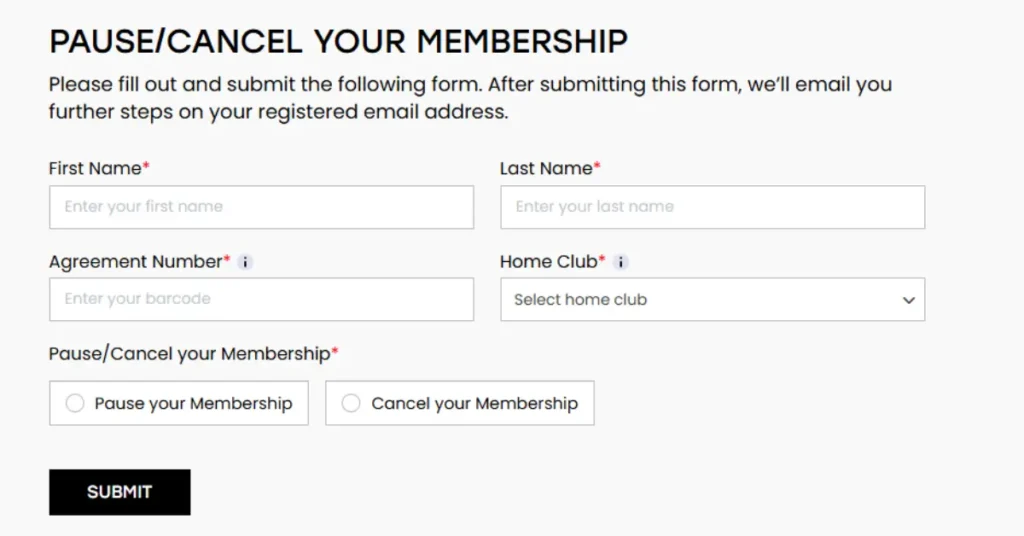
Fitness 19’s cancellation page lists three steps:
- Open Fitness 19’s cancellation page and select Begin Cancellation, or go straight to cancel.fit19.com.
- Fill in the personal details tied to your membership agreement so the page can find your account.
- Make sure your account is current, then confirm the cancellation. You keep gym access for 30 more days.
Save a screenshot of the final confirmation screen and any email you receive; you may need it if a later charge appears.
If your gym isn’t listed on fit19.com
Fitness 19 says its online cancellation and pause instructions cover only the gyms shown on its locations page. Independently run Fitness 19 gyms with their own websites set their own process.
If your gym isn’t on that list:
- Find your gym’s own contact details, for example on its website or on your membership agreement.
- Call or visit the gym, say you want to cancel, and ask what notice, fees and final payments apply under your agreement.
- Ask for written or emailed confirmation that shows the date your dues stop.
If the online form can’t find your account, call or visit your home club instead.
2. Cancellation by Phone Call
Fitness 19’s FAQ doesn’t give a central customer service number. It says to contact your gym by phone or in person, using the number on your location’s page.
- Find your gym on the Fitness 19 locations page and open its page for the phone number.
- Call the gym and say you want to cancel your membership.
- Give the details on your membership agreement so staff can find your account, and settle any outstanding balance.
- Ask for a confirmation email or text that shows the date your dues stop.
If you cannot cancel via phone, visit your gym.
3. Cancellation by Visiting GYM
Visit your local Fitness 19 gym during operating hours with your membership contract or card to request cancellation.
Some gyms may ask you to fill out a form. Ask staff for written or emailed confirmation rather than a verbal one, and check that it shows the date your dues stop.
Terms can differ between gyms because each Fitness 19 is independently owned; the membership agreement you signed is the document that applies to you.
What to Know Before Cancelling Your Fitness 19 Membership
Keep proof of your cancellation. In a BBB complaint dated April 1, 2026, a member reported cancelling in August 2025 and being billed again that December. Fitness 19’s BBB profile showed 27 complaints in the past three years (checked October 5, 2026).
To avoid surprise charges, check your bank or card statement after your next billing date, and contact your gym with your confirmation if a charge still appears.
Are There Cancellation Fees for Fitness 19 Membership?
Members on a 12-month term who cancel before the contract end date pay the early termination fee stated in their own membership agreement; Fitness 19 doesn’t publish a single amount. All outstanding fees and charges must be paid before you cancel. Late payments get a 24-hour grace period, then a $10 late fee for members who joined on or before December 31, 2025, or $15 for members who joined on or after January 1, 2026.
How Long Does It Take to Process a Fitness 19 Membership Cancellation?
Fitness 19’s cancellation terms say membership dues stop within 30 days of the cancellation request, and you can keep using the club for the rest of your current membership term.
The online cancellation page describes this as 30 additional days of gym access after you confirm, so check whether a billing date falls inside those 30 days.
If your gym isn’t listed on fit19.com, ask that gym how long its cancellations take.
Will I Receive a Refund if I Cancel My Fitness 19 Membership?
Fitness 19’s posted terms (last updated July 6, 2026) tie refunds to specific cancellation clauses in the membership agreement. They describe partial refunds on paid-in-full memberships when you move more than 25 miles away (with proof, minus a move fee), refunds for disability or death with documentation, and a 10-day processing period for refunds.
For anything else, check the refund section of your own agreement or ask your gym; the terms we could read don’t list a general refund for unused time.
How to Freeze or Pause Your Fitness 19 Membership
You can pause instead of cancelling at cancel.fit19.com (the Begin Pause button on Fitness 19’s pause page), or ask your gym. A pause lasts at least 1 month and at most 4 months per calendar year, can be requested twice a year, and can be shortened later.
Monthly dues drop to $0 while paused, but annual fees are still charged, and you can’t use your home club or any affiliate club. The pause starts within 7 days of the request, and one more EFT payment may be billed before it starts.
If you plan to return within a few months, a pause saves rejoining; if you won’t be back, cancel instead, since the annual fee keeps billing during a pause.
Leave a Reply