You can cancel your Caliber Car Wash Limitless membership online from your home location page, by email, or by contacting your local location. The Terms describe a recurring monthly membership with no fixed term and list no cancellation fee.
All three methods are confirmed in Caliber’s Terms of Service, and online cancellation works 24/7 without speaking to anyone.
The one rule that applies to all three: submit your request at least 7 days before your next month’s billing date or the next charge will still process.
Before You Cancel — What You Need
- Mobile number or email address used at sign-up
- The Caliber location where you originally enrolled
- License plate number and state (accepted as a login method)
- Last name and barcode number (accepted as a login method)
- Your monthly recharge date (check your original sign-up confirmation email)
Method 1: How to Cancel Caliber Car Wash Online
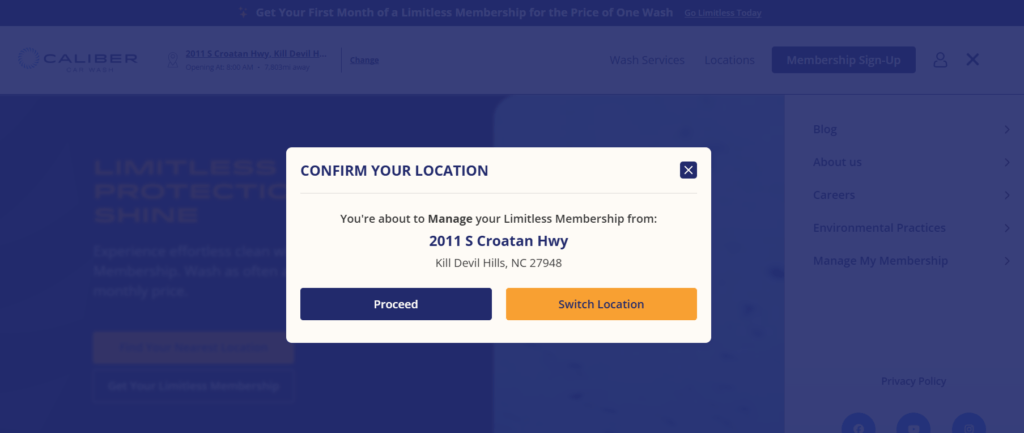
Online cancellation is available 24/7 and does not require speaking with a representative.
Step 1 — Open your enrolled location’s page
Go to calibercarwash.com and open the page for your home location, the one where you enrolled.
Step 2 — Click “Manage Your Limitless Account”
On your home location page, select Manage Your Limitless Account.
Step 3 —Log in to your account
Enter your mobile number or email and click Continue. If that fails, click “Try a different method” and use one of the alternatives:
- License Plate Number + State
- Last Name + Barcode
Step 4 — Cancel inside the dashboard
Navigate to your membership settings and select the cancellation option. Follow the prompts to confirm.
Step 5 — Save your confirmation
Screenshot the final confirmation screen and save any confirmation email or text you receive. You will need it as proof if a charge appears after your cancellation date.
Comparing car wash plans? See how Mister Car Wash handles cancellation. Also have a Zips plan? Its steps are in our Zips Car Wash cancellation guide. For other chains, browse our car wash membership cancellation guides.
Method 2: How to Cancel Caliber Car Wash by Email
Email cancellation is an official method confirmed in Caliber’s Terms of Service. It works well if you prefer a written record or the online portal gives you trouble.
Step 1 — Compose your cancellation email
Address it to info@calibercarwash.com.
Step 2 — Include your account details
In the body, include your full name, the mobile number on your account, your license plate number and state, and a clear statement that you want to cancel your caliber carwash membership.
Step 3 — Send it at least 7 days before your recharge date
The 7-day notice window applies to email cancellations. Send early.
Step 4 — Save the reply as confirmation
Keep the reply from Caliber as your cancellation record. If you receive no reply, follow up or switch to the online method.
Method 3: How to Cancel Membership in Person
The Terms let you cancel by contacting your local location, so bring your account details with you.
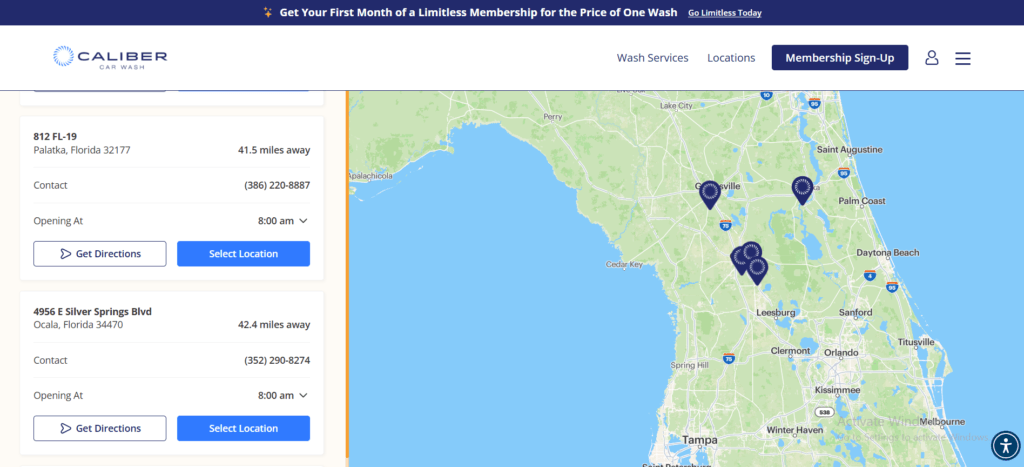
Step 1 — Find a nearby location
Go to Caliber’s locations page and find the nearest Caliber Car Wash.
Step 2 — Tell a team member you want to cancel
Walk up to the counter and say you want to cancel your Limitless membership.
Step 3 — Provide your account details
Give the team member your license plate number and the phone number on your account. Staff use these to pull up your membership.
Step 4 — Request written confirmation before you leave
Ask the team member to send a confirmation — email or text — before you walk out. Do not leave without it.
Note: If your location can’t process the cancellation, email info@calibercarwash.com on the spot, which is also an official method in the Terms.
After You Cancel
Save your confirmation immediately. It’s your best proof the cancellation went through, so screenshot it and file it somewhere accessible.
Check your bank statement after your next recharge date passes. One member’s BBB complaint (February 2026) says billing continued in January and February after both memberships were canceled in December 2025, and the complaint was still unanswered when we checked on October 20, 2026 (BBB complaints). If a charge appears after a confirmed cancellation:
- Locate your confirmation and note the submission date.
- If you are charged after cancelling submit a request at calibercarwashhelp.zendesk.com or info@calibercarwash.com attach the confirmation as proof.
- If the charge isn’t corrected, ask your bank or card issuer how to dispute it, and give them the confirmation as documentation.
Cancellation Policy
| Cancellation fee | None listed in the Terms |
| Contract required | No fixed term |
| Notice Period | 7 days before your monthly recharge date |
| Recharge date | Your sign-up date |
| Refund policy | No refunds or credits for partial months, except as required by law |
| Membership scope | One vehicle only; the Terms describe no transfer process |
| Plan pause | Available online; the Terms give no pause length or fee |
| Plan change limit | One membership level change per 90 days |
| Online support | calibercarwashhelp.zendesk.com |
| info@calibercarwash.com | |
| Phone support | Contact your Specific Location |
No fixed term, no listed fee.
The Terms describe a recurring monthly membership with no fixed term and list no cancellation fee. Online cancellation is available 24/7 without speaking to anyone.
The 7-day notice window.
Caliber’s Terms of Service require your cancellation request to arrive at least 7 days before your next billing date. Your billing date is the anniversary of the exact day you enrolled — not the first of the month. If you signed up on the 14th, Caliber charges you on the 14th of every month. Miss the 7-day window and the next payment processes.
Refunds.
Caliber’s Terms of Service state that no refunds or credits apply to partial billing periods, except as required by applicable law. Cancellation stops future charges. It does not reverse a payment that has already posted.
Price changes.
Caliber will email you at least 30 days before any rate increase. Check your inbox if you receive a price-change notice — you have time to cancel before the new rate takes effect.
One vehicle per membership.
Each Limitless membership is valid for one vehicle only, and the Terms describe no transfer process if you sell or trade in that car. The charges continue until you cancel.
Caliber’s right to cancel your membership.
Caliber’s Terms of Service say Caliber may modify, suspend or cancel any membership at any time, with or without notice. Sharing one membership across multiple vehicles is one reason the Terms give for suspending or canceling a membership.
Pause option.
The Terms say you can pause your membership online instead of canceling, through your home location page, by contacting your local location, or by emailing info@calibercarwash.com. They give no pause length or fee, so ask before you pause.
Common Issues
The car is gone but the charges continue.
If you sold or totaled your vehicle, the membership does not stop on its own. Cancel using any of the three methods. The standard no-refund policy applies.
You received a price-change email.
Caliber’s Terms of Service require at least 30 days’ notice before a rate increase. If you do not want to pay the new rate, cancel before the new rate’s effective date.
SMS and Account Notifications
If you receive Caliber text messages and want to stop them, reply STOP to the message. The following applies by message type:
Marketing texts: arrive from shortcode 225423. Caliber sends up to 10 messages per month. Reply STOP to opt out. Consent to receive these messages is not required to use the membership.
Account notifications: (receipts, billing alerts, password resets, plan changes) arrive from a 10-digit number. If you reply STOP to opt out of account notifications, Caliber will send these to your email address instead. You will not lose access to receipts or billing alerts — they move to email.
Customer care texts: are sent only in response to a message you initiate. Reply STOP to end the conversation.
Leave a Reply